

Help Center/ Cloud Operations Center/ User Guide/ Change Management/ Change Center/ Implementing and Closing a Change Ticket
Updated on 2025-03-17 GMT+08:00
Implementing and Closing a Change Ticket
Scenarios
After a change ticket is approved, implement the change within the specified time window according to the change solution.
Procedure
- Log in to COC.
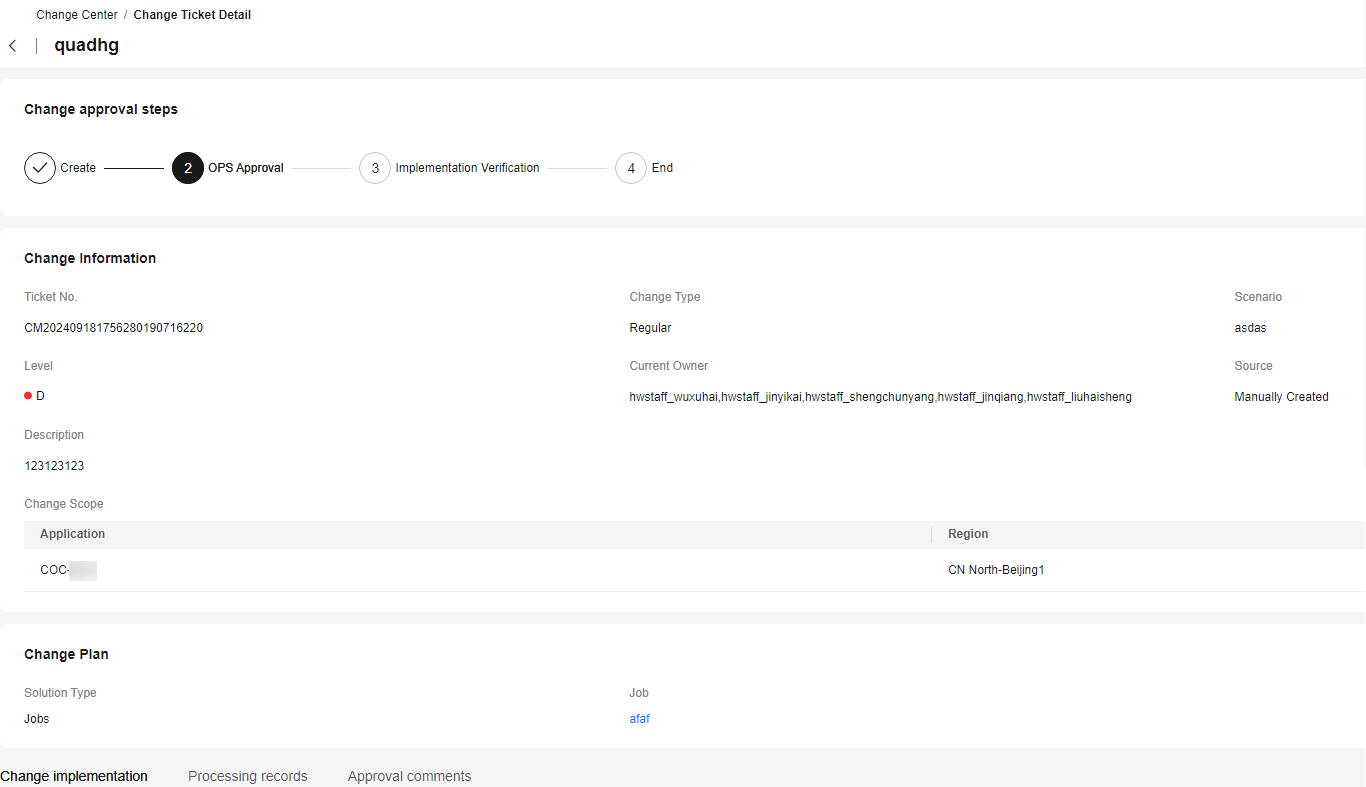
- In the navigation pane on the left, choose Change Ticket Management > Change Center. On the displayed page, locate a pending ticket and click the ticket title or click Change Start in the Operation column of a change record to view the change details and review the change. If the change solution is associated with a job, < execute the job first. If the change solution is associated with a change guide, implement the change according to the change guide. Figure 1 Change execution
- After the change is complete, click the step for finishing the change and enter the change result. Figure 2 Specifying the change result

- After the change result is specified, click Close to close the change ticket. Figure 3 Closing a change ticket

Parent topic: Change Center
What is your overall rating for this page?
0
1
2
3
4
5
6
7
8
9
10
Very dissatisfiedVery satisfied
Thank you very much for your feedback. We will continue working to improve the documentation.
The system is busy. Please try again later.


