

1078919169 DWS Data Instance Connections Exceed the Threshold
Alarm Description
This alarm is generated when the number of client connections to a CN exceeds the threshold (specified by parameter max_connections*connection_alarm_rate) configured in the postgresql.conf file.
Alarm Attributes
| Alarm ID | Alarm Category | Alarm Severity | Alarm Type | Service Type | Auto Cleared |
|---|---|---|---|---|---|
| 1078919169 | Tenant plane | Important | Service quality alarm | DWS instance | Yes |
Alarm Parameters

The number of parameters varies according to alarms.
| Type | Parameter | Description |
|---|---|---|
| Location Information | instance_id | ID of the instance for which the alarm is generated |
| instance_name | Name of the instance that reports the alarm | |
| domain_name | Domain name for which the alarm is generated | |
| domain_id | Domain ID for which the alarm is generated | |
| datastore_type | Type of the data storage for which the alarm is generated | |
| instance_role | Role of the instance for which the alarm is generated | |
| component_instance_name | Name of the component instance that reports the alarm, for example, cn_5001. | |
| Additional Information | CloudService | Name of the cloud service for which the alarm is generated |
| resourceId | Resource ID for which the alarm is generated | |
| resourceIdName | Resource for which the alarm is generated | |
| domain_name | Domain name for which the alarm is generated | |
| domain_id | Domain ID for which the alarm is generated |
Impact on the System
New clients cannot connect to a CN.
System Actions
None
Possible Causes
The number of clients connected to a CN exceeds the threshold (specified by parameter max_connections*connection_alarm_rate) configured in the postgresql.conf file.
Procedure
- Log in to the DWS console.
- On the Alarm page, view the alarms generated in the last seven days.
- Choose Cluster > Cluster List and locate the cluster based on the cluster information in the alarm details.
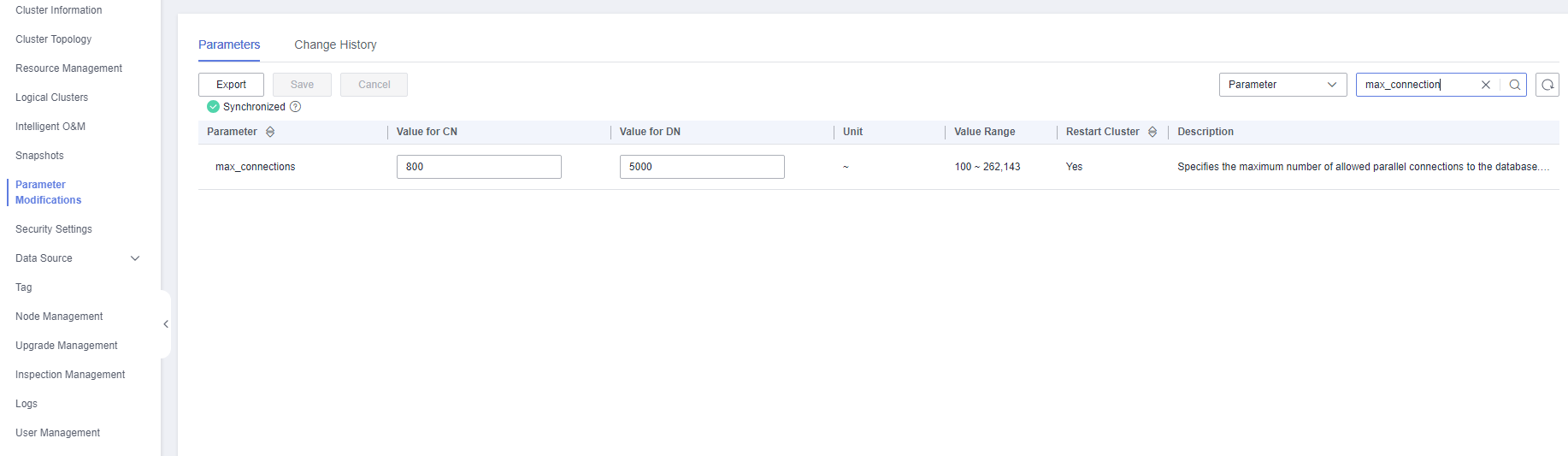
- Click the cluster name to go to the cluster details page. Choose Parameter Modifications, search for max_connections in the search box on the right of the parameter list, and change its value. Determine whether to increase the value of max_connections for CNs and DNs based on the following rules. The default value is 800 for CNs and 5,000 for DNs.
- Increasing the value of max_connections for CNs will increase the number of concurrent queries connected to DNs. Therefore, you need to increase the values of max_connections and comm_max_stream for DNs.
- Increase the value of max_connections for CNs/DNs by twice. For clusters with a small value, you can increase it by four times.
- To avoid failures in the preparation step, the value of max_prepared_transactions should at least be equal to that of max_connections. This ensures that each session has a prepared transaction in waiting state.
Figure 1 Modifying parameters
- Confirm the information and click Save.
Alarm Clearance
This alarm is automatically cleared after the fault is rectified.
Related Information
N/A


