

Enabling Overload Control for a Cluster
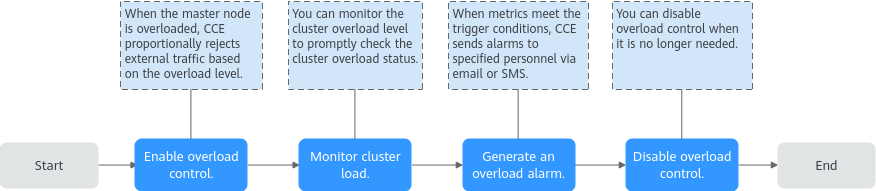
Cluster overload occurs when the system load such as request volume or resource usage exceeds the system's processing capacity, leading to performance degradation or system failure. Overload control is a dynamic mechanism that limits concurrent external requests based on the resources of the master nodes, ensuring the stability and reliability of the master nodes and the cluster. In a CCE standard or Turbo cluster, you can enable cluster overload control, monitor cluster overload, and configure overload alarms to mitigate the risk of cluster overload. For details, see Figure 1.
Constraints
The cluster version must be v1.23.5-r0 or later.
Enabling Overload Control
After overload control is enabled, CCE will proportionally reject external traffic based on the overload level when the master nodes are overloaded. This effectively reduces the load on the master nodes and ensures the stability and availability of the cluster.
- When creating a cluster v1.23 or later, enable Overload Control in (Optional) Advanced Settings > Cluster Scalability on the Buy Cluster page. After this function is enabled, CCE will dynamically adjust concurrent requests based on the resource demands received by master nodes to ensure the stability and reliability of the master nodes and the cluster.
- Click the cluster name to go to the cluster Overview page. In the Master Nodes area at the lower right of the page, verify that overload control has been enabled. If "Overload control enabled. An overloaded master node rejects external traffic proportionally based on the overload level." is displayed, overload control has been enabled.

Enabling overload control for an existing cluster will restart kube-apiserver. So, enable this function during off-peak hours.
- Log in to the CCE console and click the name of an existing cluster whose version is v1.23 or later. The cluster Overview page is displayed.
- In the Master Nodes area at the lower right of the page, click Enable.
- In the Master Nodes area, overload control has been enabled if the following information is displayed: Overload control enabled. An overloaded master node rejects external traffic proportionally based on the overload level.
Disabling Cluster Overload Control
You can disable overload control when it is no longer needed. After overload control is disabled, the master node will no longer reject external traffic when overloaded. Exercise caution when performing this operation.
- Log in to the CCE console and click the name of an existing cluster whose version is v1.23 or later.
- In the navigation pane, choose Settings.
- On the Cluster Access tab, disable overload control.
- Click Confirm Settings.
Helpful Links
In addition to enabling overload control, you can take other measures to prevent cluster overload, such as limiting the cluster resource data volume and clearing invalid cluster resources. For details, see Protecting a CCE Cluster Against Overload.


