

CREATE SCHEMA
Function
CREATE SCHEMA defines a schema.
A database schema defines how objects and data are logically organized within a database Thanks to schema management, multiple users can share a database without interference, and third-party applications can be added to specific schemas without conflicts.
Schemas have the following core functions:
- Logical isolation: Data, functions, and tenants are isolated.
- Permission control: Fine-grained security boundaries are provided.
- Organization management: The database structure is clear and maintainable.
- Namespaces: Namespaces are used to prevent naming conflicts of objects.
The same database object name can be used in different schemas in a database. For example, the mytable table can be included in both a_schema and b_schema. Users with required permissions can access objects across multiple schemas in a database.
When a user is created in the current database, the system creates a schema with the same name as the new user in the current database. For example, if user1 is created, a schema named user1 is created by default.
Precautions
- As long as the current user has the CREATE permission, the user can create a schema.
- The owner of an object created by a system administrator in a schema with the same name as a common user is the common user, not the system administrator.
- Named objects are accessed either by "qualifying" their names with the schema name as a prefix, or by setting a search path that includes the desired schema. When creating named objects, you can also use the schema name as a prefix.
- CREATE SCHEMA can include sub-commands to create objects within the new schema. The sub-commands are treated essentially the same as separate commands issued after creating the schema. If the AUTHORIZATION clause is used, all the created objects are owned by this user.
Syntax
- Create a schema based on a specified name:
1
2
3
4
CREATE SCHEMA schema_name
    [ AUTHORIZATION user_name ] [ WITH PERM SPACE 'space_limit'] [ schema_element [ ... ] ];
CREATE SCHEMA IF NOT EXISTS schema_name
    [ AUTHORIZATION user_name ] [ WITH PERM SPACE 'space_limit'] ;
- Create a schema based on a user name:
1
2
CREATE SCHEMA AUTHORIZATION user_name [ WITH PERM SPACE 'space_limit'] [ schema_element [ ... ] ];
CREATE SCHEMA IF NOT EXISTS AUTHORIZATION user_name [ WITH PERM SPACE 'space_limit'] ;
Parameter Description
| Parameter | Description | Value Range |
|---|---|---|
| schema_name | Indicates the schema name. NOTICE:
| A string, which must comply with the identifier naming convention. For details, see Identifier Naming Conventions. |
| AUTHORIZATION user_name | Indicates the name of the user who will own this schema. If schema_name is not specified, user_name will be used as the schema name. In this case, user_name can only be a role name. | Name of an existing user or role. |
| WITH PERM SPACE 'space_limit' | Indicates the storage upper limit of the permanent table in the specified schema. If space_limit is not specified, the space is not limited. | A string consists of an integer and unit. The unit can be K/M/G/T/P currently. The unit of parsed value is K and cannot exceed the range that can be expressed in 64 bits, which is 1 KB to 9007199254740991 KB. For the specific example, see Example: Creating a Schema and Setting its Permanent Storage. |
| schema_element | Indicates an SQL statement defining an object to be created within the schema. Currently, only CREATE TABLE, CREATE VIEW, CREATE INDEX, CREATE PARTITION, and GRANT are accepted as clauses within CREATE SCHEMA. Objects created by sub-commands are owned by the user specified by AUTHORIZATION. | - |
| IF NOT EXISTS | If IF NOT EXISTS is specified and no schema with the same name exists, a schema can be created. If a schema with the same name already exists during schema creation, the system will not report an error but will display a message indicating that the schema already exists and no further operations will be performed. When this parameter is used, the Schema_element subcommand cannot be included. The IF NOT EXISTS parameter is supported only by clusters of version 9.1.0 or later. If there are objects with the same name in the schemas in the current search path, you need to specify the schema where the referenced object is located. To view the schemas on the current search path, run the SHOW SEARCH_PATH command. | - |
Examples: Basic Cases
Create the role role1.
1 | CREATE ROLE role1 IDENTIFIED BY '{password}'; |
-- Create the schema role1 for the role role1. The owner of the films and winners tables created by the clause is role1.
1 2 3 4 | CREATE SCHEMA AUTHORIZATION role1 CREATE TABLE films (title text, release date, awards text[]) CREATE VIEW winners AS SELECT title, release FROM films WHERE awards IS NOT NULL; |
Example: Creating a Schema and Setting its Permanent Storage
The following procedure shows how to create a schema named testsche and set the size of the permanent storage to 10 MB. When the data size exceeds 10 MB, the system reports an error.
Alternatively, you can set the permanent storage of a schema on the DWS console. For details, see Configuring the Schema Storage Space of the DWS Database.
- Create a schema named testsche and set its permanent storage to 10 MB.
1CREATE SCHEMA testsche WITH PERM SPACE '10M';
- Use the system catalog PG_NAMESPACE to query the table storage of the schema. permspace indicates the permanent storage limit, and usedspace indicates the used permanent storage.
1SELECT permspace,usedspace FROM PG_NAMESPACE WHERE nspname = 'testsche';

- Create a test table and import data to it.
1
2
3
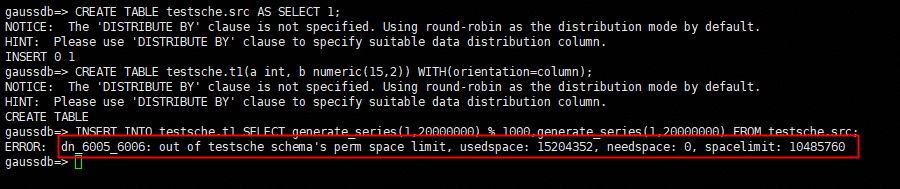
CREATE TABLE testsche.src AS SELECT 1;
CREATE TABLE testsche.t1(a int, b numeric(15,2)) WITH(orientation=column);
INSERT INTO testsche.t1 SELECT generate_series(1,20000000) % 1000,generate_series(1,20000000) FROM testsche.src;
An error message is displayed, indicating that the permanent storage of the schema exceeds the threshold.
- Increase the permanent storage of the schema to 10 GB and import the data again. The import is successful.
1
2
ALTER SCHEMA testsche WITH PERM SPACE '10G';
INSERT INTO testsche.t1 SELECT generate_series(1,20000000) % 1000,generate_series(1,20000000) FROM testsche.src;

- View the used storage.
1SELECT permspace,usedspace FROM PG_NAMESPACE WHERE nspname = 'testsche';



