

Updated on 2025-09-04 GMT+08:00
Configuring LTS
You can use Log Tank Service (LTS) to manage operation logs in the bastion host.
Prerequisites
- You have the management permissions for the System module.
- You have enabled Log Tank Service (LTS).
- An EIP has been bound to the bastion host.
Constraints
- An EIP must be bound to the bastion host.
- LTS must be enabled before you configure LTS in your bastion host.
Procedure
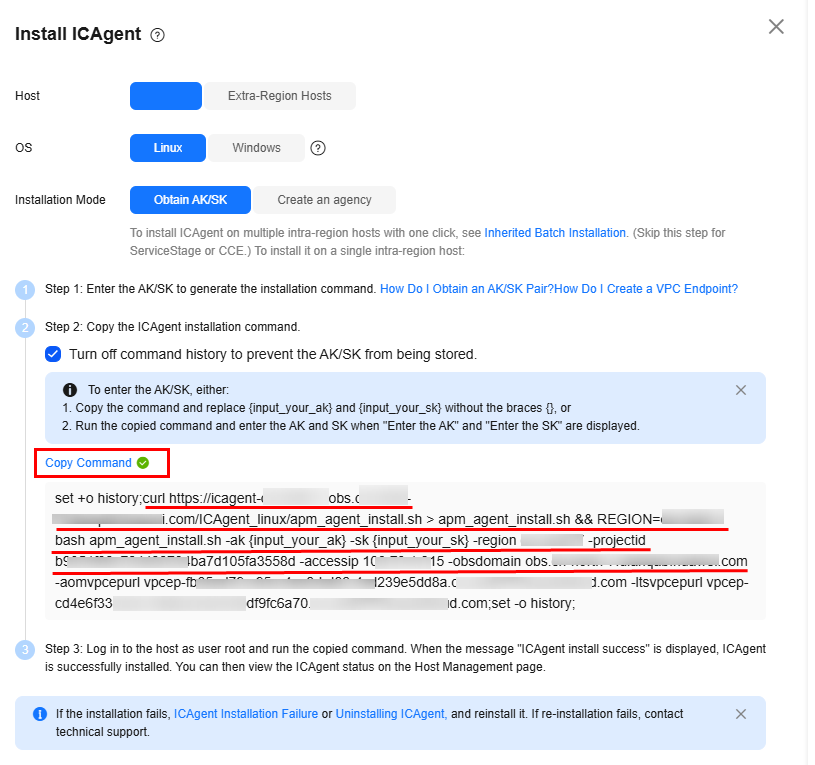
- Obtain the ICAgent installation command from LTS. For details, see Installing ICAgent (Intra-Region Hosts). You can click Copy Command as shown in Figure 1 to copy the installation command. The command structure is as follows:
1set +o history;curl https://icagent-{region}.{obsdomain}/ICAgent_linux/apm_agent_install.sh > apm_agent_install.sh && REGION=[region] bash apm_agent_install.sh -ak {input_your_ak} -sk {input_your_sk} -region [region] -projectid [projectid] -accessip [accessip] -obsdomain [obsdomain] -aomvpcepurl [aomvpcepurl] -ltsvpcepurl [ltsvpcepurl];set -o history;
- Process the command obtained in 1 according to the following rules:
- Replace {input_your_ak} and {input_your_sk} in the command with the actual AK and SK you have.
- Delete the set +o history; field from the command start and end lines.
- Delete the -aomvpcepurl [aomvpcepurl] -ltsvpcepurl [ltsvpcepurl]; field from the latter part of the command.
- If the bastion host is earlier than V3.3.54.0, change https to http. HTTPS is supported by bastion hosts V3.3.54.0 and later.
The processed command formats are as follows:
- Versions earlier than V3.3.54.0
1curl http://icagent-{region}.{obsdomain}/ICAgent_linux/apm_agent_install.sh > apm_agent_install.sh && REGION=[region] bash apm_agent_install.sh -ak {input_your_ak} -sk {input_your_sk} -region [region] -projectid [projectid] -accessip [accessip] -obsdomain [obsdomain]
- V3.3.54.0 and later
1curl https://icagent-{region}.{obsdomain}/ICAgent_linux/apm_agent_install.sh > apm_agent_install.sh && REGION=[region] bash apm_agent_install.sh -ak {input_your_ak} -sk {input_your_sk} -region [region] -projectid [projectid] -accessip [accessip] -obsdomain [obsdomain]
- Install the ICAgent in the bastion host system.
- Log in to your bastion host.
- Choose System > System Config > Outgoing.
- On the displayed page, locate the LTS Config area and click Edit.
- Click
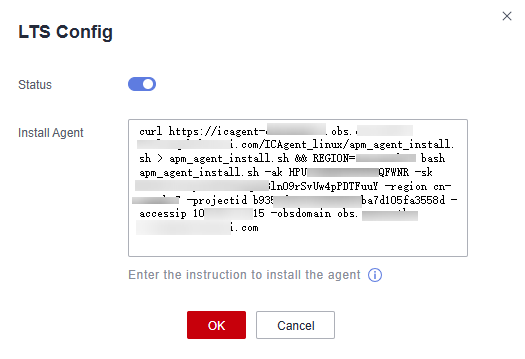
 to enable the LTS service, and enter the command processed in 2 in the Install Agent text box. Figure 2 Example for V3.3.54.0 and later
- Click OK.
You can click Go to the task center in the displayed dialog box to view the task progress and status in the task center.
Parent topic: Outgoing
What is your overall rating for this page?
0
1
2
3
4
5
6
7
8
9
10
Very dissatisfiedVery satisfied
Thank you very much for your feedback. We will continue working to improve the documentation.
The system is busy. Please try again later.


