

Help Center/ Cloud Bastion Host/ User Guide/ Resource Operation/ Host Operations/ Batch Logging In to Host Resources for O&M
Updated on 2026-11-09 GMT+08:00
Batch Logging In to Host Resources for O&M
You can batch log in to host resources through your bastion host for operations, including file transfer, file management, and command presetting. A bastion host can log all activities performed on a host resource. The logs can be used for audits.
Notes and Constraints
- Only SSH, RDP, Telnet, and VNC protocols support batch host logins via the HTML5 web interface for O&M.
- Manual login and two-person approval accounts cannot be used for batch logging.
- The cooperation session function is unavailable for hosts logged in through batch logging.

During batch logins, if invalid usernames or passwords, or both, are used for a server, the session for the server will not be displayed, and no error messages are reported. You need to log in this server separately to check the error message.
Prerequisites
- You have the management permissions for the Host Operations module.
- You have obtained the access permissions for the resources.
Procedure
- Log in to your bastion host system.
- Choose Operation > Host Operations to go to the Host Operations page.
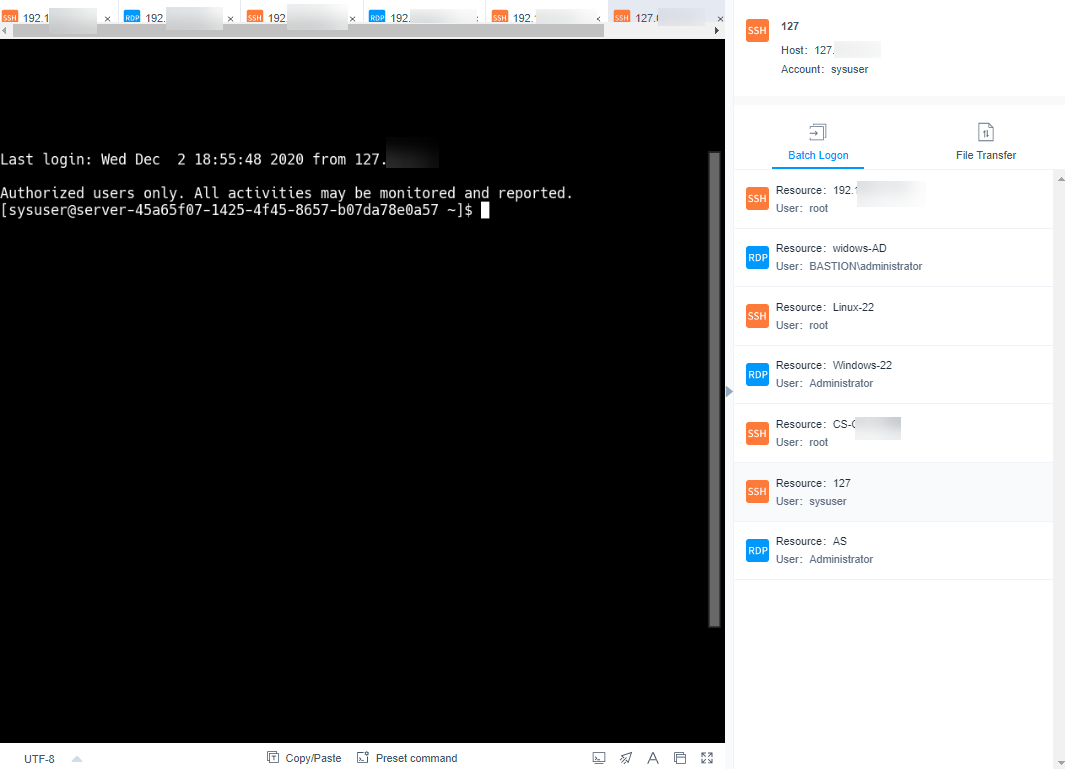
- Select multiple resources and click Batch Logon. Figure 1 Batch logon session windows
- Switch over session windows.
Click the resource name in the batch logon list to switch to the corresponding session window.
- For details about the operations in the session window, see the following description.
- Upload files to or download files from the host or host net disk. For details, see Common O&M Operation: File Transfer (Only Supported by SSH and RDP).
- In the file management area, manage files or folders on the host or host net disk. For details, see Common O&M Operations: File Management.
Parent topic: Host Operations
What is your overall rating for this page?
0
1
2
3
4
5
6
7
8
9
10
Very dissatisfiedVery satisfied
Thank you very much for your feedback. We will continue working to improve the documentation.
The system is busy. Please try again later.


