

Protecting a CCE Cluster Against Overload
Cluster overload occurs when a Kubernetes cluster's compute, storage, or network resources exceed its processing capacity, leading to exhaustion of key control plane components (like etcd and kube-apiserver) or worker nodes. This can severely degrade cluster performance or even cause operational failures. To prevent this, proactive overload protection is essential. Policies like overload control and LIST request optimization help maintain the stability of core services, ensuring that sudden spikes in loads do not result in service disruptions. This section explores the causes and impacts of cluster overload, explains CCE cluster overload control, and provides best practices for maintaining stability.
Causes of Cluster Overload
- Resource request exceeding cluster capacity: Core components on the cluster control plane include etcd and kube-apiserver. etcd is a backend database that stores all cluster data. kube-apiserver acts as the entry to the control plane and processes requests. kube-apiserver caches cluster data to lessen the burden on etcd. Other core components in the cluster also cache various resources and monitor changes to these resources. When the demand for compute, network, and storage resources surpasses the cluster capacity, these components become heavily loaded. If this load exceeds a certain threshold, the cluster becomes overloaded.
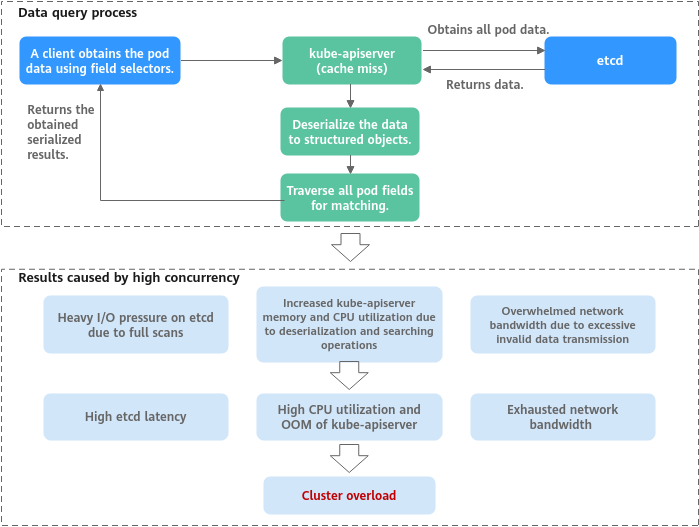
- Lots of data queries (such as multiple LIST requests or a single request retrieving large amounts of data): If a client obtains pod data using field selectors, but kube-apiserver cache does not contain the requested data, the client must fetch the full pod data from etcd because etcd cannot get data by field. Once retrieved, kube-apiserver deserializes the pod data into structured objects in memory, traverses each pod to match the requested fields, and returns the obtained serialized results. When many concurrent queries occur, resource utilization of each component increases sharply, leading to issues such as etcd latency spikes, OOM errors in kube-apiserver, and control loop imbalances. Consequently, the entire cluster becomes overloaded. Figure 1 Example of a large amount of data obtained from a client
Impacts of Cluster Overload
When a cluster experiences overload, Kubernetes API response delay increases, and resource utilization on control plane nodes rises, affecting both the control plane and related services. The impacted key areas include:
- Kubernetes resource management: Operations such as creating, deleting, updating, or obtaining Kubernetes resources may fail.
- Kubernetes leader election: Overload can prevent a leader node lease renewal from completing on time. If the lease expires, the leader node loses its leadership role, triggering re-election. This can cause temporary service interruptions, task migrations, scheduling delays, and fluctuations in cluster performance.
- Cluster management failures: Severe overload may make a cluster unavailable, preventing management operations like node creation or deletion.
CCE Overload Control
- Overload control: CCE clusters have supported overload control since v1.23, which reduces the number of LIST requests outside the system when the control plane experiences high resource usage pressure. To use this function, enable overload control for your clusters. For details, see Enabling Overload Control for a Cluster.
- Optimized processes on LIST requests: Starting from CCE clusters of v1.23.8-r0 and v1.25.3-r0, processes on LIST requests have been optimized. Even if a client does not specify the resourceVersion parameter, kube-apiserver responds to requests based on its cache to avoid additional etcd queries and ensure that the response data is up to date. Additionally, namespace indexes are now added to the kube-apiserver cache. This allows clients to request specified resources in a namespace without needing to fetch full data for that namespace. This effectively reduces the response delay and control plane memory overhead.
- Refined traffic limit policy on the server: The API Priority and Fairness (APF) feature is used to implement fine-grained control on concurrent requests. For details, see API Priority and Fairness.
Configuration Suggestions
When running services in a Kubernetes cluster, the cluster performance and availability are influenced by various factors, including the cluster scale, the number and size of resources, and the volume of resource access. CCE has optimized cluster performance and availability based on cloud native practices and has developed suggestions to protect against cluster overload. You can use these suggestions to ensure that your services run stably and reliably over the long term.
Changing the Cluster Scale
If the resource usage on the master nodes in the cluster remains high for a long time, for example, the memory usage is greater than 85%, it is recommended that you promptly increase the cluster management scale. This will prevent the cluster from becoming overloaded during sudden traffic surges. For details, see Changing a Cluster Scale.

- The larger a cluster management scale, the higher the specifications of the master nodes need to be, and the better their performance will be.
- The CCE cluster management scale is the maximum number of nodes that a cluster can manage. It is used as a reference during service deployment planning. The actual quantity of nodes in use may not reach the maximum. An actual cluster scale depends on various factors, including the type, quantity, and size of resource objects in the cluster, as well as the amount of external access to the cluster control plane.
Controlling Data Volume of Resources
The Kubernetes cluster stability and performance heavily rely on the management capabilities of the control plane components, particularly kube-apiserver and etcd, for resource objects. The total data volume of these resource objects, such as pods and Deployments, and the size of individual objects impact the scalability and reliability of the cluster.
If the total amount of data stored in etcd becomes too large, it can lead to issues like increased system resource usage and performance bottlenecks, including delays in data read and write operations and leader election. Additionally, if the data volume of each resource type is excessively large, accessing all these resources can consume a great number of system resources. In severe cases, this can prevent the kube-apiserver from initialization.
To ensure optimal performance, stability, and availability in large clusters, it is advised to manage and control both the total data volume in etcd and the data volume of individual resource types. The guidelines for this are outlined in the table below.
| Cluster Scale | 50 Nodes | 200 Nodes | 1,000 Nodes | 2,000 Nodes |
|---|---|---|---|---|
| Total etcd data capacity | 500 MiB | 1 GiB | 4 GiB | 8 GiB |
| etcd data volume of a single type of resource | 50 MiB | 100 MiB | 400 MiB | 800 MiB |
When the etcd database storage space is full, etcd generates a "No Space" alarm. In response, CCE triggers memory defragmentation to release fragmented storage space and restore the cluster operation. If an error occurs during the defragmentation, a "Defrag" event will be generated.
The size of a single resource object, such as a large ConfigMap, secret, or CRD, also has a significant impact on cluster performance.
- etcd storage limit: By default, etcd limits the size of a single key-value pair to 1.5 MiB. While the size of most Kubernetes objects is way below this threshold, embedding large files, such as certificates, configuration files, and scripts, directly into ConfigMaps or secrets can cause the size of a single object to approach or exceed this limit. This can increase I/O pressure and network transmission overhead for etcd.
- Increased API request latency: Large objects require more CPUs and bandwidth for serialization, deserialization, network transmission, and memory copying. Consequently, the latency for the kube-apiserver to process a single request can increase greatly.
- Informer cache bloat: When informers are used, large objects are fully cached in the client's memory. If there are many large objects, the memory usage of the clients, such as operators or custom controllers, can become excessive, potentially leading to out-of-memory errors or client crashes.
- gRPC transmission restrictions and cluster startup risks: During initialization or large-scale List operations, kube-apiserver retrieves data from etcd in paginated mode. etcd has a default limit on the size of its gRPC messages (2 GiB in history): If the total data volume of a single type of resource objects, such as all pods, exceeds the gRPC limit, kube-apiserver may fail to start properly. This can result in an abnormal cluster that cannot be automatically restored. To avoid this issue, kube-apiserver sets the maximum number of objects that can be obtained on each page to 10,000. This ensures that the average object size of a single type of resource does not exceed the gRPC limit divided by 10,000.
- For clusters of earlier versions (for example, earlier than v1.25.16-r10): The gRPC message size limit is 2 GiB. So, the average object size should not exceed 200 KB.
- For clusters of later versions (v1.25.16-r10, v1.28.15-r0, v1.31.1-r0, or later): The hard-coded memory limit of the dependent gRPC-Go library is 4 GiB, allowing the average object size to be up to 400 KB.
You can run the command below to export a kind of Kubernetes object as a JSON file and determine the object size based on the file size:
kubectl get <resource> <resource-name> -n <namespace> -o json --show-managed-fields > resource.json
ls -l resource.json
Controlling the Frequency of Resource Object Updates
In a Kubernetes cluster, the control plane typically experiences low load during stable operation and can efficiently handle routine tasks. However, during large-scale change operations, such as frequent resource creation and deletion, and rapid node scaling, the control plane load increases sharply. This surge in load can lead to cluster response delays, timeouts, or even temporary unavailability. These operations often involve a high volume of API requests, status synchronization, and resource scheduling, significantly increasing the resource consumption of components like the API server, etcd, and controller manager.
In a Kubernetes cluster, the control plane typically handles stable load with manageable pressure. For example, running 10,000 pods stably in a cluster that can manage up to 2,000 nodes results in controllable control plane load. However, if 10,000 jobs are created within one minute in a cluster that can manage up to 50 nodes, a request peak will occur, leading to increased API server delay or even service interruptions.
Test data supports this observation. When 800 Deployments, each containing nine pods, are created in batches in a v1.32 cluster and the QPS reaches 110, the memory usage of kube-apiserver increases by approximately 20 GiB in a short period. Even when the QPS is reduced to 50, the memory usage still increases by 12 GiB.
Therefore, when performing large-scale resource changes, it is essential to control the change rate based on the current load, resource usage, and historical performance metrics of the cluster. It is advised to use progressive operations and real-time monitoring to ensure the stability of the control plane and prevent performance fluctuations. Additionally, leveraging cloud native observability capabilities, such as using Prometheus to monitor the component metrics of the master nodes, can help maintain cluster health. For details, see Enabling Observability.
Enabling Observability
Observability is crucial for maintaining cluster reliability and stability. By using monitoring, alarms, and logs, administrators can gain a better understanding of the cluster's performance, promptly identify any issues, and take corrective action in a timely manner.
Monitoring configurations
- You can check the monitoring information about the master nodes on the Overview page of the CCE cluster console. Figure 2 Viewing master node monitoring information

- You can use Prometheus to monitor the metrics of the master node components, especially the memory usage, resource quantity, QPS, and request latency of kube-apiserver. For details, see Monitoring Master Node Components Using Prometheus.
Alarm configurations
Alarms are an additional feature of monitoring. Alarms are generated to administrators in a timely manner when a cluster experiences malfunctions, allowing for prompt resolution of any issues. You can configure alarms for metrics such as memory usage, resource quantity, QPS, and request latency of kube-apiserver as needed.
Monitoring metrics such as resource quantity, QPS, and request latency do not have a fixed boundary between normal and abnormal metrics due to variations in service scenarios. As a result, these metrics are considered normal as long as they do not impact service stability. Typical alarm thresholds cannot be defined. To address this, you can observe metric data when services are running stably and configure appropriate alarm thresholds based on the normal fluctuation range of resource usage. Alternatively, you can use the changes of metric data in a unit of time as the alarm detection object.


