

Configuring Dynamic Pre-binding of Container Network Interfaces in a CCE Turbo Cluster
In the Cloud Native 2.0 networks, each pod is allocated a network interface or a supplementary network interface. The speed of network interface creation and binding is slower than that of pod scaling, severely affecting the container startup in large-scale batch creation. Therefore, the Cloud Native 2.0 networks provide the dynamic pre-binding of container network interfaces to accelerate pod startup while improving IP address utilization.
Basic Concepts
Supplementary Network Interface
A supplementary network interface is a derivative resource built on top of a network interface. It is mounted to the network interface via a VLAN sub-interface. Since the number of network interfaces that can be directly attached to an ECS is limited, supplementary network interfaces provide a scalable alternative. When the attachment limit is reached, additional supplementary network interfaces can be mounted to existing network interfaces for expanded networking requirements.
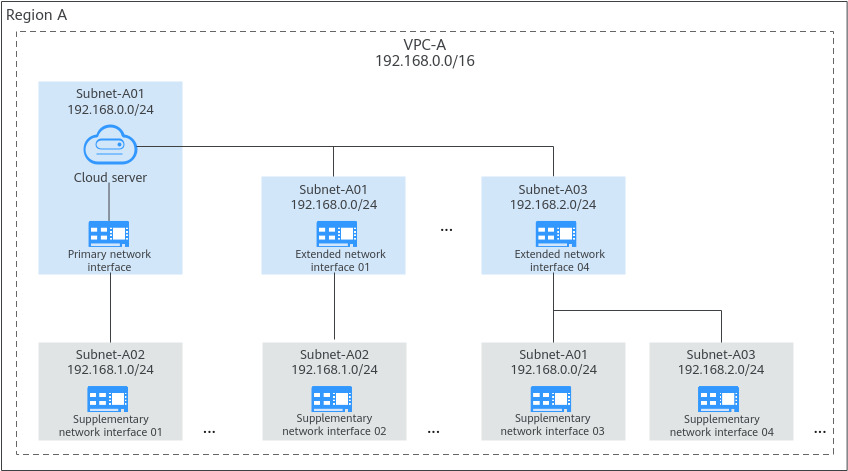
Container Network Interfaces in a CCE Turbo cluster
In a CCE Turbo cluster, pods use network interfaces or supplementary network interfaces to communicate with external networks.
- Pods running on a BMS node use network interfaces to communicate with external networks.
- Pods running on an ECS node use supplementary network interfaces to access external networks. Supplementary network interfaces are mounted to the network interfaces of ECSs through VLAN sub-interfaces.

Notes and Constraints
- CCE Turbo clusters of 1.23.5-r0, 1.25.1-r0 or later support dynamic pre-binding of network interfaces, global configuration at the cluster level, and custom settings at the node pool level. Custom settings of nodes out of a node pool is not supported.
- Modify the dynamic pre-binding parameters using the console or API instead of the node annotations in the backend. Otherwise, the modified annotations will be overwritten by the original values after the cluster is upgraded.
How It Works
CCE Turbo provides four dynamic pre-binding parameters for container network interfaces. You can properly configure the parameters based on your service requirements. (The node pool-level dynamic network interface pre-binding parameters take priority over the cluster-level dynamic network interface pre-binding parameters.)
| Parameter | Default Value | Description | Suggestion |
|---|---|---|---|
| Minimum Number of Container ENIs Bound to a Node | 10 | Minimum number of network interfaces bound to a node. The value can be a number or a percentage.
Set both nic-minimum-target and nic-maximum-target to the same value or percentage. | Configure this parameter based on the number of pods typically running on most nodes. |
| Upper Limit of Pre-bound Container ENIs | 0 | After the number of network interfaces bound to a node exceeds the nic-maximum-target value, CCE will not proactively pre-bind network interfaces. Checking the upper limit of pre-bound container network interfaces is enabled only when the value of this parameter is greater than or equal to the minimum number of container network interfaces (nic-minimum-target) bound to a node. The value can be a number or a percentage.
Set both nic-minimum-target and nic-maximum-target to the same value or percentage. | Configure this parameter based on the maximum number of pods running on most nodes. |
| Container ENIs Dynamically Pre-bound to a Node | 2 | The target number of network interfaces to be pre-bound to a node before it starts. When the sum of the nic-warm-target value and the number of network interfaces already bound to the node exceeds the nic-maximum-target value, CCE will pre-bind the number of network interfaces specified by the difference between the nic-maximum-target value and the current number of network interfaces bound to the node. | Set the parameter value to the number of pods that can be scaled out instantaneously within 10 seconds on most nodes. |
| Threshold for Unbinding Pre-bound Container ENIs | 2 | Pre-bound network interfaces on a node will only be unbound and reclaimed if the difference between the number of idle network interfaces and the nic-warm-target value exceeds the threshold. The value can only be a number.
| Configure this parameter based on the difference between the number of pods that are frequently scaled on most nodes within minutes and the number of pods that are instantly scaled out on most nodes within 10 seconds. |
Configuration Example
| Level | Service Scenario | Configuration Example |
|---|---|---|
| Cluster | All nodes use the c7.4xlarge.2 model (supplementary network interface quota: 128). Most nodes can run about 20 pods regularly. Most nodes can run a maximum of 60 pods. Most nodes can scale out 10 pods within 10 seconds regularly. Most nodes scale in or out 15 pods within minutes regularly. | Cluster-level global configuration:
|
| Node pool | A node pool that uses the c7.8xlarge.2 high-specification model is created in the cluster. (supplementary network interface quota: 256) Most nodes run about 100 pods regularly. Most nodes can run a maximum of 128 pods. Most nodes can scale out 10 pods within 10 seconds regularly. Most nodes scale in or out 12 pods regularly within minutes. | Custom settings at the node pool level:
|

Pods using HostNetwork are excluded.
Cluster-level Global Configuration
- Log in to the CCE console. In the navigation pane, choose Clusters.
- Click
 next to the target cluster and choose Manage.
 - In the window that slides out from the right, click Networking Components. For details about the parameter configurations, see Configuration Example.
- After the configuration, click OK. Wait for about 10 seconds for the configuration to take effect.
Node Pool-level Custom Settings
- Log in to the CCE console.
- Click the cluster name to access the cluster console. In the navigation pane, choose Nodes. In the right pane, click the Node Pools tab.
- Locate the row containing the node pool and choose More > Manage.
- In the window that slides out from the right, click Networking Components and enable node pool container network interface pre-binding. For details about the parameter settings, see Configuration Example.
- After the configuration, click OK. Wait for about 10 seconds for the configuration to take effect.


