

Obtaining a Client Source IP Address from Containers
When using containers, clients may communicate with them through multiple proxy servers. However, this can cause issues with transferring the clients' source IP addresses to the containers' services. This section describes how to effectively obtain the client source IP address from a container based on different network solutions provided by CCE clusters.
Description
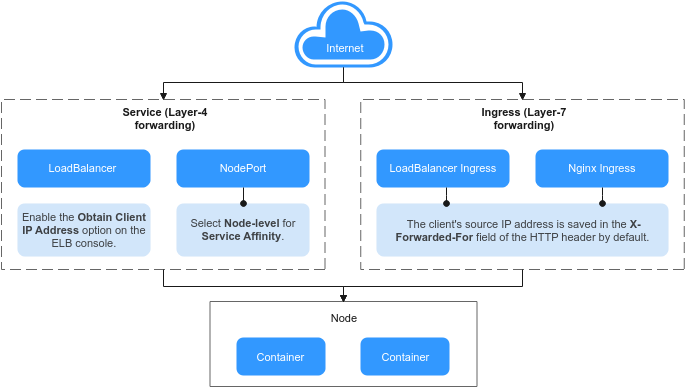
The method for obtaining client source IP addresses may vary with the network settings. The following shows some typical network configurations and their corresponding solutions:
- Ingress (Layer 7 forwarding): When accessing an application at Layer 7, the client's source IP address is automatically saved in the X-Forwarded-For field of the HTTP header. No additional configurations are needed to obtain the client's source IP address.
- Service (Layer 4 forwarding): The method and principle for obtaining source IP addresses depend on the type of Service being used.
- LoadBalancer Service: A load balancer is used as the traffic entry. Both shared and dedicated load balancers are supported.
- For a shared load balancer, you need to enable the function of obtaining client IP addresses on the listeners.
- By default, the function of obtaining client IP addresses is enabled for a dedicated load balancer listener.
- NodePort Service: Container ports are mapped to node ports, which are used as the entry for external services. The capability of obtaining client source IP addresses depends on the service affinity.
- For a NodePort Service with a cluster-level service affinity, traffic is forwarded within the cluster, which means the backend containers of the Service cannot access the client source IP address.
- For a NodePort Service with node-level service affinity, the traffic can directly reach the container without any forwarding. This allows the backend containers of the Service to obtain the client source IP address.
- LoadBalancer Service: A load balancer is used as the traffic entry. Both shared and dedicated load balancers are supported.
Scenarios Where Source IP Addresses Can Be Obtained
Due to network differences, CCE does not allow obtaining source IP addresses in some scenarios, as listed in Table 1. "-" in the table indicates that this scenario does not exist.
| Level-1 Category | Level-2 Category | Load Balancer Type | VPC and Container Tunnel Network Models | Cloud Native 2.0 Network Model (CCE Turbo Clusters) | Reference |
|---|---|---|---|---|---|
| Layer 7 forwarding (ingress) | LoadBalancer | Shared | Supported | Supported | |
| Dedicated | Supported | Supported | |||
| Nginx (connected to the NGINX Ingress Controller add-on) | Shared | Supported | Not supported | ||
| Dedicated | Supported | Supported | This function is enabled by default. No other configuration is required. | ||
| Layer 4 forwarding (Service) | LoadBalancer | Shared | Supported | Not supported (supported by workloads that use hostNetwork) | |
| Dedicated | Supported | Supported | |||
| NodePort | - | Supported | Not supported (supported by workloads that use hostNetwork) |
LoadBalancer Ingresses
For the LoadBalancer ingresses (using HTTP- or HTTPS-compliant), the function of obtaining the client source IP addresses is enabled by default. No other operation is required.
A client source IP address is placed in the X-Forwarded-For field of the HTTP header by the load balancer. The format is as follows:
X-Forwarded-For: <client-source-IP-address>, <proxy-server-1-IP-address>, <proxy-server-2-IP-address>, ...
The first IP address obtained from the X-Forwarded-For field is the client source IP address.
Nginx Ingresses

In Cloud Native 2.0 networks (for CCE Turbo clusters), if a shared load balancer is used, source IP addresses cannot be obtained when an ingress is associated with the NGINX Ingress Controller add-on. For details, see Scenarios Where Source IP Addresses Can Be Obtained. To obtain a source IP address, uninstall the NGINX Ingress Controller add-on and use a dedicated load balancer during reinstallation.
- For an Nginx ingress that uses a dedicated load balancer, transparent transmission of source IP addresses is enabled by default. This means that you can easily obtain the client source IP address without any additional configurations.
- For an Nginx ingress that uses a shared load balancer, take the following steps to obtain the client source IP address:
- Take the Nginx workload as an example. Before configuring the source IP address, obtain the access logs. nginx-c99fd67bb-ghv4q indicates the pod name.
kubectl logs nginx-c99fd67bb-ghv4q
Information similar to the following is displayed:
...
10.0.0.7 - - [17/Aug/2023:01:30:11 +0000] "GET / HTTP/1.1" 200 19 "http://114.114.114.114:9421/" "Mozilla/5.0 (Windows NT 10.0; Win64; x64) AppleWebKit/537.36 (KHTML, like Gecko) Chrome/115.0.0.0 Safari/537.36 Edg/115.0.1901.203" "100.125.**.**"
100.125.**.** specifies the CIDR block of the load balancer, indicating that the traffic is forwarded through the load balancer.
- Enable Transfer Client IP Address. This operation is required only when shared load balancers are used. For dedicated load balancers, source IP address-based transparent transmission is enabled by default.
- Click
 in the upper left corner of the management console and select a region and a project.
 - Choose Service List > Networking > Elastic Load Balance.
- On the Elastic Load Balance page, click the name of the load balancer.
- Click the Listeners tab, locate the row containing the listener, and click Edit. If modification protection exists, disable the protection on the basic information page of the listener and try again.
- Enable Transfer Client IP Address.
- Click
- Access the workload again and view the new access logs.
...
10.0.0.7 - - [17/Aug/2023:02:43:11 +0000] "GET / HTTP/1.1" 304 0 "http://114.114.114.114:9421/" "Mozilla/5.0 (Windows NT 10.0; Win64; x64) AppleWebKit/537.36 (KHTML, like Gecko) Chrome/115.0.0.0 Safari/537.36 Edg/115.0.1901.203" "124.**.**.**"
The client source IP address has been obtained.
You can enable WAF for the load balancers used by an NGINX Ingress Controller in a cluster, but different WAF modes will affect how the NGINX Ingress Controller obtains the client IP addresses.
- Load balancer access in WAF cloud CNAME access mode
When using the cloud CNAME access mode, requests go through WAF and are checked for protection before being sent to the load balancer. This means that even if a load balancer has transparent transmission of source IP addresses enabled, the client will receive the back-to-source IP address of WAF. Consequently, the NGINX Ingress Controller is unable to obtain the client IP addresses by default. In this case, you can edit the NGINX Ingress Controller add-on and add the following configuration to the add-on parameters:
{
     "enable-real-ip": "true",
     "use-forwarded-headers": "true",
     "proxy-real-ip-cidr": <Back-to-source IP address you obtained from WAF>
}
- Load balancer access in the cloud WAF mode
This mode is transparent (non-inline deployment) and supports only dedicated load balancers. In this mode, NGINX Ingress Controller can obtain the client IP addresses by default.
LoadBalancer Services
- CCE standard clusters using the VPC or tunnel networks: Client IP addresses can be obtained when either a shared or dedicated load balancer is used.
- CCE Turbo clusters using the Cloud Native 2.0 networks: Client IP addresses can be obtained when dedicated load balancers and shared load balancers with hostNetwork enabled are used.
VPC and Tunnel Networks
To enable the function of obtaining the client IP address on the console, take the following steps:
- When creating a LoadBalancer Service on the CCE console, set Service Affinity to Node-level instead of Cluster-level.
- Go to the ELB console and enable the function of obtaining the client IP addresses of the load balancer listener. Transparent transmission of client IP addresses is enabled for dedicated load balancers by default. You do not need to manually enable this function.
- Click
 in the upper left corner of the management console and select a region and a project.
 - Choose Service List > Networking > Elastic Load Balance.
- On the Elastic Load Balance page, click the name of the load balancer.
- Click the Listeners tab, locate the row containing the listener, and click Edit. If modification protection exists, disable the protection on the basic information page of the listener and try again.
- Enable Transfer Client IP Address.
- Click
Cloud Native 2.0 Networks (CCE Turbo Clusters)
- For workloads with hostNetwork enabled, you can set Service Affinity to Node-level to obtain the client IP addresses.
- For other workloads, you cannot set Service Affinity to Node-level, so the client IP addresses cannot be obtained.
Dedicated load balancers are recommended. External requests can be directly sent to containers. By default, transparent transmission of client IP addresses is enabled for dedicated load balancers. You do not need to manually enable Transfer Client IP Address on the ELB console. Instead, you only need to select a dedicated load balancer when creating a LoadBalancer Service on the CCE console.
NodePort Services
Set the service affinity of a NodePort Service to Node-level instead of Cluster-level. That is, set spec.externalTrafficPolicy of the Service to Local.
In clusters using the Cloud Native 2.0 networks, if NodePort Services are used, only workloads with hostNetwork enabled support node-level service affinity. Therefore, only such workloads can obtain client IP addresses.


