
Developing Functions in Go 1.x
Function Syntax
Syntax for creating a handler function in Go:
func Handler (payload []byte, ctx context.RuntimeContext)
- Handler: name of the handler function.
- payload: event parameter defined for the function. The parameter is in JSON format.
- ctx: runtime information provided for executing the function. For details, see SDK APIs.
SDK APIs
The Go SDK provides event, context, and logging APIs. Go SDK
- Event APIs
Event structure definitions are added to the Go SDK. Currently, CTS, Kafka, DIS, DDS, SMN, LTS, Timer, and APIG triggers are supported. The definitions make coding much simpler when triggers are required.
- APIG Trigger Field Description
- APIGTriggerEvent fields
Table 1 APIGTriggerEvent fields Field Name
Description
IsBase64Encoded
Whether the body of an event is encoded using Base64.
HttpMethod
HTTP request method.
Path
HTTP request path.
Body
HTTP request body.
PathParameters
All path parameters.
RequestContext
API Gateway configurations (APIGRequestContext object).
Headers
HTTP request header.
QueryStringParameters
Query parameters.
UserData
User data set in the APIG custom authorizer.
- APIGTriggerResponse fields
Table 3 APIGTriggerResponse fields Field Name
Description
Body
Message body.
Headers
HTTP response header to be returned.
StatusCode
HTTP status code. Type: int.
IsBase64Encoded
Whether the body has been encoded using Base64. Type: bool.

APIGTriggerEvent provides the GetRawBody() method to obtain the body decoded using Base64. APIGTriggerResponse provides the SetBase64EncodedBody() method to set the body encoded using Base64.
- APIGTriggerEvent fields
- DIS Trigger Field Description
Table 4 DISTriggerEvent fields Field Name
Description
ShardID
Partition ID.
Message
DIS message body (DISMessage structure).
Tag
Function version.
StreamName
Stream name.
Table 5 DISMessage fields Field Name
Description
NextPartitionCursor
Next partition cursor.
Records
Message records (DISRecord structure).
MillisBehindLatest
Reserved parameter.
- Kafka Trigger Field Description
Table 7 KAFKATriggerEvent fields Field Name
Description
InstanceId
Instance ID.
Records
Message records (Table 8).
TriggerType
Trigger type (Kafka).
Region
region
EventTime
Time when an event occurred (seconds).
EventVersion
Event version.
- SMN Trigger Field Description
Table 9 SMNTriggerEvent fields Field Name
Description
Record
Message records (SMNRecord structure).
Table 10 SMNRecord fields Field Name
Description
EventVersion
Event version. (Currently, the version is 1.0.)
EventSubscriptionUrn
Subscription Uniform Resource Name (URN).
EventSource
Event source.
Smn
Message body (SMNBody structure).
- Timer Trigger Field Description
Table 12 TimerTriggerEvent fields Field Name
Description
Version
Version. (Currently, the version is v1.0.)
Time
Current time.
TriggerType
Trigger type (Timer).
TriggerName
Trigger name.
UserEvent
Additional information about the trigger.
- LTS Trigger Field Description
Table 13 LTSTriggerEvent fields Field Name
Description
Lts
LTS message (LTSBody structure).
LTSBody provides the GetRawData() function to return the message decoded using Base64.
- CTS Trigger Field Description
Table 15 CTSTriggerEvent fields Field Name
Description
CTS
CTS message body (Table 16).
Table 16 CTS structure fields Field Name
Description
Time
Time when a trace occurred.
User
Information about the user who triggered the trace (Table 17).
Request
Request content of the trace.
Response
Response content of the trace.
Code
Response code.
ServiceType
Name of the service involved in the trace.
ResourceType
Type of the resource involved in the trace.
ResourceName
Name of the resource involved in the trace.
ResourceId
ID of the resource involved in the trace.
TraceName
Event name.
TraceType
Trace type, for example, ConsoleAction.
RecordTime
Time when CTS received the trace.
TraceId
Trace ID.
TraceStatus
Trace status.
Table 17 User fields Field Name
Description
Name
Username (an account can create multiple users).
Id
User ID.
Domain
Account information (Table 18)
8. DDS Trigger Field Description
Table 19 DDS event structure fields Field Name
Description
Records
DDS record (Table 20).
- When using an APIG trigger, set the first parameter of the handler function (for example, handler) to handler(APIGTriggerEvent event, Context context).
- The preceding TriggerEvent methods have corresponding set methods, which are recommended for local debugging. DIS and LTS triggers have getRawData() methods, but do not have setRawData() methods.
- APIG Trigger Field Description
- Context APIs
The context APIs are used to obtain the context, such as agency AK/SK, current request ID, allocated memory space, and number of CPUs, required for executing a function.
Table 21 describes the context APIs provided by FunctionGraph.
Table 21 Context methods Method
Description
GetRequestID( )
Obtains a request ID.
GetRemainingTimeInMilligetRunningTimeInSecondsSeconds ( )
Obtains the remaining running time of a function.
GetAccessKey( )
Obtains the AK (valid for 24 hours) of an agency. If you use this method, you need to configure an agency for the function.
GetSecretKey( )
Obtains the SK (valid for 24 hours) of an agency. If you use this method, you need to configure an agency for the function.
GetUserData(string key)
Uses keys to obtain the values passed by environment variables.
GetFunctionName( )
Obtains the name of a function.
GetRunningTimeInSeconds ( )
Obtains the timeout of a function.
GetVersion( )
Obtains the version of a function.
GetMemorySize( )
Obtains the allocated memory.
GetCPUNumber( )
Number of CPU millicores used by the function (1 core = 1000 millicores).
The value of this field is proportional to that of MemorySize. By default, 100 CPU millicores are required for 128 MB memory. The number of CPU millicores is calculated as follows: Memory/128 x 100 + 200 (basic CPU millicores).
GetProjectID( )
Obtains a project ID.
GetPackage( )
Obtains a function group, that is, an app.
GetToken( )
Obtains the token (valid for 24 hours) of an agency. If you use this method, you need to configure an agency for the function.
GetLogger( )
Obtains the logger method provided by the context. By default, information such as the time and request ID is output.

Results returned by using the GetToken(), GetAccessKey(), and GetSecretKey() methods contain sensitive information. Exercise caution when using these methods.
- Table 22 describes the logging API provided in the Go SDK.
Developing a Go Function
Log in to the Linux server where the Go 1.x SDK has been installed. (Currently, Ubuntu 14.04, Ubuntu 16.04, SUSE 11.3, SUSE 12.0 and SUSE 12.1 are supported.)
- If the Go version (1.11.1 or later) supports go mod, perform the following steps to compile and package code:
- Create a temporary directory, for example, /home/fssgo, decompress the Go SDK of FunctionGraph to the created directory, and enable the go module function.
$ mkdir -p /home/fssgo
$ unzip functiongraph-go-runtime-sdk-1.0.1.zip -d /home/fssgo
$ export GO111MODULE="on"
- Generate the go.mod file in the /home/fssgo directory. Assume that the module name is test:
$ go mod init test
- Edit the go.mod file in the /home/fssgo directory as required (that is, add the content marked in red).
module test go 1.14 require ( huaweicloud.com/go-runtime v0.0.0-00010101000000-000000000000 ) replace ( huaweicloud.com/go-runtime => ./go-runtime ) - Create a function file under the /home/fssgo directory and implement the following interface:
func Handler(payload []byte, ctx context.RuntimeContext) (interface{}, error)
In this interface, payload is the body of a client request, and ctx is the runtime context object provided for executing a function. For more information about the methods, see Table 21. The following uses test.go as an example.
package main import ( "fmt" "huaweicloud.com/go-runtime/go-api/context" "huaweicloud.com/go-runtime/pkg/runtime" "huaweicloud.com/go-runtime/events/apig" "huaweicloud.com/go-runtime/events/cts" "huaweicloud.com/go-runtime/events/dds" "huaweicloud.com/go-runtime/events/dis" "huaweicloud.com/go-runtime/events/kafka" "huaweicloud.com/go-runtime/events/lts" "huaweicloud.com/go-runtime/events/smn" "huaweicloud.com/go-runtime/events/timer" "encoding/json" ) func ApigTest(payload []byte, ctx context.RuntimeContext) (interface{}, error) { var apigEvent apig.APIGTriggerEvent err := json.Unmarshal(payload, &apigEvent) if err != nil { fmt.Println("Unmarshal failed") return "invalid data", err } ctx.GetLogger().Logf("payload:%s", apigEvent.String()) apigResp := apig.APIGTriggerResponse{ Body: apigEvent.String(), Headers: map[string]string { "content-type": "application/json", }, StatusCode: 200, } return apigResp, nil } func CtsTest(payload []byte, ctx context.RuntimeContext) (interface{}, error) { var ctsEvent cts.CTSTriggerEvent err := json.Unmarshal(payload, &ctsEvent) if err != nil { fmt.Println("Unmarshal failed") return "invalid data", err } ctx.GetLogger().Logf("payload:%s", ctsEvent.String()) return "ok", nil } func DdsTest(payload []byte, ctx context.RuntimeContext) (interface{}, error) { var ddsEvent dds.DDSTriggerEvent err := json.Unmarshal(payload, &ddsEvent) if err != nil { fmt.Println("Unmarshal failed") return "invalid data", err } ctx.GetLogger().Logf("payload:%s", ddsEvent.String()) return "ok", nil } func DisTest(payload []byte, ctx context.RuntimeContext) (interface{}, error) { var disEvent dis.DISTriggerEvent err := json.Unmarshal(payload, &disEvent) if err != nil { fmt.Println("Unmarshal failed") return "invalid data", err } ctx.GetLogger().Logf("payload:%s", disEvent.String()) return "ok", nil } func KafkaTest(payload []byte, ctx context.RuntimeContext) (interface{}, error) { var kafkaEvent kafka.KAFKATriggerEvent err := json.Unmarshal(payload, &kafkaEvent) if err != nil { fmt.Println("Unmarshal failed") return "invalid data", err } ctx.GetLogger().Logf("payload:%s", kafkaEvent.String()) return "ok", nil } func LtsTest(payload []byte, ctx context.RuntimeContext) (interface{}, error) { var ltsEvent lts.LTSTriggerEvent err := json.Unmarshal(payload, <sEvent) if err != nil { fmt.Println("Unmarshal failed") return "invalid data", err } ctx.GetLogger().Logf("payload:%s", ltsEvent.String()) return "ok", nil } func SmnTest(payload []byte, ctx context.RuntimeContext) (interface{}, error) { var smnEvent smn.SMNTriggerEvent err := json.Unmarshal(payload, &smnEvent) if err != nil { fmt.Println("Unmarshal failed") return "invalid data", err } ctx.GetLogger().Logf("payload:%s", smnEvent.String()) return "ok", nil } func TimerTest(payload []byte, ctx context.RuntimeContext) (interface{}, error) { var timerEvent timer.TimerTriggerEvent err := json.Unmarshal(payload, &timerEvent) if err != nil { fmt.Println("Unmarshal failed") return "invalid data", err } return timerEvent.String(), nil } func main() { runtime.Register(ApigTest) }
- If the error parameter returned by a function is not nil, the function execution fails.
- If the error parameter returned by a function is nil, FunctionGraph supports only the following types of values:
nil: The HTTP response body is empty.
[]byte: The content in this byte array is the body of an HTTP response.
string: The content in this string is the body of an HTTP response.
Other: FunctionGraph returns a value for JSON encoding, and uses the encoded object as the body of an HTTP response. The Content-Type header of the HTTP response is set to application/json.
- The preceding uses the APIG trigger as an example. For other trigger types, you need to modify the content of the main function. For example, change the CTS trigger to runtime.Register(CtsTest). Currently, only one entry can be registered.
- Compile and package the function code.
After completing the function code, compile and package it as follows:
- If the Go version (earlier than 1.11.1) does not support go mod, perform the following steps to compile and package code:
- Create a temporary directory, for example, /home/fssgo/src/huaweicloud.com, and decompress the Go SDK to the created directory.
$ mkdir -p /home/fssgo/src/huaweicloud.com
$ unzip functiongraph-go-runtime-sdk-1.0.1.zip -d /home/fssgo/src/huaweicloud.com
- Create a function file under the /home/fssgo/src directory and implement the following interface:
func Handler(payload []byte, ctx context.RuntimeContext) (interface{}, error)
In this interface, payload is the body of a client request, and ctx is the runtime context object provided for executing a function. For more information about the methods, see the SDK APIs. The following uses test.go as an example.
package main import ( "fmt" "huaweicloud.com/go-runtime/go-api/context" "huaweicloud.com/go-runtime/pkg/runtime" "huaweicloud.com/go-runtime/events/apig" "huaweicloud.com/go-runtime/events/cts" "huaweicloud.com/go-runtime/events/dds" "huaweicloud.com/go-runtime/events/dis" "huaweicloud.com/go-runtime/events/kafka" "huaweicloud.com/go-runtime/events/lts" "huaweicloud.com/go-runtime/events/smn" "huaweicloud.com/go-runtime/events/timer" "encoding/json" ) func ApigTest(payload []byte, ctx context.RuntimeContext) (interface{}, error) { var apigEvent apig.APIGTriggerEvent err := json.Unmarshal(payload, &apigEvent) if err != nil { fmt.Println("Unmarshal failed") return "invalid data", err } ctx.GetLogger().Logf("payload:%s", apigEvent.String()) apigResp := apig.APIGTriggerResponse{ Body: apigEvent.String(), Headers: map[string]string { "content-type": "application/json", }, StatusCode: 200, } return apigResp, nil } func CtsTest(payload []byte, ctx context.RuntimeContext) (interface{}, error) { var ctsEvent cts.CTSTriggerEvent err := json.Unmarshal(payload, &ctsEvent) if err != nil { fmt.Println("Unmarshal failed") return "invalid data", err } ctx.GetLogger().Logf("payload:%s", ctsEvent.String()) return "ok", nil } func DdsTest(payload []byte, ctx context.RuntimeContext) (interface{}, error) { var ddsEvent dds.DDSTriggerEvent err := json.Unmarshal(payload, &ddsEvent) if err != nil { fmt.Println("Unmarshal failed") return "invalid data", err } ctx.GetLogger().Logf("payload:%s", ddsEvent.String()) return "ok", nil } func DisTest(payload []byte, ctx context.RuntimeContext) (interface{}, error) { var disEvent dis.DISTriggerEvent err := json.Unmarshal(payload, &disEvent) if err != nil { fmt.Println("Unmarshal failed") return "invalid data", err } ctx.GetLogger().Logf("payload:%s", disEvent.String()) return "ok", nil } func KafkaTest(payload []byte, ctx context.RuntimeContext) (interface{}, error) { var kafkaEvent kafka.KAFKATriggerEvent err := json.Unmarshal(payload, &kafkaEvent) if err != nil { fmt.Println("Unmarshal failed") return "invalid data", err } ctx.GetLogger().Logf("payload:%s", kafkaEvent.String()) return "ok", nil } func LtsTest(payload []byte, ctx context.RuntimeContext) (interface{}, error) { var ltsEvent lts.LTSTriggerEvent err := json.Unmarshal(payload, <sEvent) if err != nil { fmt.Println("Unmarshal failed") return "invalid data", err } ctx.GetLogger().Logf("payload:%s", ltsEvent.String()) return "ok", nil } func SmnTest(payload []byte, ctx context.RuntimeContext) (interface{}, error) { var smnEvent smn.SMNTriggerEvent err := json.Unmarshal(payload, &smnEvent) if err != nil { fmt.Println("Unmarshal failed") return "invalid data", err } ctx.GetLogger().Logf("payload:%s", smnEvent.String()) return "ok", nil } func TimerTest(payload []byte, ctx context.RuntimeContext) (interface{}, error) { var timerEvent timer.TimerTriggerEvent err := json.Unmarshal(payload, &timerEvent) if err != nil { fmt.Println("Unmarshal failed") return "invalid data", err } return timerEvent.String(), nil } func main() { runtime.Register(ApigTest) } - If the error parameter returned by a function is not nil, the function execution fails.
- If the error parameter returned by a function is nil, FunctionGraph supports only the following types of values:
nil: The HTTP response body is empty.
[]byte: The content in this byte array is the body of an HTTP response.
string: The content in this string is the body of an HTTP response.
Other: FunctionGraph returns a value for JSON encoding, and uses the encoded object as the body of an HTTP response. The Content-Type header of the HTTP response is set to application/json.
- The preceding uses the APIG trigger as an example. For other trigger types, you need to modify the content of the main function. For example, change the CTS trigger to runtime.Register(CtsTest). Currently, only one entry can be registered.
- Compile and package the function code.
After completing the function code, compile and package it as follows:
- Set environment variables GOROOT and GOPATH.
$ export GOROOT=/usr/local/go (Assume that the Go SDK is installed under the /usr/local/go directory.)
$ export PATH=$GOROOT/bin:$PATH
$ export GOPATH=/home/fssgo
- Compile the function code.
$ go build -o handler test.go
The handler can be customized, which is used as the function entry.
- Package the code.
- Creating a function
Log in to the FunctionGraph console, create a Go 1.x function, and upload the fss_examples_go1.x.zip file.
Figure 1 Uploading the code package
If you edit code in Go, package the compiled file into a ZIP file, and ensure that the name of the compiled file is consistent with the handler plugin name. For example, if the name of the binary file is handler, set the handler plugin name to handler. The handler must be consistent with that defined in 3.b.
- Testing the function
- Create a test event.
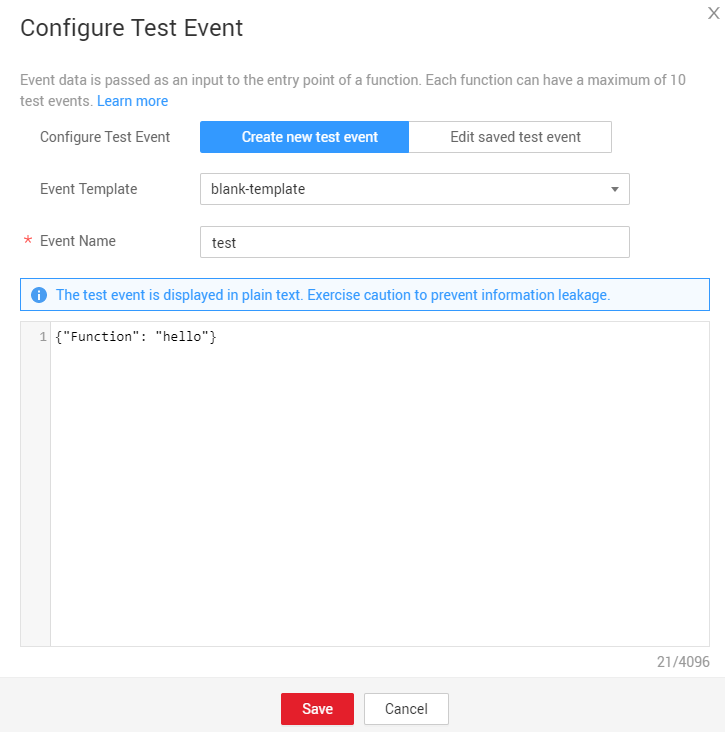
On the function details page that is displayed, choose Select test event > Configure test event. Configure the test event information, as shown in Figure 2, and then click Save.
- On the function details page, select the configured test event, and click Test.
- Create a test event.
- Executing the function
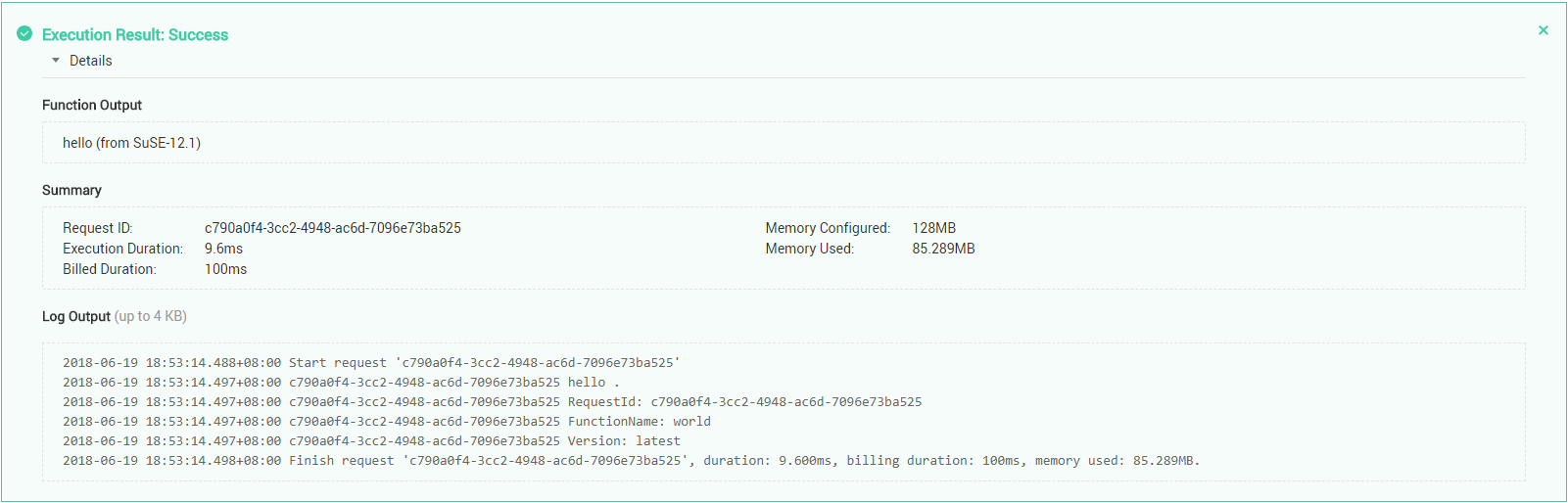
The function execution result consists of three parts: function output (returned by callback), summary, and logs (output by using the console.log or getLogger() method), as shown in Figure 3.
- Set environment variables GOROOT and GOPATH.
Execution Result
The execution result consists of the function output, summary, and log output.
| Parameter | Successful Execution | Failed Execution |
|---|---|---|
| Function Output | The defined function output information is returned. | A JSON file that contains errorMessage and errorType is returned. The format is as follows: {
"errorMessage": "",
"errorType":"",
} errorMessage: Error message returned by the runtime. errorType: Error type. |
| Summary | Request ID, Memory Configured, Execution Duration, Memory Used, and Billed Duration are displayed. | Request ID, Memory Configured, Execution Duration, Memory Used, and Billed Duration are displayed. |
| Log Output | Function logs are printed. A maximum of 4 KB logs can be displayed. | Error information is printed. A maximum of 4 KB logs can be displayed. |
Example of the function output when a function fails to be executed:
{   "errorMessage": "runtime error: invalid memory address or nil pointer dereference",
    "errorType": "panic",
    "stackTrace": [       "HandleRequest()",       "    go-runtime/main.go:15"   ]
}
Example of the log output when a function fails to be executed:
2020/08/12 09:17:07 GMT+08:00  Start invoke request 'e9d3c07f-583c-469b-866a-56a927576998', version: latest
2020/08/12 09:17:07 GMT+08:00 e9d3c07f-583c-469b-866a-56a927576998 payload:{"key": "value"}2020/08/12 09:17:07 GMT+08:00 Finish invoke request 'e9d3c07f-583c-469b-866a-56a927576998'(invoke Failed), duration: 39.413ms, billing duration: 100ms, memory used: 73.766MB Last Article: Developing Functions in Go 1.8.3
Next Article: Developing Functions in C#

Did this article solve your problem?
Thank you for your score!Your feedback would help us improve the website.