
Developing Functions in Java (Using Eclipse)
Function Syntax
The following is the syntax for creating a handler function in Java:
Scope Return parameter Function name (User-defined parameter, Context)
- Scope: It must be defined as public for the function that FunctionGraph invokes to execute your code.
- Return parameter: user-defined output, which is converted into a character string and returned as an HTTP response. The HTTP response is a JSON string.
- Function name: user-defined function name.
- User-defined parameter: FunctionGraph supports only one user-defined parameter. For complex parameters, define them as an object and provide data through JSON strings. When invoking a function, FunctionGraph parses the JSON strings as an object.
- Context: runtime information provided for executing the function. For details, see SDK APIs.
When creating a function in Java, define a handler in the format of [Package name].[Class name].[Function name].
SDK APIs
The Java SDK provides context, event, and logging APIs.
- Event APIs
Event structure definitions are added to the Java SDK. Currently, CTS, DMS, DIS, SMN, LTS, Timer, and APIG triggers are supported. The definitions make coding much simpler when triggers are required.
- APIG trigger
- APIGTriggerEvent methods
Table 1 APIGTriggerEvent methods Method
Description
isBase64Encoded()
Checks whether the body of an event has been encoded using Base64.
getHttpMethod()
Obtains the HTTP request method.
getPath()
Obtains the HTTP request path.
getBody()
Obtains the HTTP request body.
getPathParameters()
Obtains all path parameters.
getRequestContext()
Obtains API Gateway configurations (returned as an APIGRequestContext object).
getHeaders()
Obtains the HTTP request header.
getQueryStringParameters()
Obtains query parameters.
NOTE:The value of a query parameter cannot be an array. To support an array, customize the corresponding event structure.
getRawBody()
Obtains the content before Base64 encryption.
getUserData()
Obtains the user data set in the APIG custom authorizer.
- APIGTriggerResponse methods
Table 3 APIGTriggerResponse construction methods Method
Description
APIGTriggerResponse()
Set the following parameters:
- headers: null
- statusCode: 200
- body: ""
- isBase64Encoded: false
APIGTriggerResponse(statusCode, headers, body)
Set the value of isBase64Encoded to false, and use the input values of other parameters.
APIGTriggerResponse(statusCode, headers, isBase64Encoded, body)
Set the parameters in sequence.
Table 4 APIGTriggerResponse methods Method
Description
setBody(String body)
Sets the message body.
setHeaders(Map<String,String> headers)
Sets the HTTP response header to be returned.
setStatusCode(int statusCode)
Sets the HTTP status code.
setBase64Encoded(boolean isBase64Encoded)
Configures Base64 encoding for the response body.
setBase64EncodedBody(String body)
Encodes the input with Base64 and configures it in the body.
addHeader(String key, String value)
Adds a group of HTTP headers.
removeHeader(String key)
Removes the specified header.
addHeaders(Map<String,String> headers)
Adds multiple headers.

APIGTriggerResponse methods have the headers attribute, which can be initialized using the setHeaders method or a constructor function with the headers parameter.
- APIGTriggerEvent methods
- DIS trigger
Table 5 DISTriggerEvent methods Method
Description
getShardID()
Obtains the partition ID.
getMessage()
Obtains the DIS message body (DISMessage structure).
getTag()
Obtains the version of a function.
getStreamName()
Obtains the stream name.
Table 6 DISMessage methods Method
Description
getNextPatitionCursor()
Obtains the next partition cursor.
getRecords()
Obtains message records (DISRecord structure).
getMillisBehindLatest()
Reserved (Currently, 0 is returned.)
- DMS trigger
Table 8 DMSTriggerEvent methods Method
Description
getQueueId()
Obtains the queue ID.
getRegion()
Obtains the region name.
getEventType()
Obtains the event type (MessageCreated is returned).
getConsumerGroupId()
Obtains the consumer group ID.
getMessages()
Obtains the DMS message (DMSMessage structure).
- SMN trigger
Table 10 SMNTriggerEvent method Method
Description
getRecord()
Obtains message records (SMNRecord structure).
Table 11 SMNRecord methods Method
Description
getEventVersion()
Obtains the event version. (Currently, the version is 1.0.)
getEventSubscriptionUrn()
Obtains the subscription Uniform Resource Name (URN).
getEventSource()
Obtains the event source.
getSmn()
Obtains the message body (SMNBody structure).
Table 12 SMNBody methods Method
Description
getTopicUrn()
Obtains the topic URN.
getTimeStamp()
Obtains the timestamp of a message.
getMessageAtrributes()
Obtains the message attribute set.
getMessage()
Obtains the message body.
getType()
Obtains the message type.
getMessageId()
Obtains the message ID.
getSubject()
Obtains the message topic.
- Timer trigger
Table 13 TimerTriggerEvent methods Method
Description
getVersion()
Obtains the version. (Currently, the version is v1.0.)
getTime()
Obtains the current time.
getTriggerType()
Obtains the trigger type (Timer).
getTriggerName()
Obtains the trigger name.
getUserEvent()
Obtains the additional information of the trigger.
- LTS trigger
Table 14 LTSTriggerEvent method Method
Description
getLts()
Obtains LTS messages (LTSBody structure).
- CTS trigger
Table 16 CTSTriggerEvent method Method
Description
getCTS()
Obtains the CTS message body (CTS structure).
Table 17 CTS structure methods Method
Description
getTime()
Obtains the time when a trace occurred.
getUser()
Obtains the information (user structure) about the user who triggered the trace.
getRequest()
Obtains the request content of the trace.
getResponse()
Obtains the response content of the trace.
getCode()
Obtains the response code.
getServiceType()
Obtains the name of the service involved in the trace.
getResourceType()
Obtains the type of the resource involved in the trace.
getResourceName()
Obtains the name of the resource involved in the trace.
getResourceId()
Obtains the ID of the resource involved in the trace.
getTraceName()
Obtains the trace name.
getTraceType()
Obtains the trace type, for example, ConsoleAction.
getRecordTime()
Obtains the time when CTS received the trace.
getTraceId()
Obtains the trace ID.
getTraceStatus()
Obtains the trace status.
Table 18 User methods Method
Description
getName()
Obtains the username (an account can create multiple users).
getId()
Obtains the user ID.
getDomain()
Obtains the account information.
Table 19 Domain methods Method
Description
getName()
Obtains the account name.
getId()
Obtains the account ID.
- When using an APIG trigger, set the first parameter of the handler function (for example, handler) to handler(APIGTriggerEvent event, Context context).
- The preceding TriggerEvent methods have corresponding set methods, which are recommended for local debugging. DIS and LTS triggers have getRawData() methods, but do not have setRawData() methods.
- APIG trigger
- Context APIs
The context APIs are used to obtain the context, such as agency AK/SK, current request ID, allocated memory space, and number of CPUs, required for executing a function.
Table 20 describes the context APIs provided by FunctionGraph.
Table 20 Context methods Method
Description
getRequestID( )
Obtains a request ID.
getRemainingTimeInMilligetRunningTimeInSecondsSeconds ( )
Obtains the remaining running time of a function.
getAccessKey( )
Obtains the AK (valid for 24 hours) of an agency. If you use this method, you need to configure an agency for the function.
getSecretKey( )
Obtains the SK (valid for 24 hours) of an agency. If you use this method, you need to configure an agency for the function.
getUserData(string key)
Uses keys to obtain the values passed by environment variables.
getFunctionName( )
Obtains the name of a function.
getRunningTimeInSeconds ( )
Obtains the timeout of a function.
getVersion( )
Obtains the version of a function.
getMemorySize( )
Obtains the allocated memory.
getCPUNumber( )
Number of CPU millicores used by the function (1 core = 1000 millicores).
The value of this field is proportional to that of MemorySize. By default, 100 CPU millicores are required for 128 MB memory. The number of CPU millicores is calculated as follows: Memory/128 x 100 + 200 (basic CPU millicores).
getProjectID( )
Obtains a project ID.
getPackage( )
Obtains a function group, that is, an app.
getToken( )
Obtains the token (valid for 24 hours) of an agency. If you use this method, you need to configure an agency for the function.
getLogger( )
Obtains the logger method provided by the context. By default, information such as the time and request ID is output.

Results returned by using the getToken(), getAccessKey(), and getSecretKey() methods contain sensitive information. Exercise caution when using these methods.
- Logging API
Table 21 describes the logging API provided in the Java SDK.
Developing a Java Function
Perform the following procedure to develop a Java function:
- Create a function project.
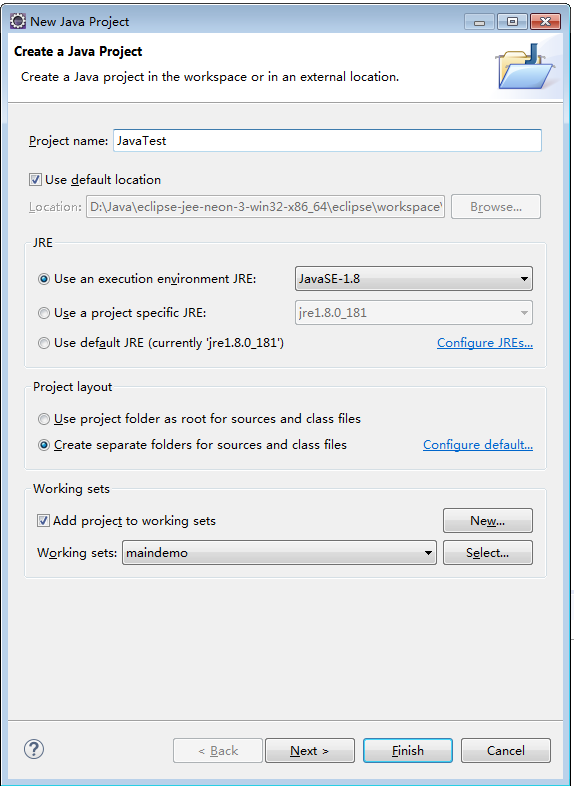
- Configure Eclipse and create a Java project named JavaTest, as shown in Figure 1.
- Add a dependency to the project.
- Configure the dependency.
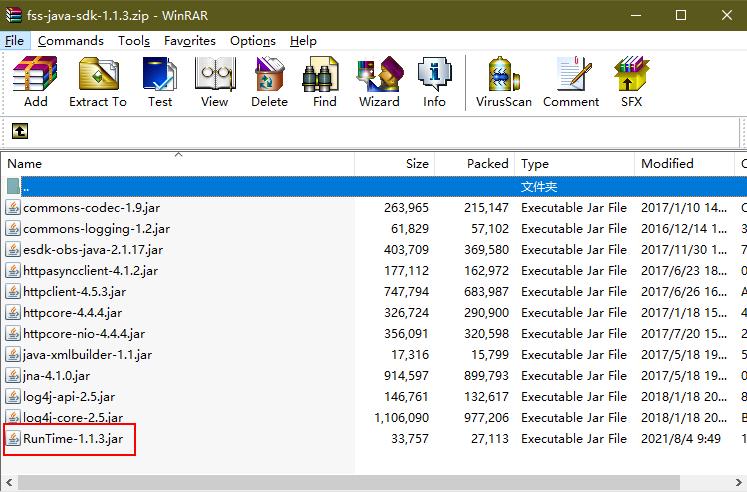
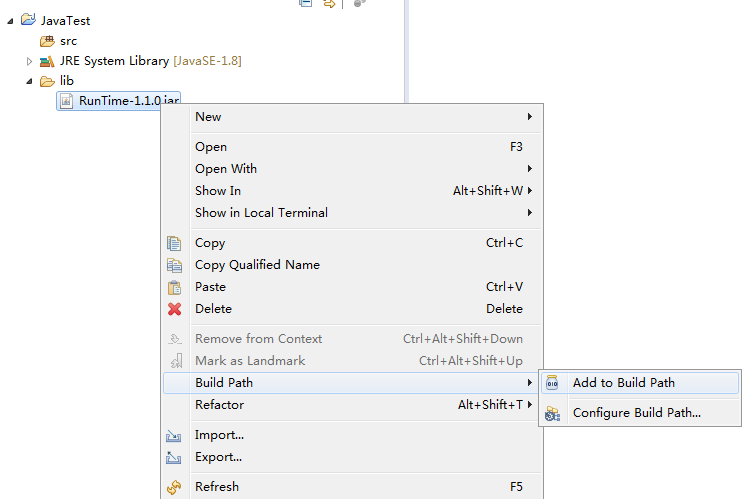
Create a folder named lib in the project directory, copy the Runtime-1.1.3.jar file in the SDK package to the lib folder, and add the JAR file as a dependency of the project, as shown in Figure 3.
- Create a function.
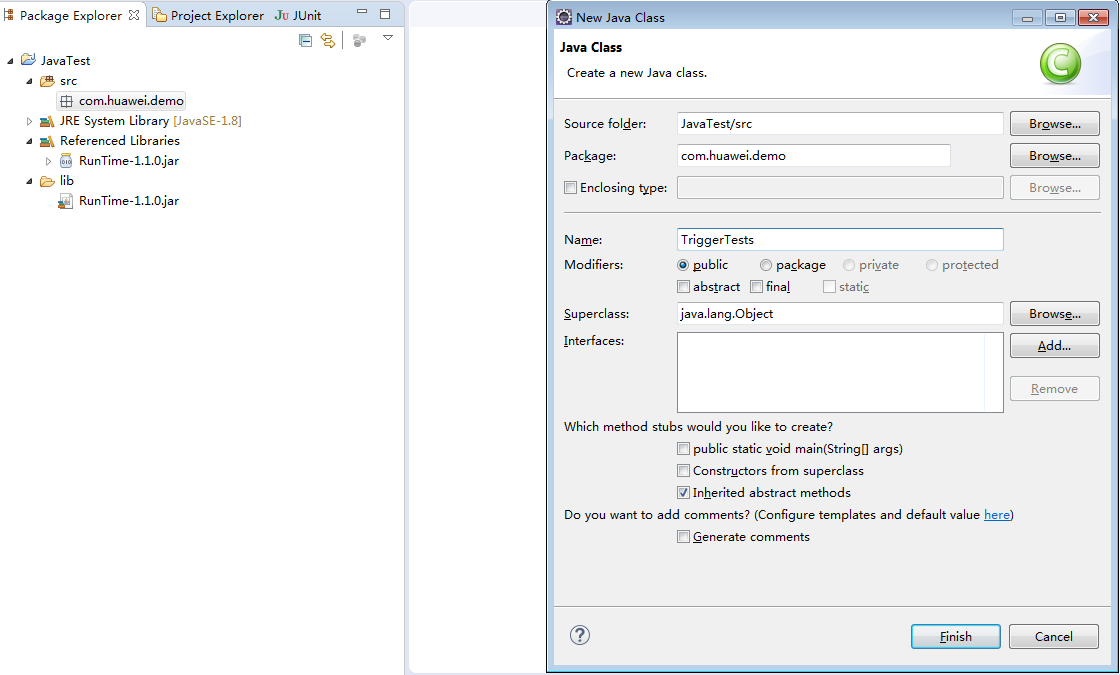
- Create a package named com.huawei.demo, and then create a class named TriggerTests under the package, as shown in Figure 4.
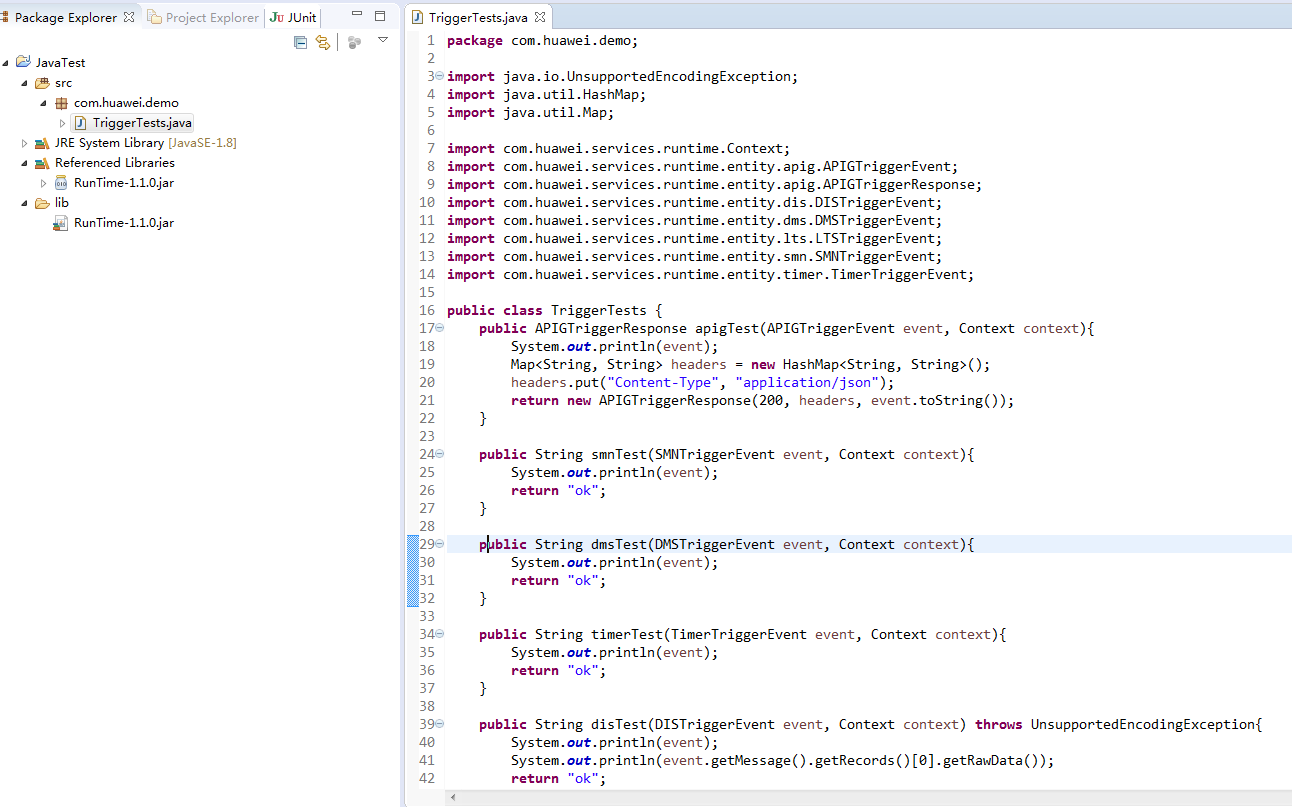
- Define the function handler in TriggerTests.java, as shown in Figure 5.
 1
 2
 3
 4
 5
 6
 7
 8
 9
10
11
12
13
14
15
16
17
18
19
20
21
22
23
24
25
26
27
28
29
30
31
32
33
34
35
36
37
38
39
40
41
42
43
44
45
46
47
48
49
50
package com.huawei.demo;

import java.io.UnsupportedEncodingException;
import java.util.HashMap;
import java.util.Map;

import com.huawei.services.runtime.Context;
import com.huawei.services.runtime.entity.apig.APIGTriggerEvent;
import com.huawei.services.runtime.entity.apig.APIGTriggerResponse;
import com.huawei.services.runtime.entity.dis.DISTriggerEvent;
import com.huawei.services.runtime.entity.dms.DMSTriggerEvent;
import com.huawei.services.runtime.entity.lts.LTSTriggerEvent;
import com.huawei.services.runtime.entity.smn.SMNTriggerEvent;
import com.huawei.services.runtime.entity.timer.TimerTriggerEvent;

public class TriggerTests {
    public APIGTriggerResponse apigTest(APIGTriggerEvent event, Context context){
        System.out.println(event);
        Map<String, String> headers = new HashMap<String, String>();
        headers.put("Content-Type", "application/json");
        return new APIGTriggerResponse(200, headers, event.toString());
    }

    public String smnTest(SMNTriggerEvent event, Context context){
        System.out.println(event);
        return "ok";
    }

    public String dmsTest(DMSTriggerEvent event, Context context){
        System.out.println(event);
        return "ok";
    }

    public String timerTest(TimerTriggerEvent event, Context context){
        System.out.println(event);
        return "ok";
    }

    public String disTest(DISTriggerEvent event, Context context) throws UnsupportedEncodingException{
        System.out.println(event);
        System.out.println(event.getMessage().getRecords()[0].getRawData());
        return "ok";
    }

    public String ltsTest(LTSTriggerEvent event, Context context) throws UnsupportedEncodingException {
        System.out.println(event);
        System.out.println("raw data: " + event.getLts().getRawData());
        return "ok";
    }
}
The example code contains multiple handler functions, which use different types of triggers.
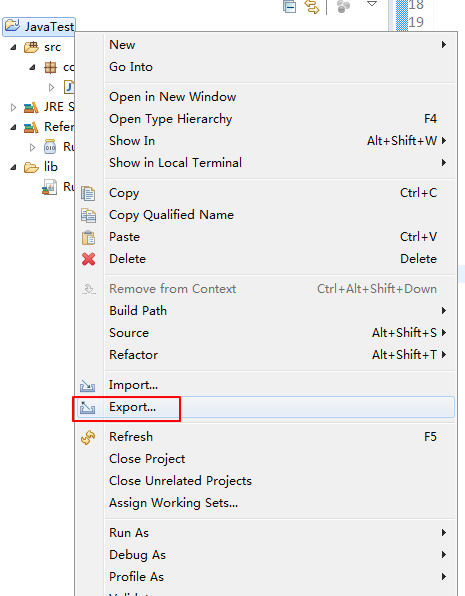
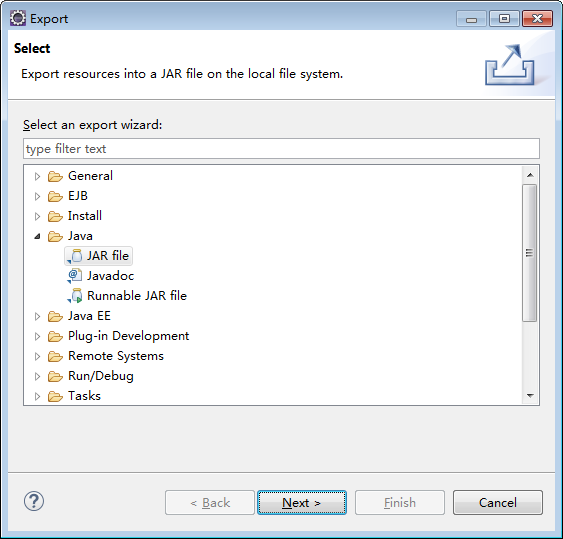
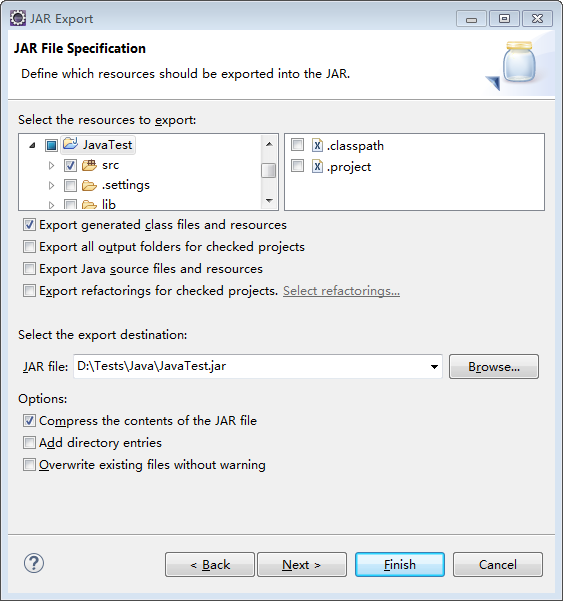
- Package the project files.
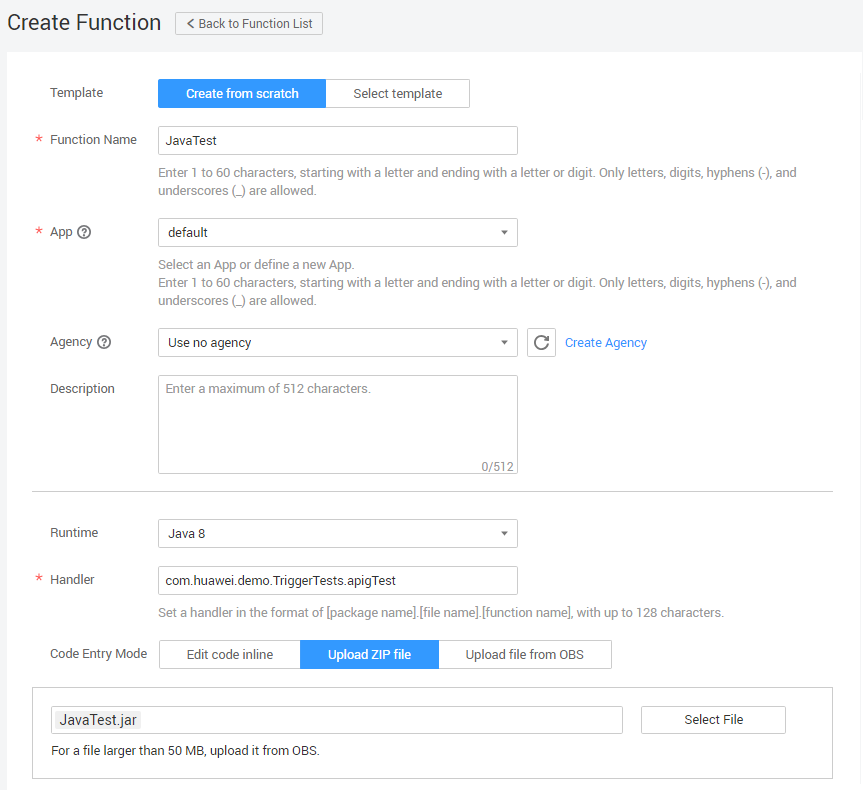
- Log in to the FunctionGraph console, create a Java function, and upload the code package, as shown in Figure 9.
- Test the function.
- Create a test event.
Select apig-event-template and click Save.
Figure 10 Configuring a test event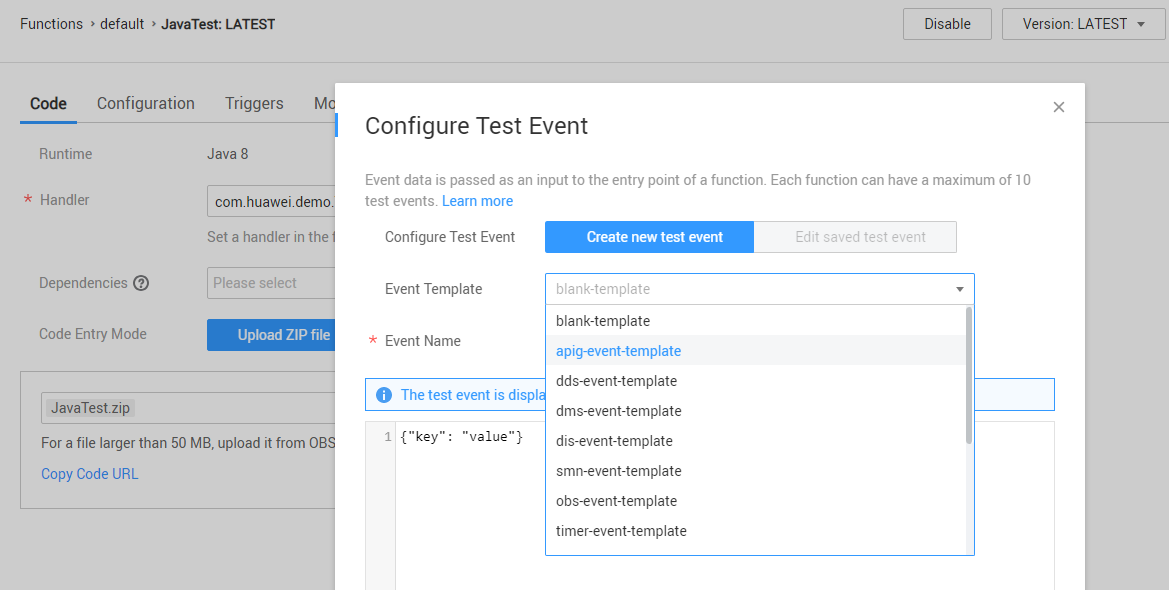
- Click Test.
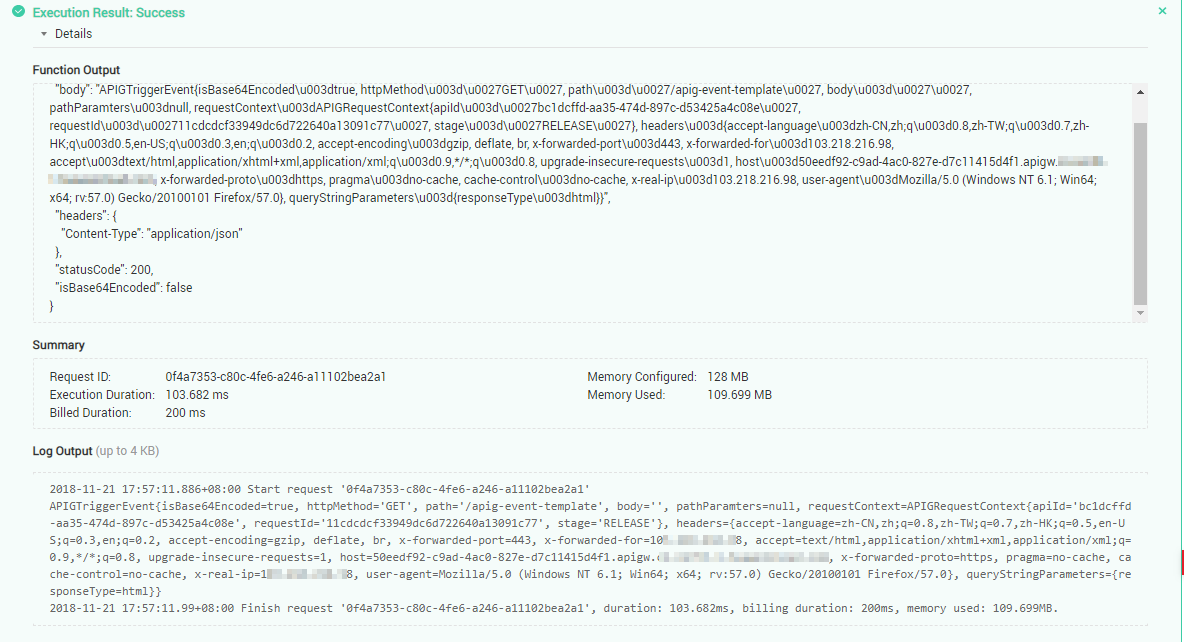
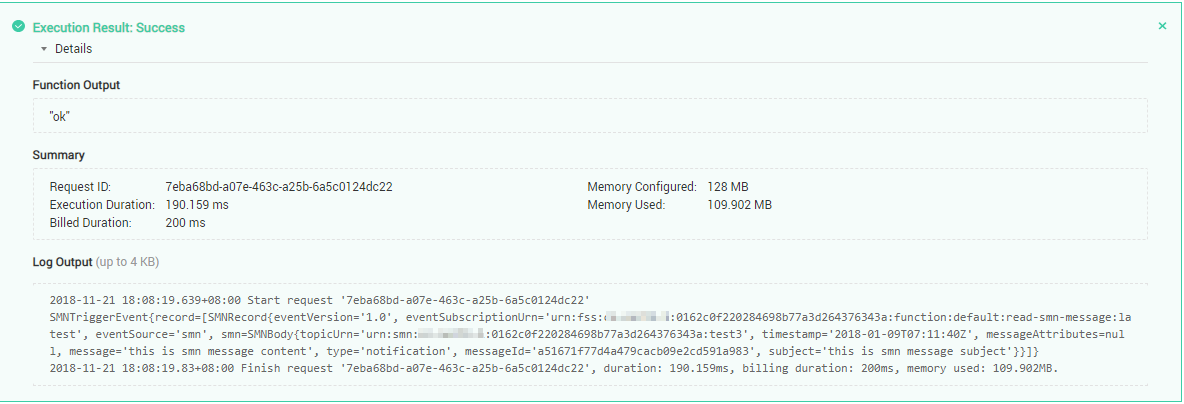
The function execution result consists of three parts: function output (returned by callback), summary, and logs (output by using the console.log or getLogger() method), as shown in Figure 11.
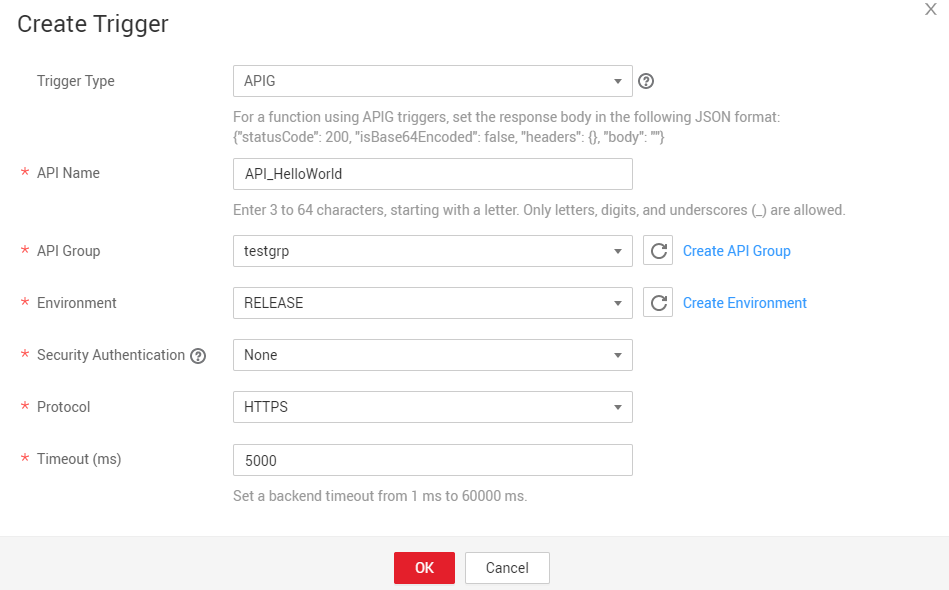
- Create an APIG trigger, as shown in Figure 12.
- Access the API URL, as shown in Figure 13. Change the handler to com.huawei.demo.TriggerTests.smnTest and change the event template to smn-event-template. Figure 14 shows the execution result.
- Create a test event.
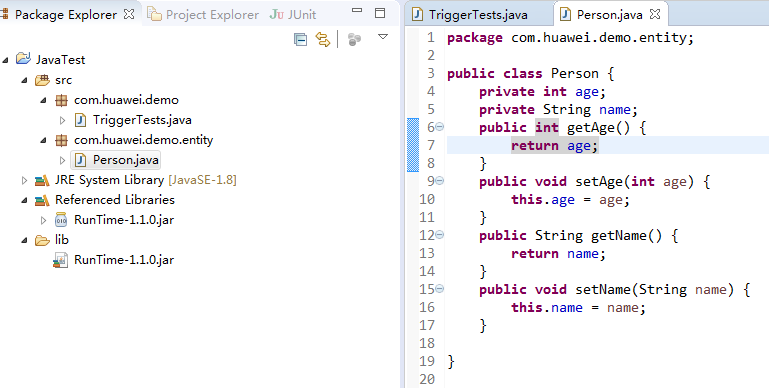
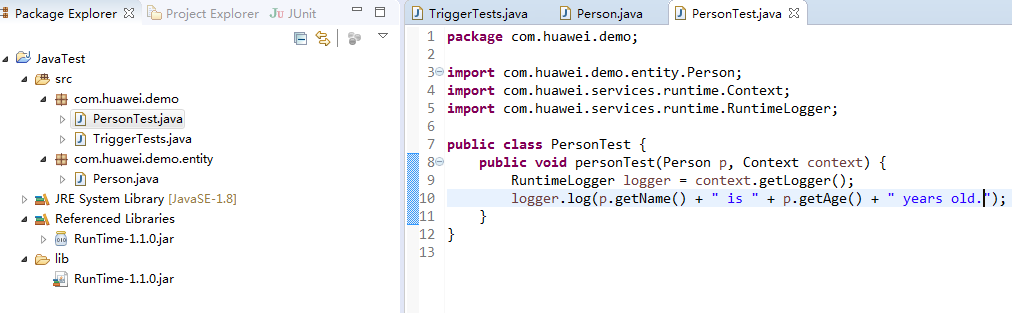
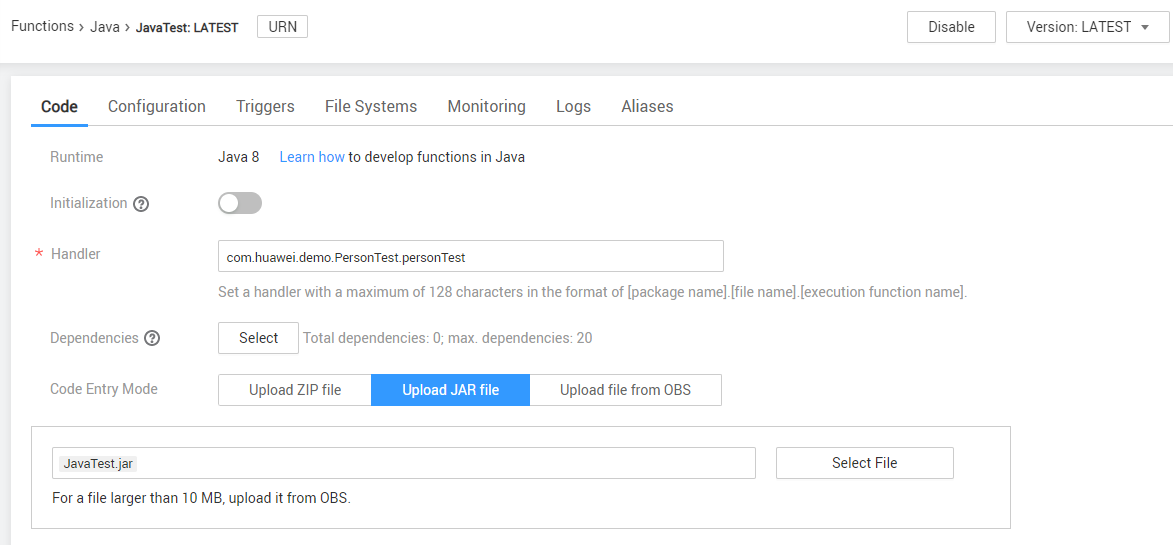
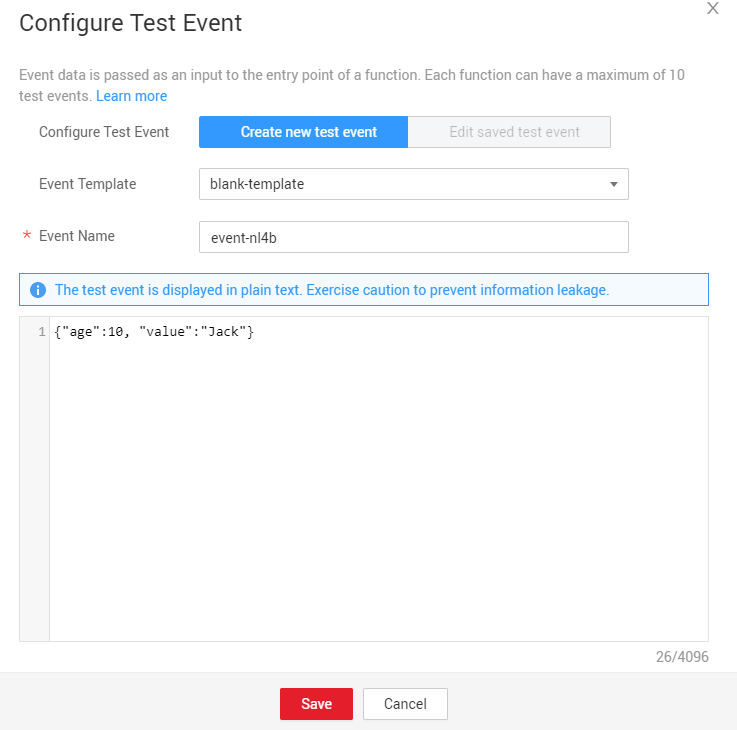
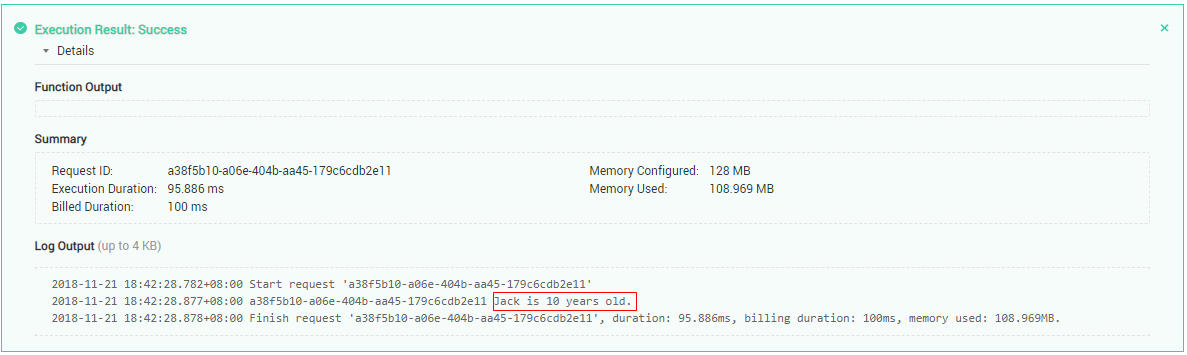
- Use a user-defined parameter in the Java code. Create a Person class in the project, as shown in Figure 15.Create a class named PersonTest.java, and add a handler function to the class, as shown in Figure 16.After exporting the new package, upload it to the function, change the function handler to com.huawei.demo.PersonTest.personTest, and click Save, as shown in Figure 17.In the Configure Test Event dialog box, select blank-template, enter a test event, and click Save, as shown in Figure 18.Click Test. Figure 19 shows the execution result.

Execution Result
The execution result consists of the function output, summary, and log output.
| Parameter | Successful Execution | Failed Execution |
|---|---|---|
| Function Output | The defined function output information is returned. | A JSON file that contains errorMessage and stackTrace is returned. The format is as follows: {
"errorMessage": "",
"stackTrace": []
} errorMessage: Error message returned by the runtime. stackTrace: Stack error information returned by the runtime. |
| Summary | Request ID, Memory Configured, Execution Duration, Memory Used, and Billed Duration are displayed. | Request ID, Memory Configured, Execution Duration, Memory Used, and Billed Duration are displayed. |
| Log Output | Function logs are printed. A maximum of 4 KB logs can be displayed. | Error information is printed. A maximum of 4 KB logs can be displayed. |
Example of the function output when a function fails to be executed:
{
  "errorMessage": "Exception: package.index",
  "stackTrace": []
}
Example of the log output when a function fails to be executed:
2020-07-27 15:16:55.819+08:00 Start invoke request '249d3490-d586-447e-92b7-945485126528', version: latest
2020-07-27 15:16:56.011+08:00 {
  "errorMessage": "Exception: package.index",
  "stackTrace": []
}
2020-07-27 15:16:56.114+08:00 Finish invoke request '249d3490-d586-447e-92b7-945485126528', duration: 294.518ms, billing duration: 300ms, memory used: 74.262MB. Last Article: Developing Functions in Java
Next Article: Developing Functions in Java (Using an IDEA Java Project)

Did this article solve your problem?
Thank you for your score!Your feedback would help us improve the website.