


使用构建任务制作SonarQube工具镜像
- 创建一个CodeArts Repo代码仓用于存放构建镜像脚本,可以参考新建CodeArts Repo代码仓。
- 单击
 按钮在代码仓根目录中新建一个目录“.cloudbuild”,并在该目录下新建一个文件“build.yml”。
 - 在代码仓根目录新建三个空文件,名称分别为:Dockerfile、excute_py.sh、generate_excel.py。
此时的目录结构如下图。

- 更改前置步骤所获取的Dockerfile。
- 删除第二行的“USER build”。
- 从第二行开始写入如下内容:
# Define build arguments and set default values # SonarQube Server version ARG SONARQUBE_VERSION=25.4.0.105899 # SonarScanner CLI version ARG SONAR_SCANNER_VERSION=7.2.0.5079 # JDK version required for SonarQube runtime ARG SONAR_JDK_VERSION=17.0.1 # Node.js version required for SonarQube (optional, required only for JavaScript/TypeScript/CSS scanning scenarios) ARG SONAR_NODE_VERSION=20.19.6 # JDK version required for compiling user code (optional, required only for Java compilation scanning scenarios) ARG COMPILE_JDK_VERSION=21.0.1 # Maven version required for compiling user code (optional, required only for Java compilation scanning scenarios) ARG COMPILE_MAVEN_VERSION=3.9.12 # Print versions RUN echo "Version of SonarQube Server: $SONARQUBE_VERSION" \ && echo "Version of SonarScanner CLI: $SONAR_SCANNER_VERSION" \ && echo "Version of JDK for SonarQube : $SONAR_JDK_VERSION" \ && echo "Version of Node.js for SonarQube: $SONAR_NODE_VERSION" \ && echo "Version of JDK for compiling code: $COMPILE_JDK_VERSION" \ && echo "Version of Maven for compiling code: $COMPILE_MAVEN_VERSION" # Download tools & extract & rename RUN mkdir -p /usr/local/tools/sonarqubecustom RUN cd /usr/local/tools/sonarqubecustom \ && curl -fSL https://binaries.sonarsource.com/Distribution/sonarqube/sonarqube-${SONARQUBE_VERSION}.zip -o sonarqube_webservice.zip \ && unzip -q sonarqube_webservice.zip \ && mv sonarqube-${SONARQUBE_VERSION} sonarqube_webservice \ && rm -f sonarqube_webservice.zip RUN cd /usr/local/tools/sonarqubecustom \ && curl -fSL https://binaries.sonarsource.com/Distribution/sonar-scanner-cli/sonar-scanner-cli-${SONAR_SCANNER_VERSION}-linux-x64.zip -o sonarqube.zip \ && unzip -q sonarqube.zip \ && mv sonar-scanner-${SONAR_SCANNER_VERSION}-linux-x64 sonarqube \ && rm -f sonarqube.zip RUN cd /usr/local/tools/sonarqubecustom \ && curl -fSL https://mirrors.huaweicloud.com/openjdk/${SONAR_JDK_VERSION}/openjdk-${SONAR_JDK_VERSION}_linux-x64_bin.tar.gz -o jdk.tar.gz\ && tar -xzf jdk.tar.gz \ && mv jdk-${SONAR_JDK_VERSION} jdk \ && rm -f jdk.tar.gz # Node.js (optional, required only for JavaScript/TypeScript/CSS scanning scenarios, used in conjunction with lines 11) RUN cd /usr/local/tools/sonarqubecustom \ && curl -fSL https://nodejs.org/dist/v${SONAR_NODE_VERSION}/node-v${SONAR_NODE_VERSION}-linux-x64.tar.xz -o nodejs.tar.xz \ && tar -xf nodejs.tar.xz \ && mv node-v${SONAR_NODE_VERSION}-linux-x64 nodejs \ && rm -f nodejs.tar.xz # Download compilation dependencies & extract & rename (optional, required only for Java compilation scanning scenarios, used in conjunction with lines 13 and 15) RUN cd /usr/local/ \ && curl -fSL https://mirrors.huaweicloud.com/openjdk/${COMPILE_JDK_VERSION}/openjdk-${COMPILE_JDK_VERSION}_linux-x64_bin.tar.gz -o compile_jdk.tar.gz \ && tar -xzf compile_jdk.tar.gz \ && mv jdk-${COMPILE_JDK_VERSION} compile_jdk \ && rm -f compile_jdk.tar.gz RUN cd /usr/local/ \ && curl -fSL https://dlcdn.apache.org/maven/maven-3/${COMPILE_MAVEN_VERSION}/binaries/apache-maven-${COMPILE_MAVEN_VERSION}-bin.tar.gz -o maven.tar.gz \ && tar -xzf maven.tar.gz \ && mv apache-maven-${COMPILE_MAVEN_VERSION} maven \ && rm -f maven.tar.gz # Configure compilation environment (optional, required only for Java compilation scanning scenarios, used in conjunction with lines 13 and 15) ENV JAVA_HOME=/usr/local/compile_jdk ENV MAVEN_HOME=/usr/local/maven ENV PATH=$MAVEN_HOME/bin:$JAVA_HOME/bin:$PATH - 将上述操作更新完毕的Dockefile文件内容复制写入代码仓根目录的“Dockerfile”文件中。
- 将如下内容复制写入代码仓中的“.cloudbuild/build.yml”文件:
--- version: 2.0 steps: BUILD: - build_image: inputs: organization: ${ORGANIZATION} image_name: ${IMAGE_NAME} image_tag: ${IMAGE_TAG} dockerfile_path: ./Dockerfile build_args: - name: SONAR_USER_NAME value: ${SONAR_USER_NAME} - name: SONAR_USER_PASSWORD value: ${SONAR_USER_PASSWORD} - name: SONARQUBE_VERSION value: ${SONARQUBE_VERSION} - name: SONAR_SCANNER_VERSION value: ${SONAR_SCANNER_VERSION} - name: SONAR_JDK_VERSION value: ${SONAR_JDK_VERSION} - name: SONAR_NODE_VERSION value: ${SONAR_NODE_VERSION} - name: COMPILE_JDK_VERSION value: ${COMPILE_JDK_VERSION} - name: COMPILE_MAVEN_VERSION value: ${COMPILE_MAVEN_VERSION} - swr: image: ${SWR_PATH}/${ORGANIZATION}/${IMAGE_NAME}:${IMAGE_TAG} inputs: command: sh ./excute_py.sh - upload_artifact: inputs: path: ./output/* - 将如下内容复制写入代码仓根目录的“excute_py.sh”文件:
#!/bin/bash
set -ex
# Generate Excel for sonarqube rules
# Configure yum repository
cp -a /etc/yum.repos.d/CentOS-Base.repo /etc/yum.repos.d/CentOS-Base.repo.bak
cat >/etc/yum.repos.d/CentOS-Base.repo << 'EOF'
[base]
name=CentOS-$releasever - Base - mirrors.huaweicloud.com
baseurl=https://mirrors.huaweicloud.com/centos/$releasever/os/$basearch/
#mirrorlist=https://mirrorlist.centos.org/?release=$releasever&arch=$basearch&repo=os
gpgcheck=1
gpgkey=https://mirrors.huaweicloud.com/centos/RPM-GPG-KEY-CentOS-7

#released updates
[updates]
name=CentOS-$releasever - Updates - mirrors.huaweicloud.com
baseurl=https://mirrors.huaweicloud.com/centos/$releasever/updates/$basearch/
#mirrorlist=https://mirrorlist.centos.org/?release=$releasever&arch=$basearch&repo=updates
gpgcheck=1
gpgkey=https://mirrors.huaweicloud.com/centos/RPM-GPG-KEY-CentOS-7

#additional packages that may be useful
[extras]
name=CentOS-$releasever - Extras - mirrors.huaweicloud.com
baseurl=https://mirrors.huaweicloud.com/centos/$releasever/extras/$basearch/
#mirrorlist=https://mirrorlist.centos.org/?release=$releasever&arch=$basearch&repo=extras
gpgcheck=1
gpgkey=https://mirrors.huaweicloud.com/centos/RPM-GPG-KEY-CentOS-7

#additional packages that extend functionality of existing packages
[centosplus]
name=CentOS-$releasever - Plus - mirrors.huaweicloud.com
baseurl=https://mirrors.huaweicloud.com/centos/$releasever/centosplus/$basearch/
#mirrorlist=https://mirrorlist.centos.org/?release=$releasever&arch=$basearch&repo=centosplus
gpgcheck=1
enabled=0
gpgkey=https://mirrors.huaweicloud.com/centos/RPM-GPG-KEY-CentOS-7
EOF
yum clean all
yum makecache
# Configure Python script execution environment
yum install -y python3
python3 -m pip install requests openpyxl
yum install -y glibc-common
localedef -c -f UTF-8 -i en_US en_US.UTF-8
export LANG=en_US.UTF-8
export LC_ALL=en_US.UTF-8
# Create non-root user and start SonarQube Server
useradd sonar && chown -R sonar:sonar /usr/local/tools/sonarqubecustom/sonarqube_webservice
su sonar -c "/usr/local/tools/sonarqubecustom/sonarqube_webservice/bin/linux-x86-64/sonar.sh start"
until curl -sf http://localhost:9000/api/system/status | grep -q '"status":"UP"'; do
  echo "wait to up"
  sleep 5
done
# Execute Python script to generate Excel
python3 ./generate_excel.py
- 将如下内容写入代码仓根目录的“generate_excel.py”文件:
import requests import json import uuid import openpyxl import os import re USER_NAME = os.getenv("SONAR_USER_NAME") # SonarQube Server username USER_PASSWORD = os.getenv("SONAR_USER_PASSWORD") # SonarQube Server password SONARQUBE_URL = "http://localhost:9000" # SonarQube Server address RULE_SEARCH_API = f"{SONARQUBE_URL}/api/rules/search" LANGUAGE_LIST_API = f"{SONARQUBE_URL}/api/languages/list" GENERATE_TOKEN_API = f"{SONARQUBE_URL}/api/user_tokens/generate" REVOKE_TOKEN_API = f"{SONARQUBE_URL}/api/user_tokens/revoke" EN_EXCEL_PATH = "output/sonarqube_rules_en.xlsx" # Excel for English interface import CN_EXCEL_PATH = "output/sonarqube_rules_cn.xlsx" # Excel for Chinese interface import SONAR_CODEARTS_LANGUAGE_MAP = { "cs": "C#", "css": "CSS", "go": "GO", "web": "HTML", "java": "JAVA", "ts": "TYPESCRIPT", "js": "JAVASCRIPT", "python": "PYTHON", "php": "PHP", "py": "PYTHON", "kotlin": "KOTLIN", "rust": "RUST", "scala": "SCALA", "terraform": "TERRAFORM", "plsqlopen": "SQL" } CN_SONAR_CODEARTS_SEVERITY_MAP = { "BLOCKER": "致命", "CRITICAL": "严重", "MAJOR": "一般", "MINOR": "一般", "INFO": "提示" } EN_SONAR_CODEARTS_SEVERITY_MAP = { "BLOCKER": "critical", "CRITICAL": "major", "MAJOR": "minor", "MINOR": "minor", "INFO": "suggestion" } # CodeArts Check whitelist validation for rule names and Rule Ids NAME_REGEX = r'^[\u4e00-\u9fa5a-zA-Z0-9\s.\-_~\'“”‘’"\(\)#\[\]@<>*+,:!=/\\$?{}`|&;%]+$' name_pattern = re.compile(NAME_REGEX) RULE_KEY_REGEX = r'^[A-Za-z0-9_\.\-\:]+$' rule_key_pattern = re.compile(RULE_KEY_REGEX) EN_HEADERS = ["name", "nameCn", "language", "isSupportPersonal", "isSupportVersion", "isSupportIDE", "severity", "criterion_type", "toolRule_name", "toolName", "good_example_cn", "good_example_en", "bad_example_cn", "bad_example_en", "recommend_cn", "recommend_en", "comments_cn", "comments_en", "options"] CN_HEADERS = ["规则英文名称", "规则中文名称", "语言", "门禁级", "版本级", "IDE级", "告警严重级别", "规则类型", "工具规则名称", "检查工具", "正确示例(中文)", "正确示例(英文)", "错误示例(中文)", "错误示例(英文)", "修改建议(中文)", "修改建议(英文)", "规则描述(中文)", "规则描述(英文)", "选项"] # Generate a random temporary token def generate_sonar_token(sonar_token_name): try: # Send a POST request response = requests.post( GENERATE_TOKEN_API, auth=(USER_NAME, USER_PASSWORD), data={ "name": sonar_token_name } ) if response.status_code == 200: try: # Try to parse JSON data data = response.json() print("Token generation successful!") return data.get("token") except json.JSONDecodeError as e: print(f"Error parsing token generation JSON: {e}") return "" else: print(f"Token generation request failed, status code: {response.status_code}") return "" except requests.exceptions.RequestException as e: print(f"Token generation request error: {e}") return "" # Delete the generated temporary token def revoke_token(sonar_token_name): try: # Send a POST request response = requests.post( REVOKE_TOKEN_API, auth=(USER_NAME, USER_PASSWORD), data={ "name": sonar_token_name } ) if response.status_code != 204: print("Token deletion failed!") print(f"Token deletion request failed, status code: {response.status_code}") except requests.exceptions.RequestException as e: print(f"Token deletion request error: {e}") print("Token deletion successful!") # Get all rule information def get_rule_json(sonar_token, language): # === Initial pagination parameters === page = 1 page_size = 500 # Maximum 500 per page (SonarQube maximum) data = [] rules = [] get_whole_rule = False while not get_whole_rule: params = { "languages": language, # Specify language "p": page, # Current page number "ps": page_size # Number of items per page } try: # Send a GET request response = requests.get(RULE_SEARCH_API, params=params, auth=(sonar_token, "")) if response.status_code == 200: try: # Try to parse JSON data data = response.json() except json.JSONDecodeError as e: print(f"Error parsing {language} language rules JSON: {e}") else: print(f"Getting {language} rules failed, status code: {response.status_code}") except requests.exceptions.RequestException as e: print(f"Error getting {language} rules: {e}") if not data.get("rules"): get_whole_rule = True rules += data.get("rules") page += 1 print(f"Parsing {language} rules successful!") return rules def generate_rules_excel(is_international, rules_list, headers, output_path): print("Exporting rules to Excel...") excel = openpyxl.Workbook() sheet_active = excel.active sheet_active.title = "Sheet1" sheet = excel["Sheet1"] sheet.append(headers) for rule_info_dict in rules_list: description = "" recommendation = "" rule_key = rule_info_dict.get("key") rule_id = rule_key.split(":")[1] name = rule_info_dict.get("name") severity = rule_info_dict.get("severity") is_template = rule_info_dict.get("isTemplate") params = rule_info_dict.get("params") option = "" if is_template: rule_key = rule_key.replace(".", "_") + "_userdefine_template" option = option + "sonar_template_key:" + rule_id + ";" if params: for param in params: option = option + param.get("key") + ":" + \ (param.get("defaultValue") if param.get("defaultValue") is not None else "") + ";" if option: option = option[0: len(option) - 1] if not rule_key_pattern.match(rule_key): print("SonarQube " + rule_info_dict.get("lang") + " language RuleId violation: " + rule_key) if not name_pattern.match(name): print("SonarQube " + rule_info_dict.get("lang") + " language rule name violation: " + name) for content in rule_info_dict.get("descriptionSections"): if content.get("key") == "root_cause" or content.get("key") == "default" \ or content.get("key") == "assess_the_problem": description = description + content.get("content") elif content.get("key") == "introduction": description = content.get("content") + description elif content.get("key") == "how_to_fix": recommendation = recommendation + content.get("content") language = SONAR_CODEARTS_LANGUAGE_MAP.get(rule_info_dict.get("lang")) if is_international: information = [name, name, language if language is not None else rule_info_dict.get("lang").upper(), "yes", "yes", "no", EN_SONAR_CODEARTS_SEVERITY_MAP.get(severity), "common", rule_key, "sonarqubecustom", "N/A", "N/A", "N/A", "N/A", recommendation if recommendation else "N/A", recommendation if recommendation else "N/A", description if description else "N/A", description if description else "N/A", option] else: information = [name, name, language if language is not None else rule_info_dict.get("lang").upper(), "是", "是", "否", CN_SONAR_CODEARTS_SEVERITY_MAP.get(severity), "通用类(非编程规范)", rule_key, "sonarqubecustom", "无", "无", "无", "无", recommendation if recommendation else "无", recommendation if recommendation else "无", description if description else "无", description if description else "无", option] sheet.append(information) if not os.path.exists("output"): os.mkdir("output") excel.save(filename=output_path) print("Rules Excel generated successfully!") # Get all languages from SonarQube Server def get_language_list(sonar_token): language_list = [] languages = [] try: # Send a GET request response = requests.get(LANGUAGE_LIST_API, auth=(sonar_token, "")) if response.status_code == 200: try: # Try to parse JSON data languages = response.json().get("languages") print("Language list retrieved successfully") except json.JSONDecodeError as e: print(f"Error parsing language list JSON: {e}") else: print(f"Getting language list failed, status code: {response.status_code}") except requests.exceptions.RequestException as e: print(f"Error getting language list: {e}") for language in languages: language_list.append(language.get("key")) return language_list if __name__ == "__main__": token_name = str((uuid.uuid1())) token = generate_sonar_token(token_name) if not token: raise Exception("Token generation failed") sonar_languages = get_language_list(token) if not sonar_languages: raise Exception("Language list retrieval failed") rules = [] for sonar_language in sonar_languages: rules_info = get_rule_json(token, sonar_language) if not rules_info: print(sonar_language + " language rules retrieval failed") rules += rules_info revoke_token(token_name) generate_rules_excel(False, rules, CN_HEADERS, CN_EXCEL_PATH) generate_rules_excel(True, rules, EN_HEADERS, EN_EXCEL_PATH) - 新建并配置代码化构建任务,参考新建代码化构建任务。
注意:创建任务时不要修改build.yml文件。
- 单击“编辑”,选择“参数设置 > 自定义参数”。
- 单击“立即新建”,创建第一个参数。
- 单击“新建参数”,需要新建如下12个参数并设置默认值(可选的参数可以不新建),详情参见:表1
表1 自定义参数表 参数名
参数描述
默认值示例
默认值说明
SONAR_USER_NAME
SonarQube Server的用户名
admin
从官网直接下载的SonarQube Server,登录的用户名默认为admin。
SONAR_USER_PASSWORD
SonarQube Server的密码
admin
从官网直接下载的SonarQube Server,登录的密码默认为admin。
SONARQUBE_VERSION
SonarQube Server的版本
25.4.0.105899
将版本号拼接到下载链接中,即“https://binaries.sonarsource.com/Distribution/sonarqube/sonarqube-25.4.0.105899.zip”。下载方式详见Dockerfile。
注意:需要确保该版本存在,在浏览器中打开如下链接即可进行确认,https://binaries.sonarsource.com/?prefix=Distribution/sonarqube/
SONAR_SCANNER_VERSION
SonarScanner CLI的版本
7.2.0.5079
将版本号拼接到下载链接中,即“https://binaries.sonarsource.com/Distribution/sonar-scanner-cli/sonar-scanner-cli-7.2.0.5079-linux-x64.zip”。下载方式详见Dockerfile。
注意:需要确保该版本存在,在浏览器中打开如下链接即可进行确认,https://binaries.sonarsource.com/?prefix=Distribution/sonar-scanner-cli/
SONAR_JDK_VERSION
该版本SonarQube Server运行所需的JDK版本
17.0.1
将版本号拼接到下载链接中,即“https://mirrors.huaweicloud.com/openjdk/17.0.1/openjdk-17.0.1_linux-x64_bin.tar.gz”。下载方式详见Dockerfile。
注意:需要确保该版本存在,在浏览器中打开如下链接即可进行确认,https://mirrors.huaweicloud.com/openjdk/
SONAR_NODE_VERSION
可选,SonarQube分析JavaScript/TypeScript/CSS语言所用到Node.js版本
20.19.6
将版本号拼接到下载链接中,即“https://nodejs.org/dist/v20.19.6/node-v20.19.6-linux-x64.tar.xz”。下载方式详见Dockerfile。
注意:需要确保该版本存在,在浏览器中打开如下链接即可进行确认,https://nodejs.org/dist/
COMPILE_JDK_VERSION
可选,SonarQube分析Java代码时,编译用户代码所需的JDK版本
21.0.1
将版本号拼接到下载链接中,即“https://mirrors.huaweicloud.com/openjdk/21.0.1/openjdk-21.0.1_linux-x64_bin.tar.gz”。下载方式详见Dockerfile。
注意:需要确保该版本存在,在浏览器中打开如下链接即可进行确认,https://mirrors.huaweicloud.com/openjdk/
COMPILE_MAVEN_VERSION
可选,SonarQube分析Java代码时,编译用户代码所需的Maven版本
3.9.12
将版本号拼接到下载链接中,即“https://dlcdn.apache.org/maven/maven-3/3.9.12/binaries/apache-maven-3.9.12-bin.tar.gz”。下载方式详见Dockerfile。
注意:需要确保该版本存在,在浏览器中打开如下链接即可进行确认,https://dlcdn.apache.org/maven/
SWR_PATH
用户所在局点的SWR地址
swr.cn-north-4.myhuaweicloud.com
可以在前置步骤中获取到的Dockerfile第一行看到。
ORGANIZATION
用户的SWR镜像组织
myorganization
IMAGE_NAME
制作出的SonarQube镜像名称
sonarqubecustom
用户自定义。
IMAGE_TAG
制作出的SonarQube镜像Tag
v1.0
用户自定义。
全部配置完后如下图:

- 单击“保存并执行”。
注意:
- 若对参数开启了“运行时设置”开关,在运行前还可以修改参数值,需再次单击“确定”开始执行。
- 若用户设置的“IMAGE_NAME”值不是已有的镜像名称而是新建的名称,那么第一次执行会失败,原因是第一次上传的镜像默认为私有镜像,导致镜像无法拉取,如下图。
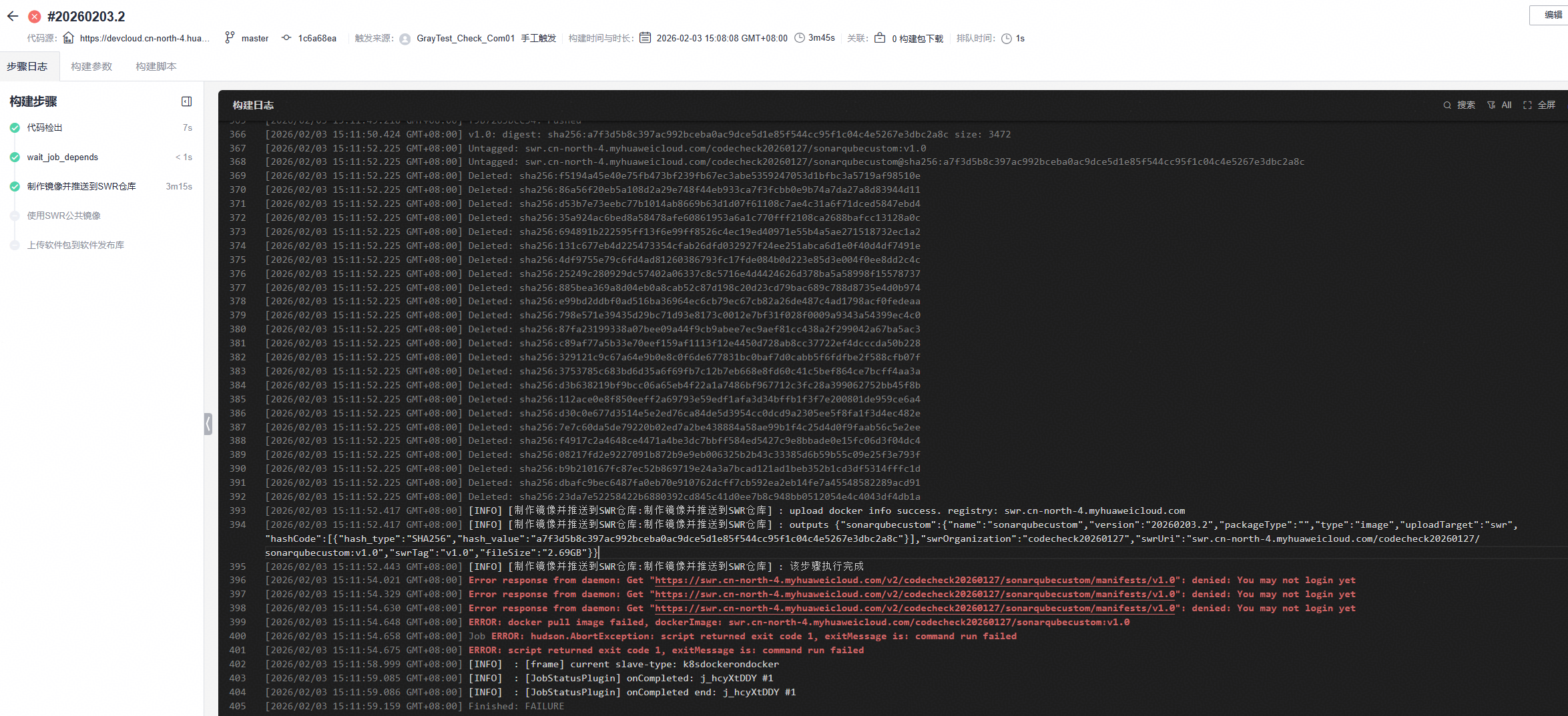
此时需要将镜像设置为公开镜像。参考使用SWR公共镜像将镜像设置为“公开”。设置为公开镜像后重新执行一遍构建任务。
- 待任务执行完毕,获取“构建包下载”中的“sonarqube_rules_cn.xlsx”和“sonarqube_rules_en.xlsx”两个文件,用于导入SonarQube规则。此时在SWR中即可看到对应的镜像。


