

Access Control Overview
- A security group protects the instances in it.
- Network ACLs provide an optional layer of security for your subnets and control the traffic entering and leaving their associated subnets. Compared with a security group that protects instances, a network ACL can protect an entire subnet when its rules are correctly configured. This allows all instances in a subnet to be protected.
- Cloud Firewall scrubs traffic between VPCs, between VPCs and the Internet, and between VPCs and on-premises data centers, securing access to services. Cloud firewalls offer broader protection compared to security groups and network ACLs.
- Security groups Sg-A and Sg-B control the traffic entering and leaving their ECSs.
- Network ACL Fw-A protects all ECSs in Subnet-A01, while network ACL Fw-B protects all ECSs in Subnet-A02 and Subnet-B01. Network ACLs and security groups are used together to enhance service security.
- Cloud firewalls
- Scrubbing traffic between a VPC and the Internet: The ECS accesses the Internet over EIP-A. Cloud firewall CFW-A scrubs the traffic from the ECS to the Internet.
- Scrubbing traffic between different VPCs: VPC-A and VPC-B are connected through enterprise router ER-X. Cloud firewall CFW-B scrubs the traffic between the two VPCs.
- Scrubbing traffic between a VPC and an on-premises data center: VPC-A and the on-premises data center are connected through enterprise router ER-X and Direct Connect connection DC-A. Cloud firewall CFW-B scrubs the traffic from VPC-A to DC-A, and then the scrubbed traffic is forwarded to the on-premises data center.
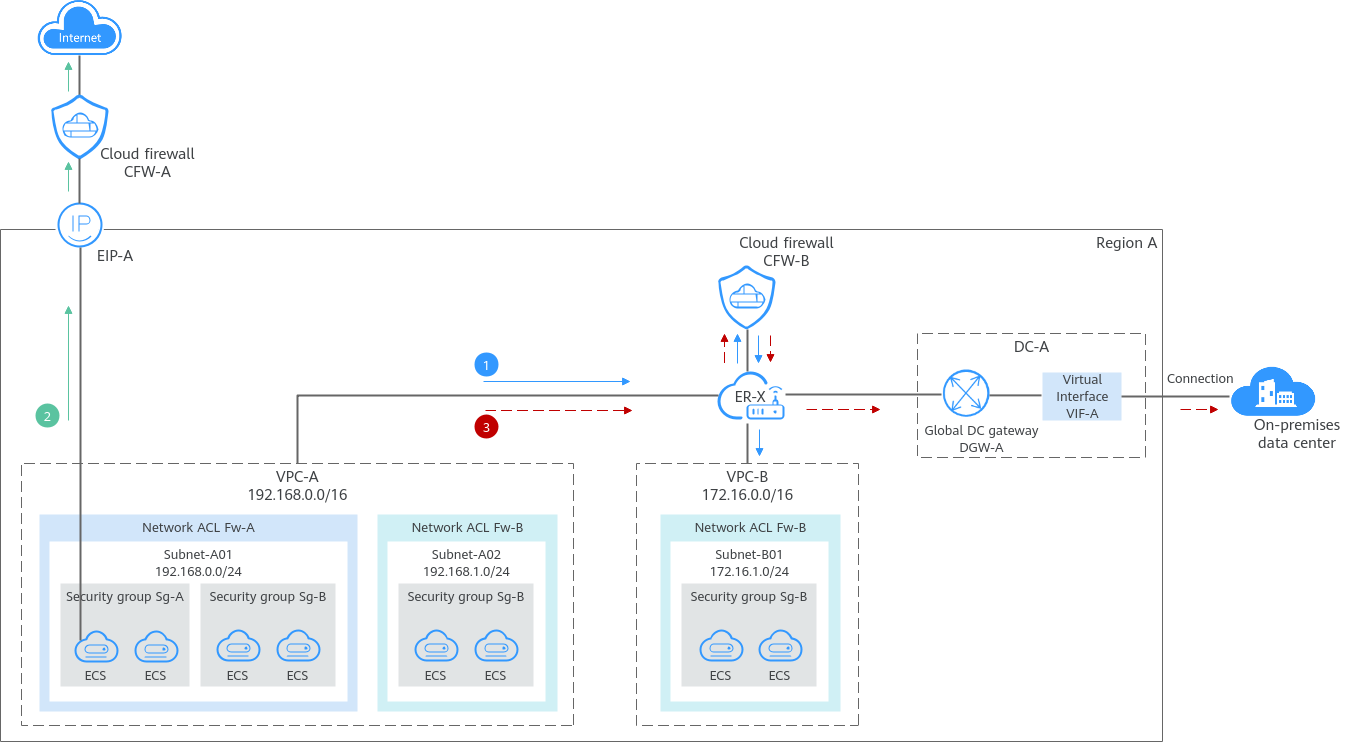
Differences Between Access Control Options
| Item | Security Group | Network ACL | Cloud Firewall |
|---|---|---|---|
| Protection Scope | Protects instances in a security group, such as ECSs, databases, and cloud containers. | Protects subnets and all the instances in the subnets. | Scrubs traffic between VPCs, between VPCs and the Internet, and between VPCs and on-premises data centers, securing access to services. |
| Mandatory or Optional | Mandatory. Instances must be added to at least one security group. | Optional. You can determine whether to associate a subnet with a network ACL based on service requirements. | Optional. You can determine whether to enable VPC border firewalls based on service requirements. |
| Billed or Free | Free | Free | Billed |
| Stateful or Not | Stateful. The response traffic of inbound and outbound requests is allowed to leave and enter an instance. | Stateful. The response traffic of inbound and outbound requests is allowed to leave and enter a subnet. | Stateful. The response traffic of inbound and outbound requests is allowed to leave and enter the Internet, a VPC, or Direct Connect connection. |
| Action | Supports both Allow and Deny rules.
| Supports both Allow and Deny rules.
| Supports both Allow and Block rules. Allow: allows matched traffic to enter or leave the Internet, a VPC, or Direct Connect connection. Block: denies matched traffic to enter or leave the Internet, a VPC, or Direct Connect connection. |
| Rule Packets | Supports packet filtering based on 3-tuple (protocol, port, and source/destination address). | Supports packet filtering based on 5-tuple (protocol, source port, destination port, source address, and destination address). | Supports packet filtering based on 5-tuple (protocol, source port, destination port, source address, and destination address), domain name, IP geolocation, and Layer 7 protocol. |
| Matching Rule | If an instance is associated with multiple security groups that have multiple rules:
| A subnet can have only one network ACL associated. If there are multiple rules in a network ACL, they are matched in ascending order, from the lowest to highest rule number. | If there are multiple rules configured for a cloud firewall, the rules are matched based on their priorities. A smaller value indicates a higher priority. |
| Usage |
| Selecting a network ACL is not allowed when you create a subnet. You must create a network ACL, add inbound and outbound rules, associate subnets with the network ACL, and enable the network ACL. The network ACL then protects the associated subnets and instances in the subnets. | Create a cloud firewall (professional edition) and configure an enterprise router to direct traffic to the cloud firewall. Configure protection rules to allow or block the traffic. CFW provides different features, such as intrusion prevention system (IPS) and antivirus, to scrub the allowed traffic. |

If you need to use advanced protection capabilities (such as access control, IPS, and antivirus based on domain names, geographical locations, and schedules), or your services have high-level protection requirements, you can use Cloud Firewall.
How Traffic Matches Security Group and Network ACL Rules
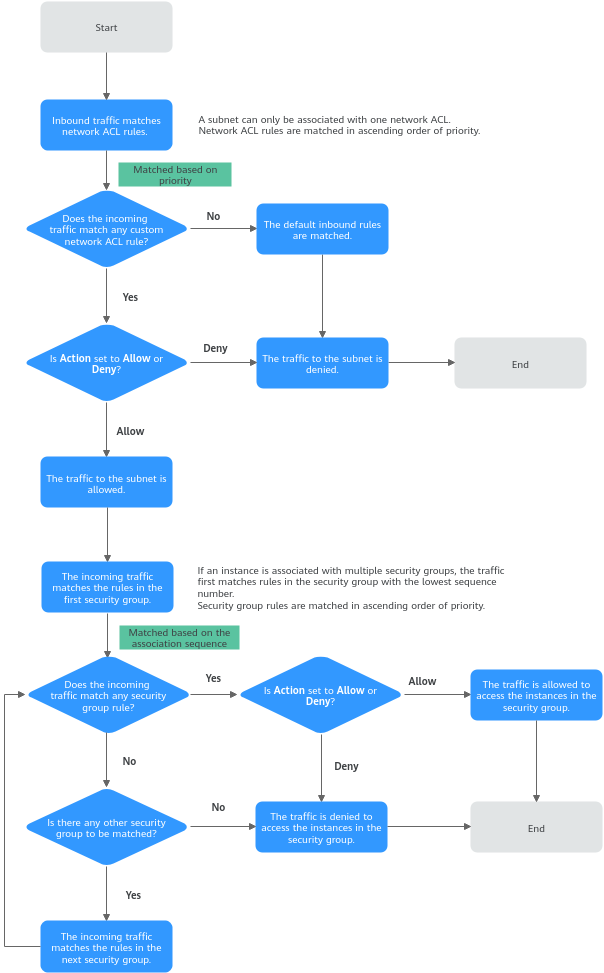
If both security group and network ACL rules are configured, traffic matches network ACL rules first and then security group rules. Figure 2 describes how inbound traffic matches security group and network ACL rules.
- Traffic first matches network ACL rules.
- If the traffic does not match any rule, the default rule is applied, and traffic to the subnet is denied.
- If the traffic matches a rule, the rule is applied, which determines where the traffic will go.
- If Action is set to Deny, the traffic to the subnet is denied.
- If Action is set to Allow, the traffic to the subnet is allowed.
- The traffic continues to match the security group rules.
- If an instance is associated with multiple security groups, the traffic first matches rules in the security group with the lowest sequence number.
- If the traffic does not match any rule, it is denied to access the instances.
- If the traffic matches a rule, the rule determines where the traffic will go.
- If Action is set to Deny, the traffic is denied to access the instances.
- If Action is set to Allow, the traffic is allowed to access the instances.
- If the traffic fails to match the rules in the first security group, it continues to match the rules in the second security group.
- If the traffic does not match the rules in any security group, the traffic is denied.
- If an instance is associated with multiple security groups, the traffic first matches rules in the security group with the lowest sequence number.
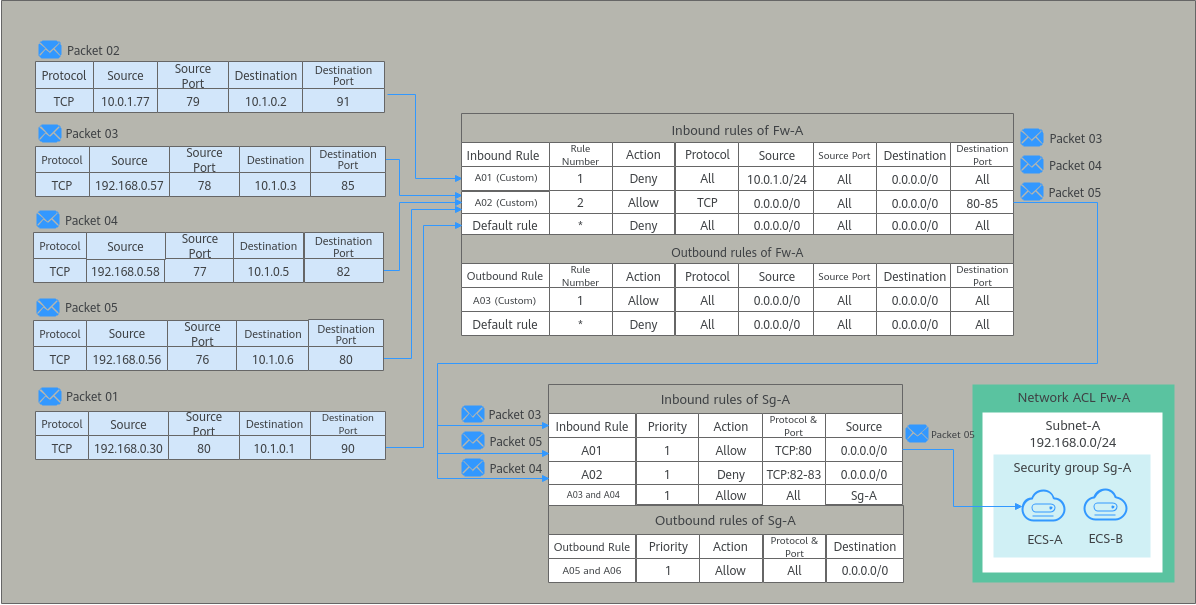
- Associate a network ACL (Fw-A) with Subnet-A. The default rules in Fw-A cannot be deleted. Traffic preferentially matches your custom rules. Table 2 shows some example rules.
- Create a security group Sg-A to protect ECS-A and ECS-B. When creating security group Sg-A, you can select an existing template. A template comes with some default rules. You can modify, delete default rules, and add custom rules. For details about security group rules, see Table 3.
| Direction | Rule Number | Type | Action | Protocol | Source | Source Port Range | Destination | Destination Port Range | Description |
|---|---|---|---|---|---|---|---|---|---|
| Inbound | 1 | IPv4 | Deny | All | 10.0.1.0/24 | All | 0.0.0.0/0 | All | Custom rule A01: denies traffic from 10.0.1.0/24 to the subnet. |
| Inbound | 2 | IPv4 | Allow | TCP | 0.0.0.0/0 | All | 0.0.0.0/0 | 80-85 | Custom rule A02: allows all TCP traffic to the instances in the subnet over ports 80 to 85. |
| Inbound | * | -- | Deny | All | 0.0.0.0/0 | All | 0.0.0.0/0 | All | Default rule: denies all inbound traffic to the subnet. |
| Outbound | 1 | IPv4 | Allow | All | 0.0.0.0/0 | All | 0.0.0.0/0 | All | Custom rule A03: allows all outbound traffic from the subnet. |
| Outbound | * | -- | Deny | All | 0.0.0.0/0 | All | 0.0.0.0/0 | All | Default rule: denies all outbound traffic from the subnet. |
| Direction | Priority | Action | Type | Protocol & Port | Source/Destination | Description |
|---|---|---|---|---|---|---|
| Inbound | 1 | Allow | IPv4 | TCP: 80 | Source: 0.0.0.0/0 | Rule A01: allows all IPv4 traffic to the instances in the security group over port 80. |
| Inbound | 1 | Deny | IPv4 | TCP: 82-83 | Source: 0.0.0.0/0 | Rule A02: denies all IPv4 traffic to the instances in the security group over ports 82 and 83. |
| Inbound | 1 | Allow | IPv4 | All | Source: current security group (Sg-A) | Rule A03: allows the instances in the security group to communicate with each other using any IPv4 protocol and port. |
| Inbound | 1 | Allow | IPv6 | All | Source: current security group (Sg-A) | Rule A04: allows the instances in the security group to communicate with each other using any IPv6 protocol and port. |
| Outbound | 1 | Allow | IPv4 | All | Destination: 0.0.0.0/0 | Rule A05: allows all IPv4 traffic from the instances in the security group. |
| Outbound | 1 | Allow | IPv6 | All | Destination: ::/0 | Rule A06: allows all IPv6 traffic from the instances in the security group. |
Based on the preceding scenarios, different inbound packets match rules as follows:
- Packet 01: If no custom rules in Fw-A are matched, the default rule is applied, denying packet 01 to the subnet.
- Packet 02: If custom rule A01 in Fw-A is matched, this rule is applied, denying packet 02 to the subnet.
- Packet 03: If custom rule A02 in Fw-A is matched, this rule is applied, allowing packet 03 to the subnet. Packet 03 continues to match the security group rules. If it does not match any inbound rule in Sg-A, packet 03 is denied to the instances.
- Packet 04: If custom rule A02 in Fw-A is matched, this rule is applied, allowing packet 04 to the subnet. Packet 04 continues to match the security group rules. If it matches rule A02 in Sg-A, packet 04 is denied to the instances.
- Packet 05: If custom rule A02 in Fw-A is matched, this rule is applied, allowing packet 05 to the subnet. Packet 05 continues to match the security group rules. If it matches rule A01 in Sg-A, packet 05 is allowed to the instances.
What is your overall rating for this page?
Thank you very much for your feedback. We will continue working to improve the documentation.See the reply and handling status in My Cloud VOC.
For any further questions, feel free to contact us through the chatbot.
Chatbot


