

Enabling TDE for a DB Instance
Scenarios
Transparent Data Encryption (TDE) performs real-time I/O encryption and decryption on data files. Data is encrypted before being written to disks and is decrypted when being read from disks to memory. This effectively protects your databases and data files.
TDE ensures data security in the following scenarios:
- Hard disks are stolen, causing data leakage.
- Hackers intrude the system and copy the files, causing data leakage. If TDE is not enabled for a database, hackers can browse all data in it as long as they obtain the database file. If TDE is enabled, all data in the database is encrypted. No one can access the data without a key.
Billing
Keys used for encryption are generated and managed by Key Management Service (KMS). TaurusDB's data encryption is free, and there are no charges for using KMS.
Required Permissions
- If you enable TDE using a Huawei Cloud account, no additional configuration is required. If you enable TDE as an IAM user for the first time, you need to obtain the permission to create an agency.
- To enable TDE, you must have the following IAM permissions.
Table 1 IAM permissions and agencies IAM Policy
Permission
Agency
Role/Policy-based
- iam:agencies:listAgencies
- iam:agencies:createAgency
- iam:permissions:listRolesForAgencyOnProject
- iam:permissions:grantRoleToGroupOnProject
- iam:permissions:grantRoleToAgencyOnProject
- iam:roles:listRoles
- iam:roles:createRole
- kms:cmk:decryptDataKey
- kms:cmk:createDataKey
- kms:cmk:encryptDataKey
If you do not have these permissions, create a custom policy.
The system will automatically create the RDSAccessProjectResource agency. This agency is visible to you. Deleting the agency will result in TDE failures.
Identity policy-based
- iam:agencies:listAgencies
- iam:agencies:createServiceLinkedAgencyV5
If you do not have these permissions, create a custom identity policy.
The system will automatically create the ServiceLinkedAgencyForGaussDBforMySQL agency. This agency is visible to you but cannot be deleted.
Constraints
| Phase | Constraint |
|---|---|
| Before TDE is enabled |
|
| After TDE is enabled | After TDE is enabled for a DB instance, you cannot:
|
Procedure
- Go to the Buy DB Instance page.
- On the Instances page, click Buy DB Instance.
- On the displayed Custom Config page, set instance parameters, enable TDE, and select the cryptographic algorithm AES256 or SM4 as needed. Figure 1 Enabling TDE

- After the DB instance is created, click the instance name to go to the Basic Information page and check the TDE status in the Configuration area.
FAQ
How Do I Manually Create the RDSAccessProjectResource Agency?
An Agency is used to grant specific permissions to a cloud service, enabling the service to perform operations such as enabling transparent data encryption (TDE). Enabling TDE automatically creates the RDSAccessProjectResource agency. This agency is visible to you. Deleting the agency can cause TDE to fail.
You can manually add an agency as follows:
- Log in to the IAM console.
- In the navigation pane, choose Agencies. On the displayed page, search for RDSAccessProjectResource.
If the agency cannot be found, click Create Agency in the upper right corner.
- On the displayed page, set agency parameters. Figure 2 Creating an agency
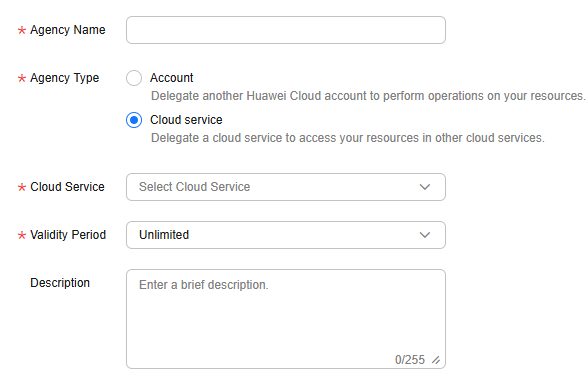
- Agency Name: Enter RDSAccessProjectResource.
- Agency Type: Select Cloud service.
- Cloud Service: Search for op_svc_rds and select Database Service (DBS).
- Validity Period: Select Unlimited.
- Click OK.
- In the displayed dialog box, click Authorize.
- Search for DBS AgencyPolicy, select it, and click Next.

- Select Region-specific projects and the target region, and click OK. Figure 3 Authorizing an agency

What is your overall rating for this page?
Thank you very much for your feedback. We will continue working to improve the documentation.See the reply and handling status in My Cloud VOC.
For any further questions, feel free to contact us through the chatbot.
Chatbot


