

Updated on 2026-07-24 GMT+08:00
Triggering Rules
Scenarios
Rules can be triggered automatically or manually.
- Automatic
- A rule will be automatically triggered after it is created.
- A rule will be automatically triggered after it is updated.
- A rule will be automatically triggered after it is enabled.
- If the Trigger type is set to Configuration change for a rule, the rule will be automatically triggered when there is a change to the resources within the monitoring scope.
- If the Trigger Type to Periodic execution for a rule, the rule will be automatically triggered at the configured frequency.
- Manual
- You can manually initiate rule evaluation at any time. For details, see Procedure.
Constraints and Limitations
- You can add up to 500 rules in an account.
- The resource recorder must be enabled for adding, modifying, enabling, or triggering a rule. If the resource recorder is disabled, you can only view, disable, and delete rules.

Only resources captured by the resource recorder are eligible for compliance rule evaluation. To ensure consistent and accurate evaluation results, maintain the resource recorder in an enabled state. The following scenarios describe the impact of recorder status on compliance:
- Recorder disabled: Compliance rules cannot evaluate resource data while the recorder is inactive. However, previously generated evaluation results remain available.
- Partial scope: If the monitoring scope is restricted to a subset of resources, compliance rules will only evaluate the selected resources.
For details about how to enable and configure the resource recorder, see Configuring the Resource Recorder.
Procedure
- Log in to the Config console.
- In the navigation pane on the left, choose Resource Conformance.
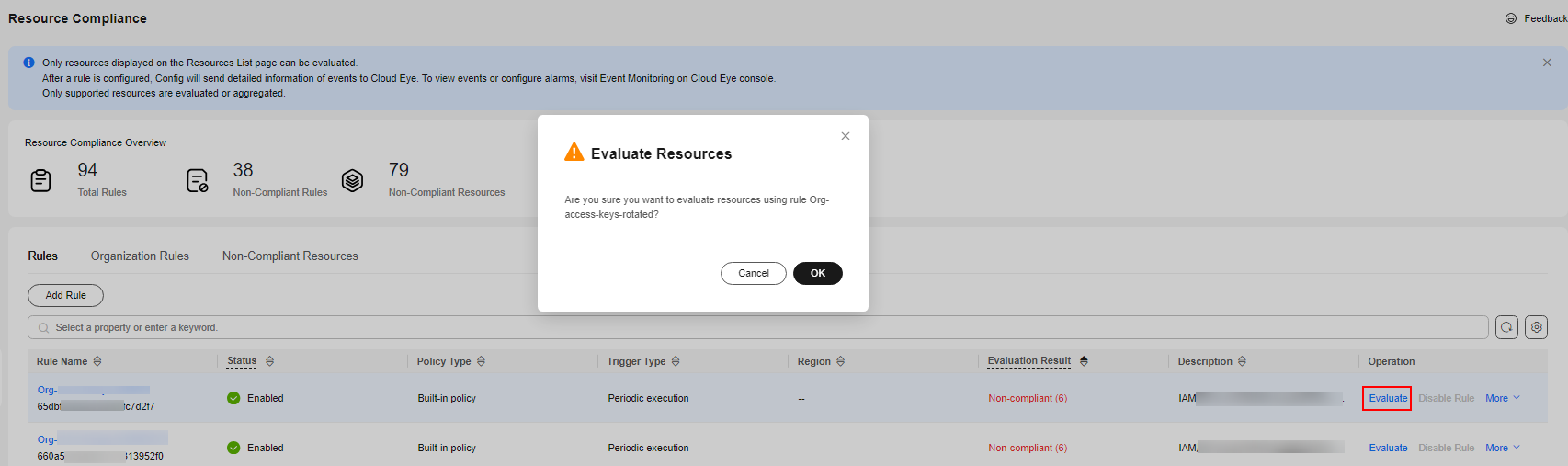
- Locate a target rule and click Evaluate in the Operation column.
Alternatively, you can click Evaluate in the upper right corner of the rule details page.
- In the displayed dialog box, click OK. Figure 1 Manually triggering a rule
Parent topic: Rules
What is your overall rating for this page?
0
1
2
3
4
5
6
7
8
9
10
Very dissatisfiedVery satisfied
Thank you very much for your feedback. We will continue working to improve the documentation.See the reply and handling status in My Cloud VOC.
The system is busy. Please try again later.
For any further questions, feel free to contact us through the chatbot.
Chatbot


