

Help Center/ Data Admin Service/ User Guide/ Logging In to a DB Instance/ Logging In to a DB Instance Shared by Others/ Managing DB Instance Connections Shared by IAM Users
Updated on 2026-07-28 GMT+08:00
Managing DB Instance Connections Shared by IAM Users
After logging in to DAS using a Huawei Cloud account, you can view information about all shared DB instance connections, including the sharer, sharee, shared DB instance, DB engine version, DB source, login username, and creation time.
Usage Notes
- This function is available only after you log in to DAS using a Huawei Cloud account.
- This function displays only the login information of shared DB instances that can be logged in to.
Procedure
- Log in to the DAS console using a Huawei Cloud account.
- Click
 in the upper left corner and select a region and project.
 - In the navigation pane on the left, choose Development Tool.
You can also click Go to Development Tool on the overview page.
- Click DB Instance Connections that IAM Users Share with Others and view information about the shared DB instance. Figure 1 Viewing the information about the shared DB instance
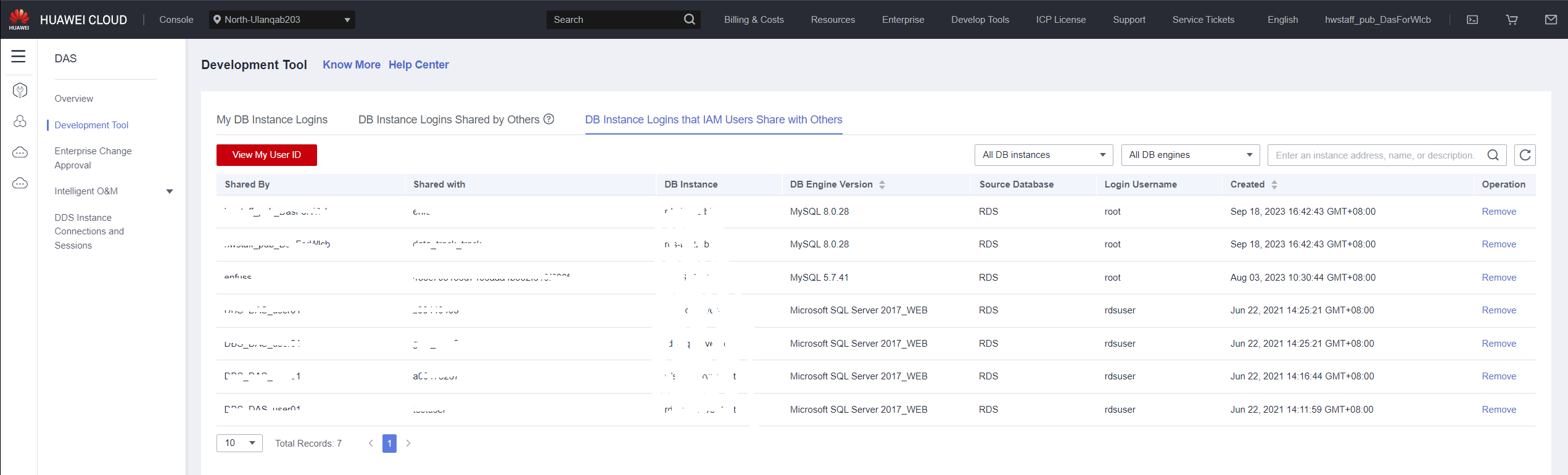
- You can view the sharer, sharee, shared DB instance, DB engine version, DB source, login username, and creation time.
- You can also click Remove in the Operation column to cancel the sharing of the DB instance.
Parent topic: Logging In to a DB Instance Shared by Others
What is your overall rating for this page?
0
1
2
3
4
5
6
7
8
9
10
Very dissatisfiedVery satisfied
Thank you very much for your feedback. We will continue working to improve the documentation.See the reply and handling status in My Cloud VOC.
The system is busy. Please try again later.
For any further questions, feel free to contact us through the chatbot.
Chatbot


