

How Do I Configure a Password Expiration Policy for TaurusDB Instances?
In TaurusDB kernel version 8.0, you can set the global variable default_password_lifetime to control the default validity period of a user password.
The default value of default_password_lifetime is 0, indicating that the created user password will never expire. If this parameter is set to N, the password must be updated every N days, starting from the last password update time.
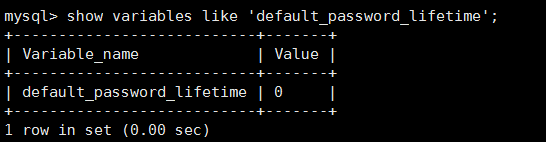
Changing and Checking a Password Expiration Policy
You can change the global automatic password expiration policy in either of the following ways:
- Change the value of default_password_lifetime on the TaurusDB console.
- Log in to the TaurusDB console.
- On the Instances page, click the instance name.
- In the navigation pane, choose Parameters.
- Search for default_password_lifetime in the search box.

- Change its value and click Save.
- In the displayed dialog box, click Yes.
- Run the following command to change the value of default_password_lifetime:
set global default_password_lifetime=0;
- Configuring the password expiration policy during user creation
create user 'script'@'localhost' identified by '*********' password expire interval 90 day;
- Configuring the password expiration policy after user creation
ALTER USER 'script'@'localhost' PASSWORD EXPIRE INTERVAL 90 DAY;
- Setting the password to be permanently valid
CREATE USER 'mike'@'%' PASSWORD EXPIRE NEVER;
ALTER USER 'mike'@'%' PASSWORD EXPIRE NEVER;
- Setting the password to follow the global expiration policy
CREATE USER 'mike'@'%' PASSWORD EXPIRE DEFAULT;
ALTER USER 'mike'@'%' PASSWORD EXPIRE DEFAULT;
Run the following command:
show create user jeffrey@'localhost';

EXPIRE DEFAULT indicates that the password follows the global expiration policy.
Checking the Password Expiration Date of All Users
Run the following command:
select user,host,password_expired,password_last_changed,password_lifetime from user;

What is your overall rating for this page?
Thank you very much for your feedback. We will continue working to improve the documentation.See the reply and handling status in My Cloud VOC.
For any further questions, feel free to contact us through the chatbot.
Chatbot


