

Development Suggestions
Considering Increasing the Number of Checkpoints for High Availability
By default, only the latest checkpoint status file is saved. If this file is unavailable (for example, all copies of the HDFS file are damaged), state restoration fails. If we keep two state file checkpoints, Flink rolls back to the state file of the previous one even if the latest checkpoint is unavailable. You can increase the number of reserved checkpoints as needed.
[Example] Set the number of reserved checkpoint files to 2.
state.checkpoints.num-retained: 2
Using Incremental RocksDB as the State Backend in the Production Environment
Flink provides three state backends: MemoryStateBackend, FsStateBackend, and RocksDBStateBackend.
- MemoryStateBackend stores states on the Java heap memory of JobManager. Each state cannot be bigger than an akka frame, and the total size cannot exceed the heap memory size of JobManager. This state backend is suitable for local development and debugging or small-size states.
- FsStateBackend is the file system state backend. Generally, states are stored in the TaskManager heap memory. In checkpointing, states are stored in the file system. The JobManager memory stores only a small amount of metadata (which is stored in ZooKeeper in HA scenarios). Since there is sufficient storage space in the file system, this backend is suitable for stateful processing tasks with large states, long window, or large key value states, and is also suitable for the HA solution.
- RocksDBStateBackend is an embedded database backend. Generally, states are stored in the RocksDB database, and the database data is stored on the local disk. In checkpointing, states are stored in the file system, and the JobManager memory stores a small amount of metadata (which is stored in ZooKeeper in HA scenarios). This state backend is the only one that supports incremental checkpointing. In addition to same scenarios of the FsStateBackend, it is also suitable for processing ultra-large states.
| Type | MemoryStateBackend | FsStateBackend | RocksDBStateBackend |
|---|---|---|---|
| Method | Checkpoint data is directly returned to the master node and is not flushed to disks. | Data is written to a file whose path is then sent to the master node. | Data is written to a file whose path is then sent to the master node. |
| Storage | Heap memory | Heap memory | RocksDB (local disk) |
| Performance | Best performance among the three (generally not used) | High performance | Poor performance |
| Disadvantage | Small data volume only and easy data loss | OOM | Time-consuming read/write, serialization, and I/O |
| Incremental | Not supported | Not supported | Supported |
[Example] Configure a RockDBStateBackend (flink-conf.yaml):
state.backend: rocksdb
state.checkpoints.dir: hdfs://namenode:40010/flink/checkpoints
Using EXACTLY ONCE Stream Processing Semantics to Ensure End-to-End Consistency
There are three types of stream processing semantics: EXACTLY ONCE, AT LEAST ONCE, and AT MOST ONCE.
- AT MOST ONCE: The integrity of data cannot be ensured, but the performance is the best.
- AT LEAST ONCE: The integrity of data can be ensured, but the accuracy cannot be ensured. The performance is moderate.
- EXACTLY ONCE: Data processing accuracy can be ensured, but the performance is the worst.
Check whether EXACTLY_ONCE can be ensured. This semantics requires data replay in the source (for example, Kafka message replay) and transactional in the sink (for example, MySQL atomic data writing). If these requirements cannot be met, you can degrade to AT LEAST ONCE or AT MOST ONCE.
- If the source does not support replay, only AT MOST ONCE can be ensured.
- If the sink does not support atomic write, only AT LEAST ONCE can be ensured.
[Example] Use EXACTLY ONCE semantics with API calls:
env.getCheckpointConfig.setCheckpointingMode(CheckpointingMode.EXACTLY_ONCE)
[Example] Set Exactly once semantics in the resource file.
# Semantics of checkpoint
execution.checkpointing.mode: EXACTLY_ONCE
Locating Back Pressure Point by Monitoring Information
Flink provides many monitoring metrics for you to analyze the performance states and bottlenecks of a job.
[Example] Configure the number of samples and sampling interval.
# Sampling interval when the valid backpressure result is discarded and backpressed, in milliseconds
web.backpressure.refresh-interval: 60000
# Number of backpressure samples
web.backpressure.num-samples: 100
# Interval for backpressure sampling, in ms
web.backpressure.delay-between-samples: 50
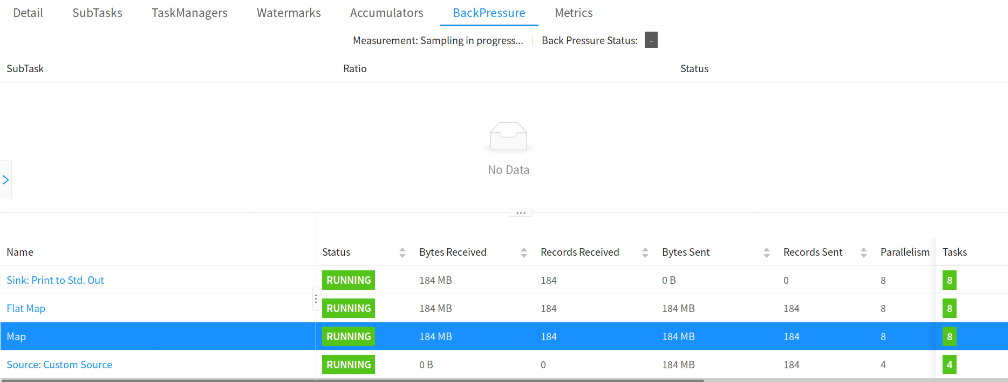
You can view BackPressure in the Overview tab of the job. The following figure shows that sampling is in progress. By default, sampling takes about 5 seconds.
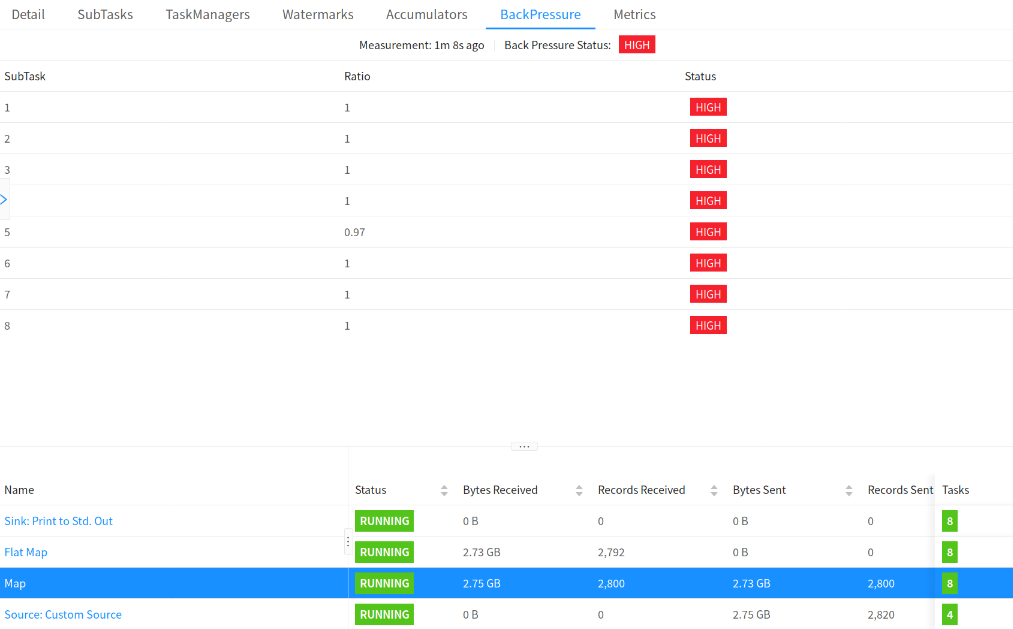
As shown in the following figure, OK indicates that there is no back pressure, and HIGH indicates that a subtask is backpressed.

Switching to the Hive Dialect When Hive SQL Is Used and the Flink Syntax Is Incompatible
Currently, Flink parses SQL syntax with the default or Hive engine. The former supports Flink native SQL, and the latter supports Hive SQL. DDL and DML of some Hive syntax cannot be run using Flink SQL. You can switch to Hive dialect. Pay attention to the following things when using Hive dialect:
- Hive dialect can only be used to operate Hive tables only. Hive dialects should be used with HiveCatalog.
- Although all Hive versions support the same syntax, whether there are specific functions still depends on the Hive version in use. For example, database location update is supported only in Hive-2.7.0 or later.
- Hive and Calcite have different reserved keywords. For example, default is a reserved keyword in Calcite and a non-reserved keyword in Hive. When using Hive dialect, you must use backquotes (`) to reference such keywords so that they can be used as identifiers.
- Views created in Flink cannot be queried in Hive.
[Example] Use Hive syntax to parse SQL statement (sql-submit-defaults.yaml):
configuration: table.sql-dialect: hive
Using Memory Dimension Tables (such as Hudi) for Small- and Medium-scale Data
- In a memory dimension table, dimension data is loaded to the memory. Each TM loads full data and point query joins are performed in the memory. If the data volume is too large, you need to allocate large memory space to the TM. Otherwise, job exceptions may occur.
- In an external dimension table, dimension data is stored in a high-speed K-V database. Point query joins are implemented through remote K-V query. Typical open-source K-V databases include HBase
- State dimension table data is read to streaming jobs in real time as a stream table. Data stream withdrawal is used to ensure data consistency for dimension update and unsynchronized data. Dimension tables are stored for a long time. Currently, Flink on Hudi allows you to set the TTL for a Hudi dimension table.
| Dimension | Memory Dimension Table (Hive/Hudi) | External Dimension Table (HBase) | State Dimension Table |
|---|---|---|---|
| Performance | Very high (within milliseconds) | Medium (millisecond-level) | High (within and in milliseconds) |
| Data volume | Small, less than 1 GB for a single TM | Large, in TB level | Medium, in GB level |
| Storage | High memory consumption, full storage of a single TM | No storage consumption (external storage is used) | Distributed storage for each TM: memory and disks |
| Timeliness | Periodic data loading, low timeliness | Relatively high | High |
| Join result | Low | Medium | - |
Using HBase for Large Dimension Tables
If the data volume is large and data consistency requirement is not high, use HBase KV databases to support point query joins of dimension tables.
Data in the K-V database is written by another job, introducing a delay relative to the current Flink job. As a result, the Flink job may not query the latest data in the K-V database. Given that the lookup query cannot be undone, the association result may have consistency issues.
Using Stream Tables as Dimension Tables for High Data Consistency
When you are using a Hudi dimension source table, the TTL of the table can be set separately. Data will not age based on the overall TTL of the job. Dimension data can be stored in the state backend for a long time. In addition, stream tables can be used as dimension tables to ensure data consistency with the Flink withdrawal.
Configuring and Using the SinkUpsertMaterializer Operator
SinkUpsertMaterializer is a critical operator used to process UPSERT semantics. It works as an intermediate step to address the out-of-order events and generate new Changelog events based on the primary key of the sink table when the sink outputs an update stream and the UPSERT key does not match the primary key of the sink table.
Configuration of the SinkUpsertMaterializer operator
- The SinkUpsertMaterializer operator is typically inferred and added to the execution plan by Flink automatically. Before the Sink operator, you need to specify the primary key in the sink table.
Flink SQL example: Specifying the primary key
 CREATE TABLE output_table (
  user_id STRING,
  pv BIGINT,
  uv BIGINT,
  PRIMARY KEY (user_id) NOT ENFORCED
) WITH (...);
- You can also configure the SinkUpsertMaterializer operator using table.exec.sink.upsert-materialize.
- auto (default value): indicates that Flink infers whether there is an out-of-order issue from the perspective of correctness and adds SinkUpsertMaterializer if necessary.
- none: disables the SinkUpsertMaterializer operator.
- force: indicates the SinkUpsertMaterializer operator is enforced to be used. Even if no primary key is specified for the DDL of the sink table, the optimizer inserts the SinkUpsertMaterializer state node to ensure physical data processing.
The SinkUpsertMaterializer operator is required in the following scenarios:
- The data written to the sink table lost its uniqueness although the primary key has been specified in the table.
- Data is written in to the sink table without using the primary key. As a result, the original data sequence is disrupted. For example, in a dual-stream join, if the data of one stream is not associated with the data of the other stream through the primary key, but the primary key column of the sink table is generated based on the primary key column of the other stream, the data sequence may be disordered.
The SinkUpsertMaterializer operator is not recommended in the following scenarios:
If the join association field set to the primary key field of the source stream, ensuring the data with the same key is processed in the same operator, the output order can be maintained without requiring SinkUpsertMaterializer.

Although SinkUpsertMaterializer solves out-of-order Changelog event issues at the sink end, it maintains a RowData list in the state backend. This may lead to excessive state size and increased I/O overhead of state access, ultimately affecting the throughput of the job. Therefore, you are advised to use it with caution, and preferably avoid if possible.
Configuring and Using the ChangelogNormalize Operator
ChangelogNormalize is a critical operator used to process changelog data streams. It is mainly used to standardize Changelog entries that involve primary key semantics. In addition, it can effectively integrate and optimize the Changelog records to ensure data consistency and accuracy.
Configuration of the ChangelogNormalize operator
ChangelogNormalize is automatically generated by the optimizer and cannot be disabled. The optimizer adds this operator only when the source contains a primary key and the source's Changelog mode is UPSERT.
The ChangelogNormalize operator is required in the following scenarios:
- An UPSERT source table with a primary key is used, and a complete Changelog message needs to be output.
When a document is updated or deleted, the operator can query the table to determine the previous document status.

- Deduplicate CDC event logs, and table.exec.source.cdc-events-duplicate is set to true.
The following figure shows how the ChangelogNormalize operator uses ValueState to store the latest row of records under the current primary key, update the state, and send the change to the downstream.
When the second record -U(2, 'Jerry', 77) is processed, the state is empty, indicating that +I/+UA and -D/-UB have been offset. This means the current retract message is duplicate and can be discarded.

Similar to the SinkUpsertMaterializer operator, ChangelogNormalize stores the latest record of the primary key in ValueState at the state backend. This increases the I/O overhead of state access and affects the job throughput. Therefore, you are advised to use it with caution, and preferably avoid if possible.
What is your overall rating for this page?
Thank you very much for your feedback. We will continue working to improve the documentation.See the reply and handling status in My Cloud VOC.
For any further questions, feel free to contact us through the chatbot.
Chatbot


