

Solution Overview
What Is Jenkins?
Jenkins is an open-source continuous integration (CI) tool with a user-friendly GUI. Originally derived from Hudson, it automates the continuous building and testing of software projects and helps monitor the execution of external tasks.
Jenkins is written in Java and can run separately or in popular servlet containers such as Tomcat. It is usually used together with the version control tools (or SCM tools) and build tools. Jenkins supports project building in diverse languages and is fully compatible with many third-party build tools, such as Maven, Ant, and Gradle. Jenkins is seamlessly integrated with typical versioning tools, such as SVN and GIT. It can directly connect to source code hosting websites, such as GitHub.
Notes and Constraints
- This solution can be deployed only in CCE clusters. It is not supported in DeC.
- CCE does not provide maintenance and support for Jenkins. The maintenance is provided by the developers.
Solution Architecture
You can install Jenkins using either of the following ways:
- Use a single master to install Jenkins. The master handles jobs and builds and releases services. However, security risks may exist.
- Use masters and agents. A master schedules build jobs to agents for execution, and monitors agent status. Agents execute build jobs dispatched by the master and return the job progress and result.
You can install Jenkins masters and agents on VMs, containers, or combination of the two. For details, see Table 1.
| Deployment Mode | Master | Agent | Advantages and Disadvantages |
|---|---|---|---|
| Single master | VMs | N/A |
|
| Single master | Containers | N/A |
|
| Masters and agents | VMs | VMs |
|
| Containers (Kubernetes cluster) |
| ||
| Masters and agents | Containers (Kubernetes cluster) | Containers (Kubernetes cluster) |
|
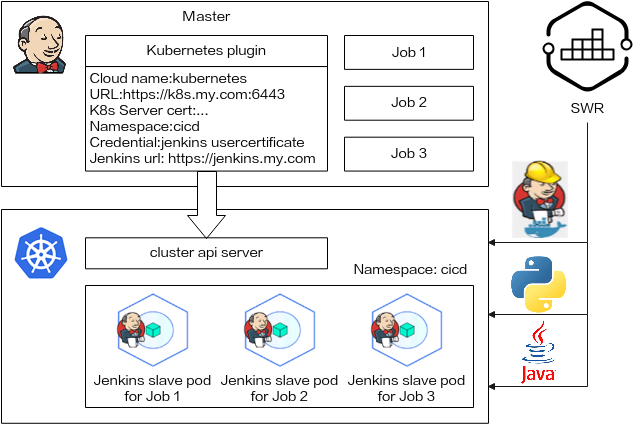
In this section, Jenkins is installed with the containerized masters and agents. Kubernetes schedules the dynamic agents. For details about the architecture, see Figure 1.
- Masters manage jobs. To use the Kubernetes resources, install Kubernetes add-ons on the masters.
- Kubernetes creates pods for agents to execute jobs. When a job on a master is scheduled, the master sends a request to Kubernetes through the Kubernetes add-ons. After receiving the request, Kubernetes creates a pod using the pod template. The pod then sends requests to the master. After accessing the master, you can execute the job on the pod.
Procedure
- Install and deploy a Jenkins master by referring to Installing and Deploying a Jenkins Master.
Jenkins masters are deployed in a CCE cluster using container images.
- Configuring a Jenkins Agent
Jenkins can create static agents in a cluster or use pipelines to interconnect with CCE to provide pods for agents to execute jobs. The dynamic agents use Kubernetes add-ons to configure cluster authentication and user permissions.
- Use Jenkins to build a pipeline by referring to Using Jenkins to Build a Pipeline.
Jenkins pipelines interconnect with SWR and call docker build/login/push commands in agents to package and push images automatically.
You can also use pipelines to deploy and upgrade Kubernetes resources (such as Deployments, Services, ingresses, and jobs).
What is your overall rating for this page?
Thank you very much for your feedback. We will continue working to improve the documentation.See the reply and handling status in My Cloud VOC.
For any further questions, feel free to contact us through the chatbot.
Chatbot


