

Help Center/ CodeArts/ API Reference/ Appendix/ Obtaining a Project ID/ Obtaining a CodeArts Project ID
Updated on 2025-12-18 GMT+08:00
Obtaining a CodeArts Project ID
- Go to the CodeArts homepage.
- Log in to the CodeArts console, click
 , and select a region where you have enabled CodeArts.
 - Click Go to Workspace.
If your account uses the old billing mode (see Old Billing Modes), click Access Service.
- Log in to the CodeArts console, click
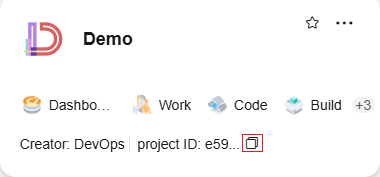
- Find the target project card on the CodeArts homepage and copy the project ID. Figure 1 Obtaining a CodeArts Project ID
Parent topic: Obtaining a Project ID
Feedback
Was this page helpful?
Provide feedbackThank you very much for your feedback. We will continue working to improve the documentation.See the reply and handling status in My Cloud VOC.
The system is busy. Please try again later.
For any further questions, feel free to contact us through the chatbot.
Chatbot


