

Help Center/ Huawei Cloud Astro Zero/ User Guide (No-Code)/ Creating a Form or Process/ Setting Process Widget Properties/ Setting Properties of a Condition Branch Node
Updated on 2025-08-21 GMT+08:00
Setting Properties of a Condition Branch Node
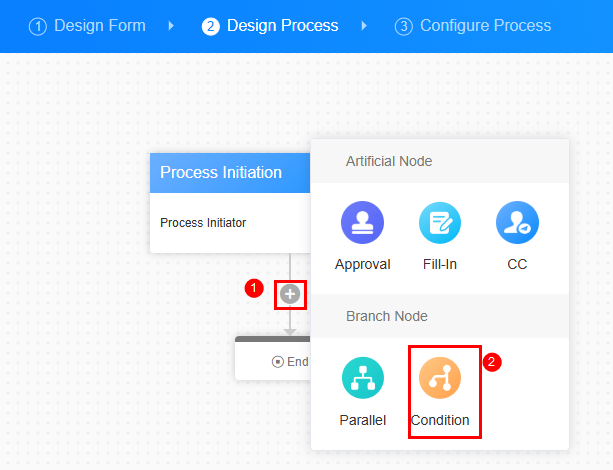
Conditional branches have priorities, and only the highest-priority branch that meets the criteria is executed. In contrast, parallel branches have no priority and all branches that meet the criteria are executed.
Figure 1 Conditional branch node
Select a branch and click Add to add filter criteria.
Figure 2 Adding filter criteria
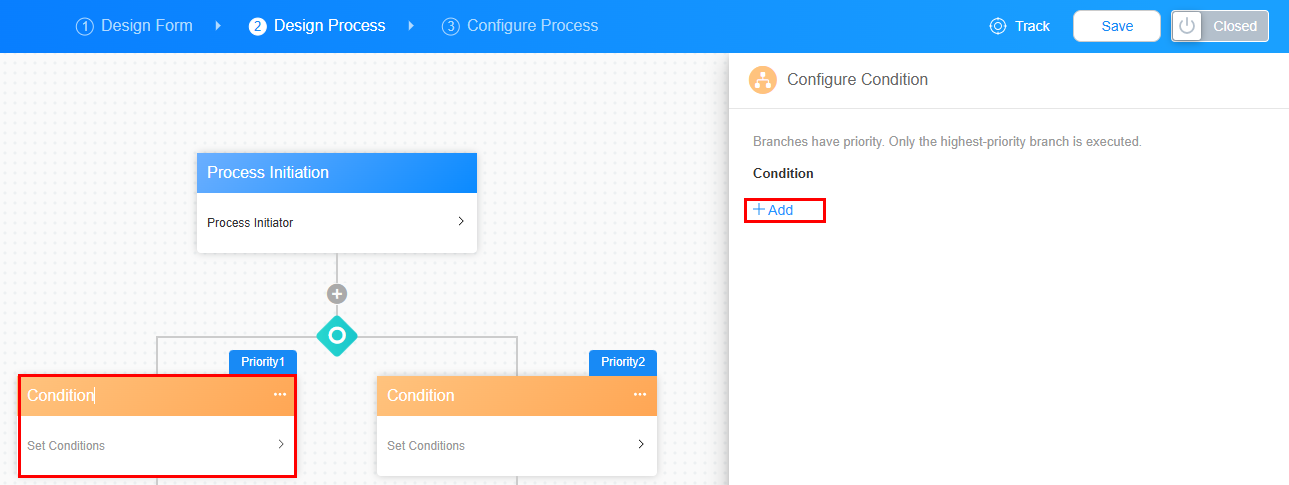
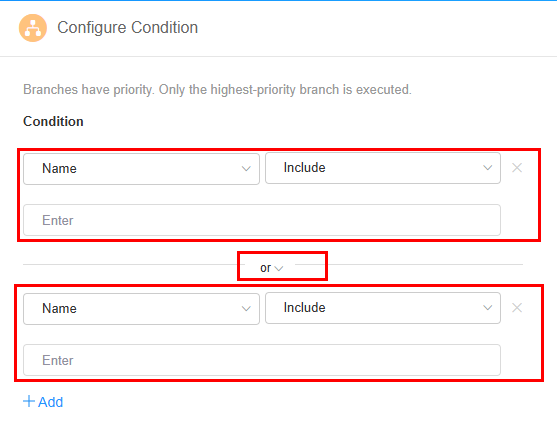
Figure 3 Setting filter criteria
What is your overall rating for this page?
0
1
2
3
4
5
6
7
8
9
10
Very dissatisfiedVery satisfied
Thank you very much for your feedback. We will continue working to improve the documentation.See the reply and handling status in My Cloud VOC.
The system is busy. Please try again later.
For any further questions, feel free to contact us through the chatbot.
Chatbot


