

Interconnecting with KMS
You can obtain the key sources from Key Management Service (KMS). Currently, Huawei Cloud is supported.
KMS is a cryptographic platform that provides key management services for third-party cryptographic applications.
Procedure
- Log in to a database encryption and access control instance as the sysadmin user.
- In the navigation pane on the left, choose Key Management > KMS Management.
- Click the Huawei Cloud tab.
- Configure the parameters for interconnecting with KMS. For details, see Table 1.
Table 1 Parameters Parameter
Description
Region
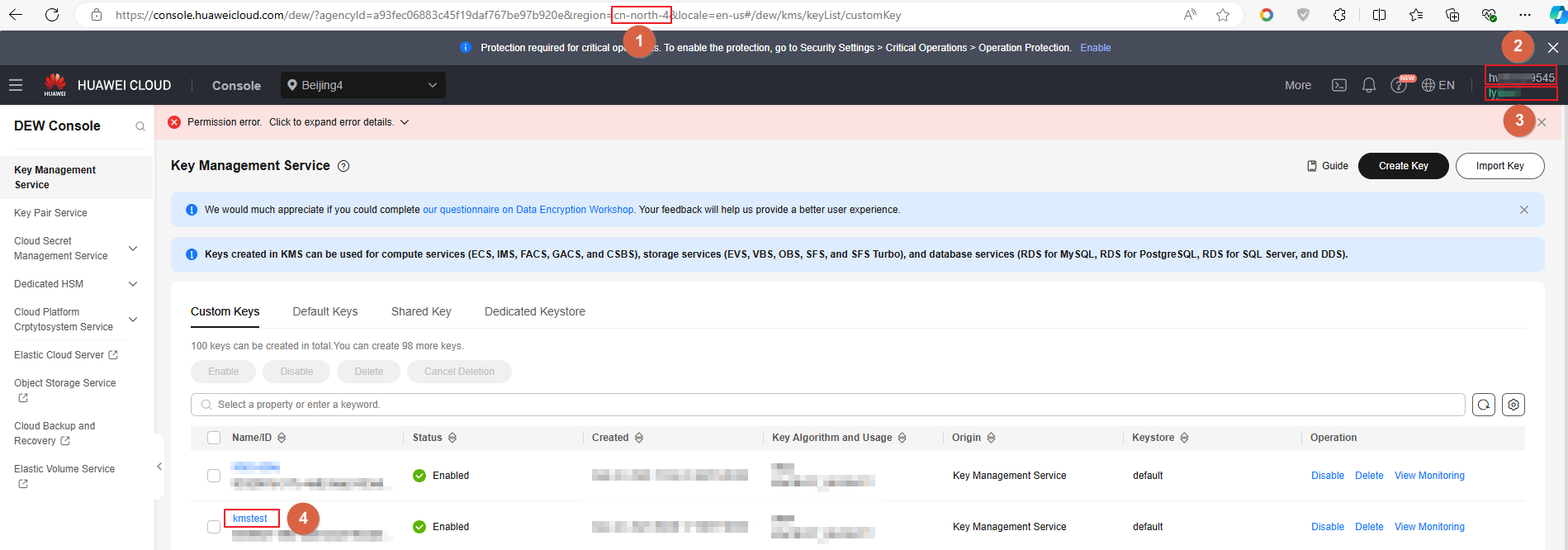
Region of Huawei Cloud. You can obtain it from the URL of the KMS console, as shown in Figure 1.
Access Key
Access key ID.
Secret Key
Secret access key.
Key Alias
KMS key alias.
- Click Connection Test.
- After KMS is interconnected, click Save.
Follow-up Operations
After the configuration, you can select it by clicking KEY_Service when initializing a key. For details, see Initializing a Key.
What is your overall rating for this page?
Thank you very much for your feedback. We will continue working to improve the documentation.See the reply and handling status in My Cloud VOC.
For any further questions, feel free to contact us through the chatbot.
Chatbot


