

Help Center/ Content Delivery Network/ User Guide/ Custom Domain Name Configuration/ Origin Settings/ Origin Protocol
Updated on 2026-10-21 GMT+08:00
Origin Protocol
You can configure the protocol used for origin pull.
Precautions
- By default, CDN uses HTTP for origin pulls.
- If you have enabled HTTP/2 and set the origin protocol to Same as user, CDN uses HTTPS/1.1 for origin pull.
- If Service Type of your domain name is set to Whole site, CDN does not support TLS 1.3 when using HTTPS for origin pull. Pay attention to the TLS version configured on the origin server.
- When CDN uses HTTPS for origin pull, the supported TLS version depends on the origin server settings. For example, if the origin server supports TLS 1.1 and TLS 1.2, CDN will also support TLS 1.1 and TLS 1.2 for origin pull.
Procedure
- Log in to the CDN console.
- In the navigation pane, choose .
- In the domain list, click the target domain name. The Overview page is displayed.
- In the full configuration directory, click the Origin Settings tab.
- Click
 next to Origin Protocol. Figure 1 Origin protocol
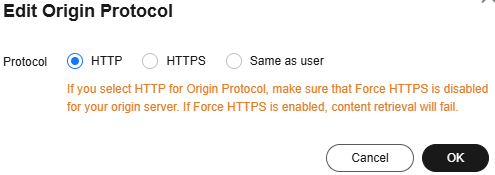
Table 1 Parameters Origin Protocol
Description
Same as user
The origin protocol is the same as the client access protocol. For example, if a client accesses CDN using HTTP, CDN also uses HTTP for origin pull.
HTTP
CDN uses HTTP for origin pull.
HTTPS
CDN uses HTTPS for origin pull.
- Select an origin protocol and click OK.
Helpful Links
- Modifying Origin Server Settings
- Modifying the Full Domain Configuration to modify origin protocol settings
Parent topic: Origin Settings
What is your overall rating for this page?
0
1
2
3
4
5
6
7
8
9
10
Very dissatisfiedVery satisfied
Thank you very much for your feedback. We will continue working to improve the documentation.See the reply and handling status in My Cloud VOC.
The system is busy. Please try again later.
For any further questions, feel free to contact us through the chatbot.
Chatbot


