

CREATE ROW LEVEL SECURITY POLICY
Function
CREATE ROW LEVEL SECURITY POLICY creates a row-level access control policy for a table.
A row-level security policy (ROW LEVEL SECURITY POLICY) refines database access control permissions to the row level of a data table, enabling the database to achieve row-level access control. When different users execute the same SQL query operation, the system automatically returns different read results based on the created control policy.
When creating a row-level access control policy on a table, the row-level access control switch for that table must be enabled (ALTER TABLE ... ENABLE ROW LEVEL SECURITY or ALTER FOREIGN TABLE ... ENABLE ROW LEVEL SECURITY) for the policy to take effect. Otherwise, it will not take effect.
Policy Application
- Row-level access control policy names are specific to a table. The same data table cannot have two row-level access control policies with the same name. Different data tables can have row-level access control policies with the same name.
- A row-level access control policy can be applied to specified users (roles) or to all users (PUBLIC). If no affected users are specified when defining a row-level access control policy, the default value is PUBLIC.
- A row-level access control policy can be applied to specified operations (SELECT, UPDATE, DELETE, ALL). ALL indicates that it affects the SELECT, UPDATE, and DELETE operations. If no affected operations are specified when defining a row-level access control policy, the default value is ALL.
- Currently, row-level access control affects read operations on data tables (SELECT, UPDATE, DELETE) but does not affect write operations (INSERT, MERGE INTO). The table owner or system administrator can create an expression in the USING clause. When the client performs a data table read operation, the database backend concatenates the expression that meets the conditions during the query rewrite phase and applies it to the execution plan. For each tuple in a data table, if the expression returns TRUE, the tuple is visible to the current user. If the expression returns FALSE or NULL, the tuple is invisible to the current user.
Precautions
- Row-level access control policies can be defined on row-store tables, row-store partitioned tables, column-store tables, column-store partitioned tables, replication tables, unlogged tables, hash tables, and foreign tables that are not under an EXTERNAL SCHEMA.
- Multiple row-level access control policies can be created on a given table. A maximum of 100 row-level access control policies can be created on a single table.
- Users with administrator privileges, the initial O&M user (Ruby), the table owner, and members of the table owner's role group are not affected by row-level access control and can view all data in the table.
- Queries on tables with row-level access control policies via SQL statements, views, functions, and stored procedures are all affected.
- Row-level access control policies cannot be defined on HDFS tables, foreign tables under an EXTERNAL SCHEMA, or temporary tables.
- Row-level access control policies cannot be defined on views.
- Type modification of columns on which a row-level access control policy depends is not supported. For example, the following modifications are not supported:
1ALTER TABLE public.all_data ALTER COLUMN role TYPE text;
Syntax
1 2 3 4 5 | CREATE [ ROW LEVEL SECURITY ] POLICY policy_name ON table_name [ AS { PERMISSIVE | RESTRICTIVE } ] [ FOR { ALL | SELECT | UPDATE | DELETE } ] [ TO { role_name | PUBLIC } [, ...] ] USING ( using_expression ) |
Parameter Description
| Parameter | Description | Value Range |
|---|---|---|
| policy_name | Specifies the name of the row-level access control policy to be created. | The same data table cannot have two row-level access control policies with the same name. |
| table_name | Specifies the name of the table to which the row-level access control policy is applied. | A valid table name. |
| PERMISSIVE | Specifies the type of the row-level access control policy as permissive. For a given query, all applicable permissive policies are combined using the OR operator. The default type of a policy is permissive. | - |
| RESTRICTIVE | Specifies the type of the row-level access control policy as restrictive. For a given query, all applicable restrictive policies are combined using the AND operator. At least one permissive policy is required to grant access to data records. If only restrictive policies are used, no records will be accessible. When both permissive and restrictive policies are used, a record is accessible only when it passes at least one permissive policy and all restrictive policies. | - |
| command | Specifies the SQL operation affected by the current row-level access control. The specifiable operations include ALL, SELECT, UPDATE, and DELETE. If this parameter is not specified, the default value ALL will be used, covering SELECT, UPDATE, and DELETE. |
For the relationship between row-level access control policies and compatible SQL syntax, see Table 2. |
| role_name | Specifies the database user affected by row-level access control. System administrators are not affected by the row-level access control feature. If this parameter is not specified, the default value PUBLIC will be used, indicating that all database users will be affected. You can specify multiple affected database users. | A valid role name. |
| using_expression | Specifies the expression for row-level access control (returns a Boolean value). | The conditional expression cannot contain aggregate functions or window functions. During the query rewrite phase, if row-level access control of the data table is enabled, the expression that meets the conditions is added to the plan tree. The expression is calculated for each tuple in the data table. For SELECT, UPDATE, and DELETE, row data is visible to the current user only when the return value of the expression is TRUE. If the expression returns FALSE, the tuple is invisible to the current user. In this case, the user cannot view the tuple through the SELECT statement, update the tuple through the UPDATE statement, or delete the tuple through the DELETE statement. |
| Command | SELECT/ALL Policy | UPDATE/ALL Policy | DELETE/ALL Policy |
|---|---|---|---|
| SELECT | Existing row | No | No |
| SELECT FOR UPDATE/SHARE | Existing row | Existing row | No |
| UPDATE | No | Existing row | No |
| UPDATE RETURNING | Existing row | Existing row | No |
| DELETE | No | No | Existing row |
| DELETE RETURNING | Existing row | No | Existing row |
Example 1: Creating a Row-Level Access Control Policy Where the Current User Can Only View Their Own Data
- Create users alice and bob.
1
2
3
4
DROP ROLE IF EXISTS alice;
DROP ROLE IF EXISTS bob;
CREATE ROLE alice PASSWORD '{password}';
CREATE ROLE bob PASSWORD '{password}';
- Create the data table public.all_data.
1
2
DROP TABLE IF EXISTS public.all_data;
CREATE TABLE public.all_data(id int, role varchar(100), data varchar(100));
- Insert data into the table.
1
2
3
INSERT INTO all_data VALUES(1, 'alice', 'alice data');
INSERT INTO all_data VALUES(2, 'bob', 'bob data');
INSERT INTO all_data VALUES(3, 'peter', 'peter data');
- Grant the read permission for the all_data table to users alice and bob.
1GRANT SELECT ON all_data TO alice, bob;
- Enable row-level access control.
1ALTER TABLE all_data ENABLE ROW LEVEL SECURITY;
- Create a row-level access control policy where the current user can only view their own data.
1CREATE ROW LEVEL SECURITY POLICY all_data_rls ON all_data USING(role = CURRENT_USER);
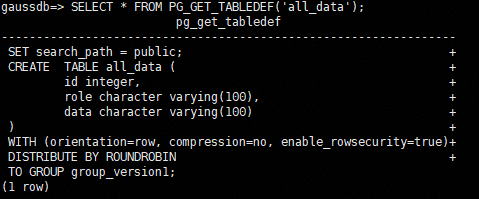
- View information about the all_data table.
1SELECT * FROM PG_GET_TABLEDEF('all_data');
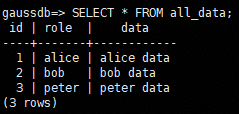
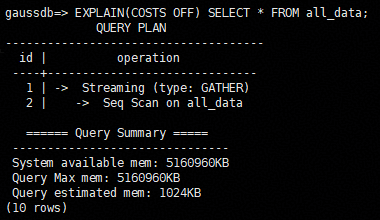
- Run SELECT.
1SELECT * FROM all_data;
1EXPLAIN(COSTS OFF) SELECT * FROM all_data;
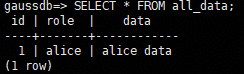
- Switch to the alice user.
1SET role alice password '{password}';
- Perform the SELECT operation.
1SELECT * FROM all_data;
1EXPLAIN(COSTS OFF) SELECT * FROM all_data;

Example 2: Partition Permission Management Through Row-Level Control
- Create user alice.
1
2
3
SET role dbadmin password '{password}';
DROP ROLE IF EXISTS alice;
CREATE ROLE alice PASSWORD '{password1}';
- Create the range partitioned table web_returns_p1 and insert data into the table.
 1
 2
 3
 4
 5
 6
 7
 8
 9
10
11
12
13
14
15
16
17
DROP TABLE IF EXISTS web_returns_p1;
CREATE TABLE web_returns_p1
(
    wr_returned_date_sk       integer,
    wr_returned_time_sk       integer,
    wr_item_sk                integer NOT NULL,
    wr_refunded_customer_sk   integer
)
WITH (orientation = column)
DISTRIBUTE BY HASH (wr_item_sk)
PARTITION BY RANGE(wr_returned_date_sk)
(
    PARTITION p2016 START(800) END(830) EVERY(1)
);

INSERT INTO web_returns_p1 values (801,17,11,102);
INSERT INTO web_returns_p1 values (802,18,12,103);
- Grant the read permission on the web_returns_p1 table to user alice.
1GRANT SELECT ON web_returns_p1 TO alice;
- Enable row-level access control.
1ALTER TABLE web_returns_p1 ENABLE ROW LEVEL SECURITY;
- Create row-level access control policy web_returns_rsl. In the command, wr_returned_date_sk is a partition name of the web_returns_p1 partition table, and 801 is the partition value.
1CREATE ROW LEVEL SECURITY POLICY web_returns_rsl ON web_returns_p1 USING('wr_returned_date_sk' = '801');
- Impose the row-level access control policy web_returns_rsl on user alice.
1ALTER ROW LEVEL SECURITY POLICY web_returns_rsl ON web_returns_p1 TO alice;
- Switch to the alice user.
1SET ROLE alice password '{password1}';
- Query the web_returns_p1 table.
1SELECT * FROM web_returns_p1;
Helpful Links
ALTER ROW LEVEL SECURITY POLICY, DROP ROW LEVEL SECURITY POLICY
What is your overall rating for this page?
Thank you very much for your feedback. We will continue working to improve the documentation.See the reply and handling status in My Cloud VOC.
For any further questions, feel free to contact us through the chatbot.
Chatbot


