

ALTER EXCEPT RULE
Function
This syntax modifies an exception rule set. You can modify one or more specific rule thresholds in a rule set.
Precautions
When a new rule threshold is added, the other existing rules specified in the WITH parameter are retained rather than being cleared and overwritten. For example, suppose an existing set of rules contains only one rule: the maximum time a job can remain blocked in the queue, specified by blocktime = 100 seconds. If a new rule is added using the ALTER EXCEPT RULE syntax to set the maximum job execution time to elapsedtime = 1000 seconds, the resulting rule set contains both rules.
Syntax
1 2 3 4 5 6 7 8 9 10 11 12 13 | ALTER EXCEPT RULE except_rule_name WITH ( | BLOCKTIME = VALUE, | CPUTIME = VALUE, | ELAPSEDTIME = VALUE, | CPUSKEWPERCENT = VALUE, | SPILLSIZE = VALUE, | BROADCASTSIZE = VALUE, | MEMSIZE = VALUE, | CPUAVGPERCENT = VALUE, | BANDWIDTH = VALUE, | ACTION = ['abort' | 'penalty'] ); |
Parameter Description
| Parameter | Description | Value Range |
|---|---|---|
| rule_name | Name of an exception rule set. | A string compliant with the identifier naming rules. |
| blocktime | Maximum duration of job queue blocking, in seconds. | Numeric type. The value can be –1 or ranges from 1 to INT64_MAX. |
| elapsedtime | Maximum job execution duration, in seconds. | Numeric type. The value can be –1 or ranges from 1 to INT64_MAX. |
| allcputime | Maximum CPU time used during job running, in seconds. | Numeric type. The value can be –1 or ranges from 1 to INT64_MAX. |
| cpuskewpercent | CPU usage skew during job execution, in percentage. | Numeric type. The value can be –1 or ranges from 1 to 100. |
| cpuavgpercent | Average CPU usage during job execution, in percentage. | Numeric type. The value can be –1 or ranges from 1 to 100. |
| spillsize | Maximum size of data spilled to disks during job execution, in MB. | Numeric type. The value can be –1 or ranges from 1 to INT64_MAX. |
| broadcastsize | Maximum broadcast size of a job, in MB. | Numeric type. The value can be –1 or ranges from 1 to INT64_MAX. |
| memsize | Maximum memory size used for job execution, in MB. | Numeric type. The value can be –1 or ranges from 1 to INT64_MAX. |
| bandwidth | Maximum network bandwidth that can be used for job execution, in MB. | Numeric type. The value can be –1 or ranges from 1 to INT64_MAX. |
Examples
Create an exception rule except_rule1.
1 | CREATE EXCEPT RULE except_rule_1 WITH (blocktime=2000, spillsize=3000, action=abort); |
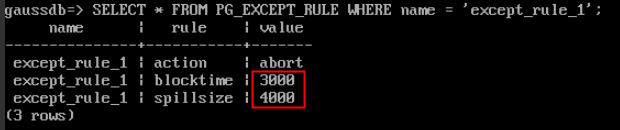
Change the blocktime threshold of exception rule set except_rule1 to 3000s and the space for spilled data to 4000 MB.
1 | ALTER EXCEPT RULE except_rule_1 WITH (blocktime=3000, spillsize=4000); |
Check whether the exception rule is modified successfully by querying the PG_EXCEPT_RULE system catalog.
1 | SELECT * FROM PG_EXCEPT_RULE WHERE name = 'except_rule_1'; |
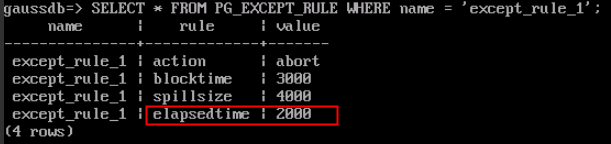
Add a new rule, that is, the maximum job execution time (elapsedtime) is 2000 seconds.
1 | ALTER EXCEPT RULE except_rule_1 WITH (elapsedtime=2000); |
Check the exception rule again. The rule is modified successfully. Note that the original rule is retained instead of being cleared.
1 | SELECT * FROM PG_EXCEPT_RULE WHERE name = 'except_rule_1'; |
Create a resource pool and bind it to exception rule set except_rule_1.
1 2 | DROP resource pool IF EXISTS resource_pool_a1; CREATE resource pool resource_pool_a1 WITH (except_rule='except_rule_1'); |
Unbind the exception rule set from the resource pool resource_pool_a1.
1 | ALTER resource pool resource_pool_a1 WITH (except_rule='None'); |
Helpful Links
What is your overall rating for this page?
Thank you very much for your feedback. We will continue working to improve the documentation.See the reply and handling status in My Cloud VOC.
For any further questions, feel free to contact us through the chatbot.
Chatbot


