

What Is OOM? Why Does OOM Occur?
OOM Concepts
Out of Memory (OOM) occurs when all available memory is exhausted and the system is unable to allocate memory for processes, which will trigger a kernel panic or OOM killer.
On Linux, OOM killer is a process that prevents other processes from collectively exhausting the host's memory. When the system is critically low on memory, the processes that use more memory than available will be killed to ensure the overall availability of the system.
OOM Parameters
Example of OOM Killer
- Set HCE system parameters by referring to Table 1. The following is an example:
[root@localhost ~]# cat /proc/sys/vm/panic_on_oom
0
[root@localhost ~]# cat /proc/sys/vm/oom_kill_allocating_task
0
[root@localhost ~]# cat /proc/sys/vm/oom_dump_tasks
1
- panic_on_oom=0 indicates that OOM killer is triggered when OOM occurs.
- oom_kill_allocating_task=0 indicates that the process with the highest oom_score value is preferentially terminated when OOM killer is triggered.
- oom_dump_tasks=1 indicates that the process and OOM killer information is recorded when OOM occurs.
- Start the process.
Start three same test processes (test, test1, and test2) in the system at the same time, continuously request new memory for the three processes, and set oom_score_adj of process test1 to 1000 (indicating that OOM killer will terminate this process first), until the memory is used up and OOM occurs.
[root@localhost ~]# ps -ef | grep test
root        2938    2783  0 19:08 pts/2    00:00:00 ./test
root        2939    2822  0 19:08 pts/3    00:00:00 ./test1
root        2940    2918  0 19:08 pts/5    00:00:00 ./test2
[root@localhost ~]# echo 1000 > /proc/2939/oom_score_adj
[root@localhost ~]# cat /proc/2939/oom_score_adj
1000
- View the OOM information.
After a period of time, OOM occurs in the system, and OOM killer is triggered. At the same time, the memory information of all processes in the system is printed in /var/log/messages, and process test1 is terminated.
Figure 1 Checking process information
 Figure 2 Error logs for OOM
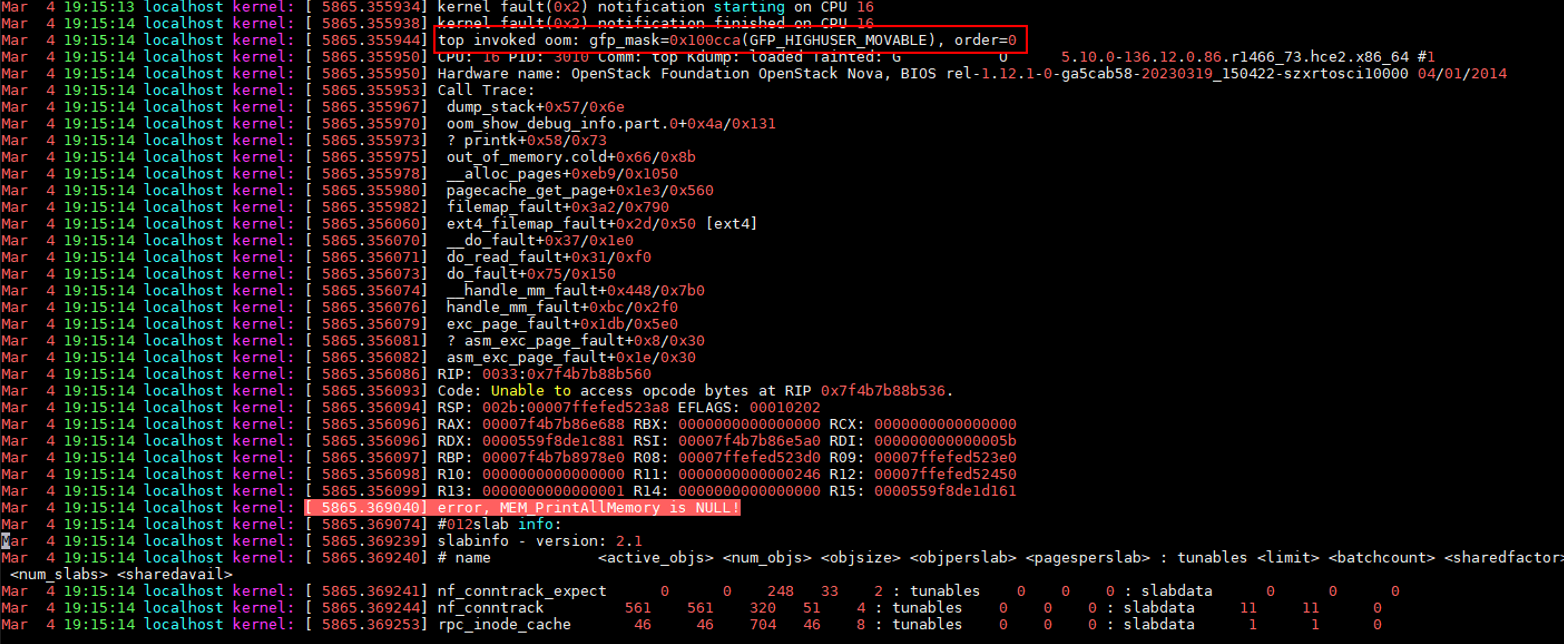 Figure 3 Processes that triggered OOM

Possible Causes
- The cgroup memory is insufficient.
The used memory exceeds the size specified by memory.limit_in_bytes in the cgroup. The following is an example:
If memory.limit_in_bytes is set to 80 MB and memhog is used to allocate 100 MB of memory, an OOM event is triggered. The log shows that the memhog process (PID: 2021820) uses 81,920 KB of memory, which exceeds the limit and triggers the OOM event.
Part of the logs in /var/log/messages is as follows:
warning|kernel[-]|[2919920.414131] memhog invoked oom-killer: gfp_mask=0xcc0(GFP_KERNEL), order=0, oom_score_adj=0
info|kernel[-]|[2919920.414220] memory: usage 81920kB, limit 81920kB, failcnt 30
err|kernel[-]|[2919920.414272] Memory cgroup out of memory: Killed process 2021820 (memhog) total-vm:105048kB, anon-rss:81884kB, file-rss:1544kB, shmem-rss:0kB, UID:0 pgtables:208kB oom_score_adj:0
- The memory of the parent cgroup is insufficient.
The memory in child cgroups is sufficient, but the memory in the parent cgroup is insufficient. As a result, the memory usage exceeds the limit. The following is an example:
memory.limit_in_bytes is set to 80 MB for the parent cgroup, and set to 50 MB for each of the two child cgroups. Memory is allocated in a loop within the two child cgroups, triggering an OOM event.
Part of the logs in /var/log/messages is as follows:
warning|kernel[-]|[2925796.529231] main invoked oom-killer: gfp_mask=0xcc0(GFP_KERNEL), order=0, oom_score_adj=0
info|kernel[-]|[2925796.529315] memory: usage 81920kB, limit 81920kB, failcnt 199
err|kernel[-]|[2925796.529366] Memory cgroup out of memory: Killed process 3238866 (main) total-vm:46792kB, anon-rss:44148kB, file-rss:1264kB, shmem-rss:0kB, UID:0 pgtables:124kB oom_score_adj:0
- The system memory is insufficient.
The OS's free memory is insufficient while applications keep requesting memory. The memory shortage cannot be resolved by memory reclamation. An OOM event is triggered. The following is an example:
In an OS, memory is allocated in a loop, triggering an OOM event. The logs show that the free memory of Node 0 (memory node) is lower than the minimum memory limit (the value of low). This triggers an OOM event.
Part of the logs in /var/log/messages is as follows:
kernel: [ 1475.869152] main invoked oom: gfp_mask=0x100dca(GFP_HIGHUSER_MOVABLE|__GFP_ZERO), order=0
kernel: [ 1477.959960] Node 0 DMA32 free:22324kB min:44676kB low:55844kB high:67012kB reserved_highatomic:0KB active_anon:174212kB inactive_anon:1539340kB active_file:0kB inactive_file:64kB unevictable:0kB writepending:0kB present:2080636kB managed:1840628kB mlocked:0kB pagetables:7536kB bounce:0kB free_pcp:0kB local_pcp:0kB free_cma:0kB
kernel: [ 1477.960064] oom-kill:constraint=CONSTRAINT_NONE,nodemask=(null),cpuset=/,mems_allowed=0,global_oom,task_memcg=/system.slice/sshd.service,task=main,pid=1822,uid=0
kernel: [ 1477.960084] Out of memory: Killed process 1822 (main) total-vm:742748kB, anon-rss:397884kB, file-rss:4kB, shmem-rss:0kB, UID:0 pgtables:1492kB oom_score_adj:1000
- The memory of the memory nodes is insufficient.
In NUMA mode, an OS manages multiple memory nodes. If applications keep requesting memory from specific nodes, an OOM event may be triggered even if the OS memory is sufficient. The following is an example:
There are two memory nodes. Applications keep requesting memory from Node 1. As a result, the memory of Node 1 is insufficient while the OS memory is sufficient.
Part of the logs in /var/log/messages is as follows:
kernel: [  465.863160] main invoked oom: gfp_mask=0x100dca(GFP_HIGHUSER_MOVABLE|__GFP_ZERO), order=0
kernel: [  465.878286] active_anon:218 inactive_anon:202527 isolated_anon:0#012 active_file:5979 inactive_file:5231 isolated_file:0#012 unevictable:0 dirty:0 writeback:0#012 slab_reclaimable:6164 slab_unreclaimable:9671#012 mapped:4663 shmem:2556 pagetables:846 bounce:0#012 free:226231 free_pcp:36 free_cma:0
kernel: [  465.878292] Node 1 DMA32 free:34068kB min:32016kB low:40020kB high:48024kB reserved_highatomic:0KB active_anon:188kB inactive_anon:778076kB active_file:20kB inactive_file:40kB unevictable:0kB writepending:0kB present:1048444kB managed:866920kB mlocked:0kB pagetables:2752kB bounce:0kB free_pcp:144kB local_pcp:0kB free_cma:0kB
kernel: [  933.264779] oom-kill:constraint=CONSTRAINT_MEMORY_POLICY,nodemask=1,cpuset=/,mems_allowed=0-1,global_oom,task_memcg=/system.slice/sshd.service,task=main,pid=1733,uid=0
kernel: [  465.878438] Out of memory: Killed process 1734 (main) total-vm:239028kB, anon-rss:236300kB, file-rss:200kB, shmem-rss:0kB, UID:0 pgtables:504kB oom_score_adj:1000
- Other possible cause
During memory allocation, if the memory of the buddy system is insufficient, OOM killer is triggered to release the memory to the buddy system.
Solutions
- Check if there is memory leak, which causes OOM.
- Check whether the cgroup limit_in_bytes configuration matches the memory plan. If any modification is required, run the following command:
echo <value> > /sys/fs/cgroup/memory/<cgroup_name>/memory.limit_in_bytes
- If more memory is required, upgrade the ECS flavors.
What is your overall rating for this page?
Thank you very much for your feedback. We will continue working to improve the documentation.See the reply and handling status in My Cloud VOC.
For any further questions, feel free to contact us through the chatbot.
Chatbot


