

Enabling Data Consumption
Data consumption refers to the process during which third-party software or cloud products consume the log data in real time through a client. It is a sequential read/write from/into full data.
SecMaster provides the data consumption function and supports real-time data consumption through the client.
Enabling Data Consumption
- Log in to the SecMaster console.
- Click
 in the upper left corner of the management console and select a region or project.
 - In the navigation pane on the left, choose Workspaces > Management. In the workspace list, click the name of the target workspace. Figure 1 Workspace management page

- In the navigation pane on the left, choose . Figure 2 Accessing the Security Analysis tab

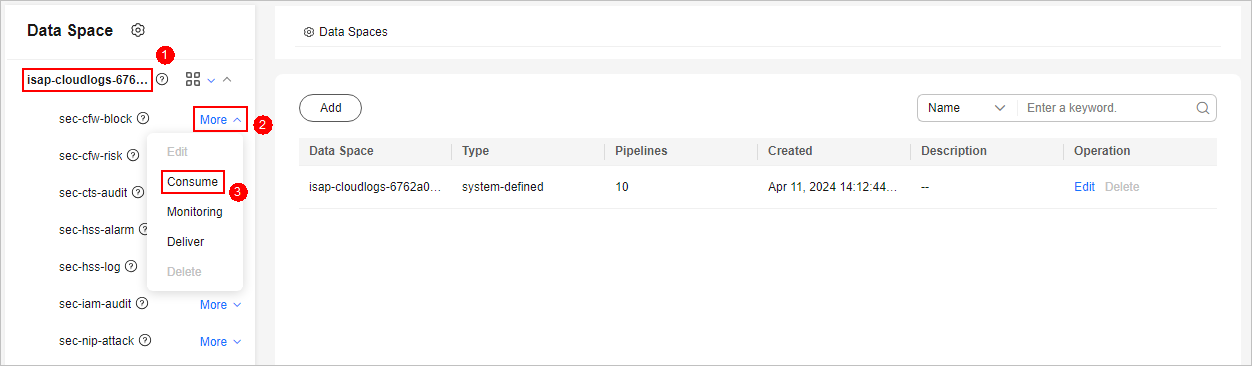
- In the data space navigation tree on the left, click the data space name to expand all pipelines. Next to the name of the target pipeline, click More > Consume. Figure 3 Accessing the data consumption page
- On the Data Consumption page, click
 next to Current Status to enable data consumption.
 After the function is enabled, the consumption configuration information is displayed, as shown in Table 1.
Figure 4 Enabling Data Consumption
Table 1 Data consumption parameters Parameter
Description
Status
Data consumption refers to the process during which third-party software or cloud products consume the log data in real time through a client. It is a sequential read/write from/into full data.
Status indicates whether data consumption has been enabled in the current pipeline.
Pipeline Name
Name of the pipeline corresponding to the current data consumption.
Subscriber
A subscriber is a program or service that receives and consumes data.
The preset subscription mode in the system. This parameter determines how data is transmitted to data consumers.
Access Node
The current data access node, which is the cloud service entry address used for consuming data.
Related Operations
After data consumption is enabled, you can click  next to Status on the Data Consumption page to disable data consumption.
Feedback
Was this page helpful?
Provide feedbackThank you very much for your feedback. We will continue working to improve the documentation.See the reply and handling status in My Cloud VOC.
For any further questions, feel free to contact us through the chatbot.
Chatbot


