

Backup Types
RDS for PostgreSQL supports multiple backup types. Based on different dimensions, there are the following backup types:
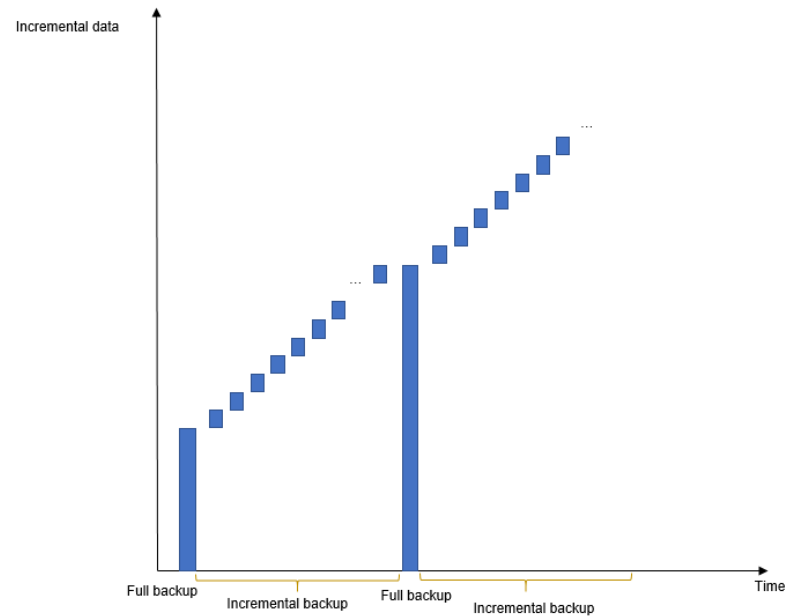
By Data Volume: Full Backups, Database-Level Backups, and Incremental Backups
| Backup Type | Full backups | Database-level backups | Incremental backups |
|---|---|---|---|
| Description | All data in an instance is backed up. | Specific databases in an instance are backed up. | Only data changes within a certain period of time are backed up. |
| Enabled by Default | Yes | No | Yes |
| Retention Period |
| Database-level backups are the backups you create for specific databases. They are retained until you delete them manually. | Incremental backups will be deleted along with automated full backups. |
| Characteristics |
|
|
|
| How to Check Backup Size | Click the target instance name. On the Backups & Restorations page, click the Full Backups tab and check the backup size. | Click the target instance name. On the Backups & Restorations page, click the Database Backups tab and check the backup size. | Click the target instance name. On the Backups & Restorations page, click the Incremental Backups tab and check the backup size. |
By Backup Method: Automated Backups and Manual Backups
| Backup Type | Automated backups | Manual backups |
|---|---|---|
| Description |
NOTE: Once a DB instance is created, a backup is restored to a new instance, or a minor version is upgraded, a full backup is automatically triggered by default and this function cannot be disabled. Backups that are being created can be stopped. If such a backup task is stopped and the first full backup of your instance is not complete, no backup is available for restoration. |
|
| Enabled by Default | Yes | Yes |
| Retention Period | Automated backups are retained for the number of days you specified. The retention period ranges from 1 to 3,660 days. | Manual backups are always retained until you delete them manually. |
| How to Configure |
By Backup Region: Same-Region Backups and Cross-Region Backups

| Backup Type | Same-region backups | Cross-region backups |
|---|---|---|
| Description | Backups are stored in the same region as your DB instance. | Backups are stored in a different region from that of your DB instance. |
| Enabled by Default | Yes | No |
| Retention Period | Backups are retained for the number of days you specified. The retention period ranges from 1 to 3,660 days. | Backups are retained for the number of days you specified. The retention period ranges from 1 to 1,825 days. |
| Characteristics | Backups are stored in the same region as your DB instance. Same-region backup (automated backup) is enabled by default and cannot be disabled. | Backups are stored in a region different from the one where your DB instance is located. After you enable cross-region backup, the backups are automatically stored in the region you specify. |
| How to Configure | ||
| How to Check Backup Size | Click Backups in the navigation pane. On the Same-Region Backups tab, check the backup size. | Click Backups in the navigation pane. On the Cross-Region Backups tab, click View Cross-Region Backup and check the backup size. |
What is your overall rating for this page?
Thank you very much for your feedback. We will continue working to improve the documentation.See the reply and handling status in My Cloud VOC.
For any further questions, feel free to contact us through the chatbot.
Chatbot


