

Introduction to Backups
What Are Database Backups?
RDS for PostgreSQL automatically creates backups for DB instances during the backup time window. The system retains the backups based on your specified retention period (1 to 3,660 days).
A backup file is generated each time a backup is complete. If the instance fails or data is damaged, you can use the backup file to restore the instance, ensuring data reliability.
During a backup, the system reads database files, which consumes disk read I/O. Then, it compresses and uploads the backup data, which can fully utilize a single CPU core. Therefore, perform backups during off-peak hours.
In a standard Huawei Cloud environment, a full backup or restoration of 2 TB of data can be completed within 8 hours.
Tables with the UNLOGGED attribute (unlogged tables) do not record WAL logs and do not support backup or restoration functions.
Backup Types
RDS for PostgreSQL supports multiple backup types. For details, see Backup Types.
Where Data Is Backed Up
- Single-node instance
A single-node architecture, which is more cost-effective than mainstream primary/standby DB instances. After a backup is triggered, data is backed up from the primary instance and stored as a package on OBS. The backup does not take up storage space of the instance.
- Primary/standby instance
An HA architecture. In a primary/standby pair, each instance has the same instance class. After a backup is triggered, data is backed up from the primary instance and stored as a package on OBS. The backup does not take up storage space of the instance.
If a database or table in the primary instance is maliciously or mistakenly deleted, the database or table in the standby instance will also be deleted. In this case, you can only use backups to restore the deleted data.
How Data Is Backed Up
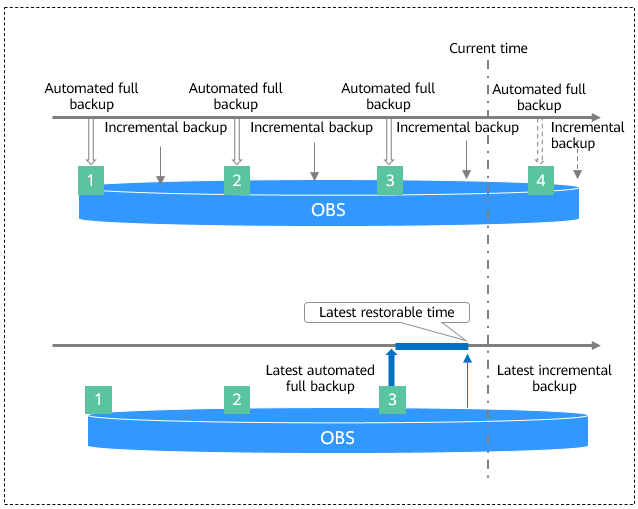
RDS for PostgreSQL automated backup is enabled by default and cannot be disabled. RDS for PostgreSQL performs automated full backups based on the time window and interval specified in the backup policy. It also backs up data changes made after the most recent automated full or incremental backup every 5 minutes. When you restore an instance to a point in time, the most recent full backup will be downloaded from OBS for restoration. After the restoration is complete, incremental backups will be replayed to the specified point in time.
Backup Storage Location and Billing
All backups are stored as compressed packages in OBS.
Billing rules without CBR backups enabled: Backups are uploaded to OBS to occupy backup space. When the used backup space exceeds the free quota provided, you are billed for the excess space based on usage. For details, see How Is RDS for PostgreSQL Backup Data Billed?
- For snapshots created before September 2025: No backup space is provided for free. You are billed for database server backup vaults in CBR on a pay-per-use basis. For details, see How Is CBR Billed?
- For snapshots created in September 2025 and later: RDS provides free snapshot backup space. After the free space is used up, you are billed for CBR snapshots in RDS on a pay-per-use basis. For details, see RDS Pricing Details.
Deleting Backups
- Manual backups can only be manually deleted.
- Automated backups cannot be manually deleted. To delete them, set the retention period specified in your automated backup policy. Retained backups will be automatically deleted at the end of the retention period.
What is your overall rating for this page?
Thank you very much for your feedback. We will continue working to improve the documentation.See the reply and handling status in My Cloud VOC.
For any further questions, feel free to contact us through the chatbot.
Chatbot


