

Hot Row Update
Scenarios
Hot rows refer to database rows that are frequently created, read, updated, and deleted. They are common in scenarios such as flash sales, concert ticket booking, and popular route train ticket booking. When a transaction updates data in a row, the row needs to be locked. Only one transaction can update a row at a time. Others have to wait for the lock to be released, creating a performance bottleneck for hot row update. Traditional sharding policies have a limited effect in improving performance.
TaurusDB optimizes hot row update, which can be automatically or manually enabled. After hot row update is enabled, hot rows can be updated efficiently.
Principles
The following figure shows the architecture of TaurusDB hot row update. There are three parts: Fold, Counter_hash, and Group_hash.
- Fold: This is a SQL identifier calculated based on factors such as the table, primary key, unique key, or isolation level. It supports multiple isolation levels simultaneously.
- Counter_hash: This is used to automatically identify hot rows. It consists of counters, which count the number of executions of SQL statements affecting hot rows. Hot rows are automatically identified based on the execution frequency of such SQL statements.
- Group_hash: It consists of multiple hotspot groups and is used to update hot rows. Each hotspot group corresponds to a hot row. Each hotspot group consists of multiple batches to ensure that the statements that update hot rows can be committed alternately.

Constraints
- The kernel version of your TaurusDB instance must be 2.0.54.240600 or later. For details about how to check the kernel version, see How Can I Check the Version of a TaurusDB Instance?
- Hot row update takes effect only when all the following conditions are met. Otherwise, a standard UPDATE statement is executed:
- Only InnoDB tables are supported.
- The SET clause of a single UPDATE statement can modify only one column. Multi-column updates are not supported.
- No BEFORE or AFTER UPDATE triggers can be defined on the table.
- Multi-table UPDATE statements (such as UPDATE t1 JOIN t2 ...) are not supported, even if the HOTSPOT hint is used.
- The WHERE clause must use only equality conditions on a primary key or unique index, update only a single record, and cover all columns of the selected index.
- Modifying any index column (including primary keys, unique indexes, and secondary indexes) is not allowed.
- This feature applies only to increment or decrement operations with integer constants, regardless of the column data type.
Table 1 Hot row update examples Statement
Effective
Reason
c = c + 1
Yes
-
c = c + 1.5 or c = c + 0.1
No
The increment is not an integer constant.
- Only two-operand increment or decrement operations are allowed for hot row records. The first operand in the expression must match the left side of the equal sign and satisfy unique index constraints. Direct assignment operations are not permitted.
Table 2 Hot row update examples Statement
Effective
Reason
c = c + 2
Yes
-
c = d + 1
No
The first operand differs from the left side of the equal sign.
c = 1 + c
No
The order of operands is incorrect.
c = c + 1 + 1
No
There are more than two operands.
- Hot row update must be used in implicit transactions (that is, AUTOCOMMIT must be ON) and cannot be used in explicit BEGIN or COMMIT transactions.
- The HOTSPOT hint must be explicitly used, or automatic detection must be enabled (by setting rds_hotspot_auto_detection_threshold to a non-zero value and rds_hotspot to ON).
- The feature takes effect only at the Read Committed (RC) isolation level.
- This feature cannot be used in stored functions or triggers. Otherwise, the following error is reported on the client:
HOTSPOT hints can not be used in stored function or trigger.
- Behavior change: In a hotspot transaction group, all transactions, except those that failed to be executed or were killed in the update phase, are committed in batches. Their redo logs and undo logs are also recorded. These transactions can only be committed or rolled back as a group and cannot be rolled back individually. Each batch contains dozens to several hundreds of transactions. Exception handling:
- If an exception interrupts the commit phase (for example, the process is killed), the entire batch is rolled back, including transactions that have succeeded but are not yet committed.
- If a single transaction fails due to a constraint violation or value overflow, this transaction is removed from the batch and the remaining transactions in the batch commit normally.
Parameter Description
| Parameter | Description |
|---|---|
| rds_hotspot | Whether to enable hot row update. ON: The function is enabled. |
| rds_hotspot_follower_wait_commit_interval | Sleep time in microseconds before a follower transaction is blocked when waiting for leader transaction logs to be persisted during hotspot row updates. For instances with slow log persistence, you are advised to increase the value. For instances with fast log persistence, you are advised to set this parameter to 0 so that follower transactions are blocked without sleeping. |
| rds_hotspot_leader_wait_follower_interval | Time interval, in microseconds, that the leader transaction in a hot row update waits for the follower transaction to update records. In low concurrency, you are advised to set this parameter to a smaller value to avoid performance deterioration. In high concurrency, you are advised to set this parameter to a larger value to improve performance. If queries per second (QPS) exceeds 200,000, you are advised to set this parameter to 100 or a larger value. |
| rds_hotspot_auto_detection_threshold | Whether to enable automatic identification for hot rows. The value 0 indicates that the function is disabled. If the value is not 0, it indicates the threshold for identifying hot rows. When the number of row updates per second exceeds the threshold, hot row update is enabled. |
| rds_hotspot_batch_size_lower_limit | Recommended minimum size for each batch of hot transactions. Each batch should strive to reach this size as much as possible. However, this is not strictly guaranteed. When the leader finds that all followers to be waited for have arrived, the batch of transactions enters the commit state. |
| rds_hotspot_max_memory_size | Maximum memory occupied by groups and counters during a hot row update. If the memory occupied by groups or counters exceeds this value, the occupied memory will be cleared (when new memory is requested). |
| rds_hotspot_enable_time_statistics | Whether to enable status statistics related to the update time of hot rows. ON: The function is enabled. |
Status Description
| Status | Description |
|---|---|
| Hotspot_total_trx | Total transactions using the hot row update function. |
| Hotspot_update_errors | Transactions that failed to update hot rows. These transactions do not affect the commit of other transactions that update hot rows. |
| Hotspot_trx_rollbacked | Number of transactions that are successfully updated but finally rolled back by the leader upon the commit. An update statement goes through two phases: update and commit. When the leader decides to roll back transactions, all followers roll back transactions together. |
| Hotspot_trx_committed | Number of transactions that are successfully committed to update hot rows. |
| Hotspot_batch_size | Number of transactions that are to update hot rows at a time. These transactions are committed in batches. |
| Hotspot_batch_wait_time | Hotspot row updates hold locks and commit transactions in batches. This parameter specifies the time (in microseconds) that the current batch of hotspot row updates waits for the previous batch to release locks. |
| Hotspot_leader_wait_follower_time | Time in microseconds for the leader to wait for the followers in the current batch to complete record update. |
| Hotspot_leader_total_time | Total time spent by the leader transaction in updating hot rows in the current batch, in microseconds. |
| Hotspot_follower_total_time | Total time spent by a follower transaction in updating hot rows in the current batch, in microseconds. |
| Hotspot_follower_wait_commit_time | Time for a follower to wait for the leader to persist logs in the current batch, in microseconds. |
| Hotspot_group_counts | Number of groups. Each hot row update corresponds to a group, and transactions in the group are committed in batches. |
| Hotspot_counter_counts | Number of counters. Counters are used to automatically determine whether a hot row is updated. When the statistical value in a counter meets the requirement, a group is created for hot row update. |
New Keywords
The following table lists new keywords.
| Keyword | Description |
|---|---|
| HOTSPOT | Indicates that hot row update is enabled. |
| NOT_MORE_THAN | (Optional) Indicates that the target value is not greater than a certain value. |
| NOT_LESS_THAN | (Optional) Indicates that the target value is not less than a certain value. |
The preceding keywords are placed at the end of a SQL statement. HOTSPOT must be placed at the beginning. NOT_MORE_THAN and NOT_LESS_THAN can be placed at any position.
For example, if table_name is the table name, id is the primary key column, and c is an int column, the following syntax is supported:
UPDATE table_name SET c=c+1 where id=10 HOTSPOT;
UPDATE table_name SET c=c+1 where id=10 HOTSPOT NOT_MORE_THAN 100; // The value of c cannot exceed 100.
UPDATE table_name SET c=c-1 where id=10 HOTSPOT NOT_LESS_THAN 0;   // The value of c cannot be less than 0.
UPDATE table_name SET c=c+1 where id=10 HOTSPOT NOT_MORE_THAN 100 NOT_LESS_THAN 0; // The value of c must not exceed 100 and must not be less than 0.
UPDATE table_name SET c=c+1 where id=10 HOTSPOT NOT_LESS_THAN 0 NOT_MORE_THAN 100; // The value of c must not exceed 100 and must not be less than 0.
When any value exceeds the value of NOT_MORE_THAN or NOT_LESS_THAN, the following error is reported to the client:
HOTSPOT field value exceeds limit
Example
- Create a table and prepare data.
CREATE TABLE test.hotspot1 (
  `id` int NOT NULL primary key,
  `c` int NOT NULL DEFAULT '0'
) ENGINE=InnoDB;
INSERT INTO test.hotspot1 VALUES (1, 1);
- Enable hot row update.
SET GLOBAL rds_hotspot = ON;
- Change the isolation level to AUTOCOMMIT.
SET SESSION TRANSACTION ISOLATION LEVEL READ COMMITTED;
SET SESSION AUTOCOMMIT = ON;
- Initiate an update with HOTSPOT keyword.
UPDATE test.hotspot1 SET c=c+1 WHERE id=1 HOTSPOT;
- Check the update status of hot rows.
SHOW STATUS like "%hotspot%";
Performance Tests
- Test environments
Instance specifications: 8 vCPUs | 32 GB, 32 vCPUs | 128 GB
ECS specifications: 32 vCPUs | 64 GB
Region: CN North-Beijing4
Test tool: sysbench-1.0.18
Data models:
- One table with one data record
- Eight tables, with each table containing one data record
- Parameter settings
transaction_isolation=READ-COMMITTED
max_prepared_stmt_count=1048576
rds_global_sql_log_bin=OFF
- Test method
Definition of the data tables required for the test:
CREATE TABLE sbtest (id int NOT NULL AUTO_INCREMENT,k int NOT NULL DEFAULT '0',PRIMARY KEY (id));
Test statement:
UPDATE sbtest%u SET k=k+1 WHERE id=1 hotspot;
- Test scenarios and results
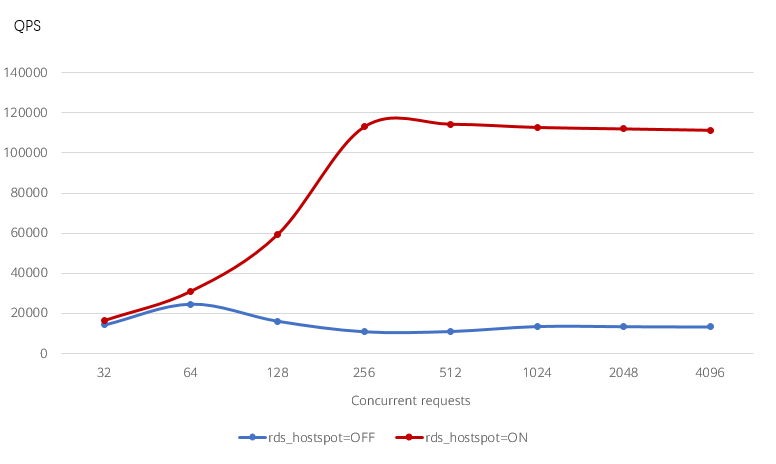
Test scenario 1: updating a single hot row of an instance with 8 vCPUs and 32 GB
Test result: The performance of all concurrent requests was improved to different degrees. The performance of 64 or less concurrent requests was not improved significantly, but the performance of 128 or more concurrent requests was improved significantly (up to 9.26 times).

Test scenario 2: Updating a single hot row of an instance with 32 vCPUs and 128 GB
Test result: The performance of 128 or more concurrent requests was improved significantly, by 639 times.


Test scenario 3: Updating eight hot rows of an instance with 32 vCPUs and 128 GB
Test result: The performance of 256 or fewer concurrent requests was not improved, but the performance of 512 or more concurrent requests was improved significantly, by 78 times.


What is your overall rating for this page?
Thank you very much for your feedback. We will continue working to improve the documentation.See the reply and handling status in My Cloud VOC.
For any further questions, feel free to contact us through the chatbot.
Chatbot


