

Managing GeminiDB Serverless Tables
After a VPC endpoint is created, you can create, delete, and view GeminiDB Serverless tables on the console.
Usage Notes
- Only standard tables of GeminiDB DynamoDB-Compatible instances can be created.
- During the OBT, a tenant can create a maximum of three tables.
Billing
Serverless tables are free of charge during OBT. You will be billed automatically after GA. You can check the notice on Huawei Cloud.
Configuring Permissions
If you are using an IAM user, configure GeminiDB permissions before you use DynamoDB Serverless. For details about the permissions, see GeminiDB Permission Management. The procedure is as follows:
- System-defined policy: Configure GeminiDB FullAccess and GeminiDBServerlessFullAccessPolicy permissions.
- If you do not configure GeminiDB FullAccess, you can create a custom policy and configure the following permissions on the IAM console. For details, see Creating a Custom Policy.
If the JSON view is used to configure a custom policy, the policy content is as follows. Table 1 lists the details.
{ "Version": "5.0", "Statement": [ { "Effect": "Allow", "Action": [ "vpcep:endpoints:create", "vpcep:endpoints:delete", "vpcep:endpoints:get", "gaussdbfornosql:serverless:createDynamoDBTable", "gaussdbfornosql:serverless:createEndpoint", "gaussdbfornosql:serverless:deleteDynamoDBTable", "gaussdbfornosql:serverless:deleteEndpoint", "gaussdbfornosql:serverless:getDynamoDBSubscriptionStatus", "gaussdbfornosql:serverless:listDynamoDBTables", "gaussdbfornosql:serverless:listEndpoints", "gaussdbfornosql:serverless:updateDynamoDBSubscriptionStatus" ] } ] } - You can assign the custom policy created in 2 to the user on the IAM console.
| Service | Permission | Description |
|---|---|---|
| gaussdbfornosql | gaussdbfornosql:serverless:updateDynamoDBSubscriptionStatus gaussdbfornosql:serverless:getDynamoDBSubscriptionStatus | Enables Serverless. |
| gaussdbfornosql | gaussdbfornosql:serverless:listDynamoDBTables gaussdbfornosql:serverless:createDynamoDBTable gaussdbfornosql:serverless:deleteDynamoDBTable | Manages tables on the console. |
| gaussdbfornosql | gaussdbfornosql:serverless:listEndpoints gaussdbfornosql:serverless:createEndpoint gaussdbfornosql:serverless:deleteEndpoint | Manages VPC endpoints on the console. |
| VPCEP | vpcep:endpoints:create vpcep:endpoints:delete vpcep:endpoints:get | Grants GeminiDB the permissions of VPC endpoint services. |
Procedure
- Log in to the GeminiDB console.
- In the navigation pane, choose Serverless > DynamoDB-compatible.
- If you have not enabled GeminiDB Serverless, enable it first.
- After enabling GeminiDB Serverless, click Create Serverless Table. In the Create Serverless Table dialog box, set the parameters listed in Table 2. Figure 1 Creating a Serverless table
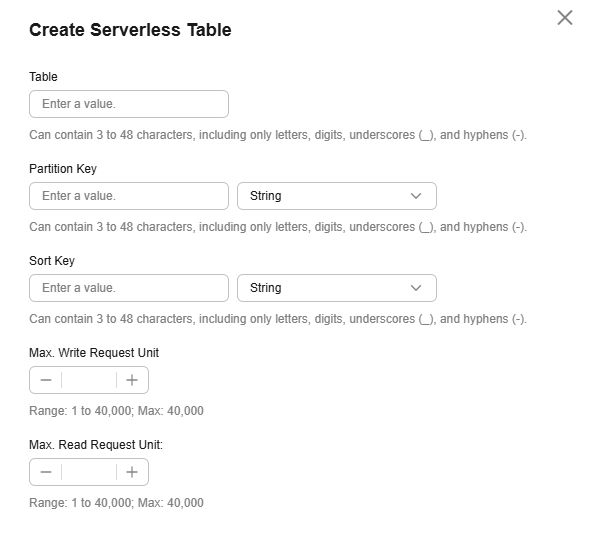
Table 2 Creating a Serverless table Parameter
Description
Table
(Mandatory) Name of a table to be created. The value can contain 3 to 48 characters, including only letters, digits, underscores (_), and hyphens (-).
Partition Key
(Mandatory) Partition key name, which can contain 3 to 48 characters, including only letters, digits, underscores (_), and hyphens (-)
Partition Key Type
(Mandatory) Partition key type, which can be String, Number, or Binary.
Sort Key
(Optional) Sort key name, which can contain 3 to 48 characters, including only letters, digits, underscores (_), and hyphens (-). The value must be different from partition key names.
Sort Key Type
(Optional) Sort key type, which can be String, Number, or Binary.
Max. Write Request Unit
(Optional) Maximum write request unit (WRU). In pay-per-request billing, API calls to write data to your table are billed by WRU. One WRU can write up to 1 KB of data. More than 1 KB of data consumes additional WRUs. For example, writing 1 KB of data requires one WRU, and writing 3 KB of data requires three WRUs. This parameter is not returned if it is not set. The maximum WRU is 40,000.
Max. Read Request Unit
(Optional) Maximum read request unit (RRU). In pay-per-request billing, API calls to read data from your table are billed by RRU. When you request strongly consistent reads, one RRU can read up to 4 KB of data. More than 4 KB of data consumes additional RRUs. This parameter is not returned if it is not set. The maximum RRU is 40,000.
- Click Create Now.
Wait for about 30 seconds and refresh the table list to check whether the table is created.
- Log in to the GeminiDB console.
- In the navigation pane, choose Serverless > DynamoDB-compatible.
- Search for a keyword (such as a table ID or name). Figure 2 Viewing a Serverless table

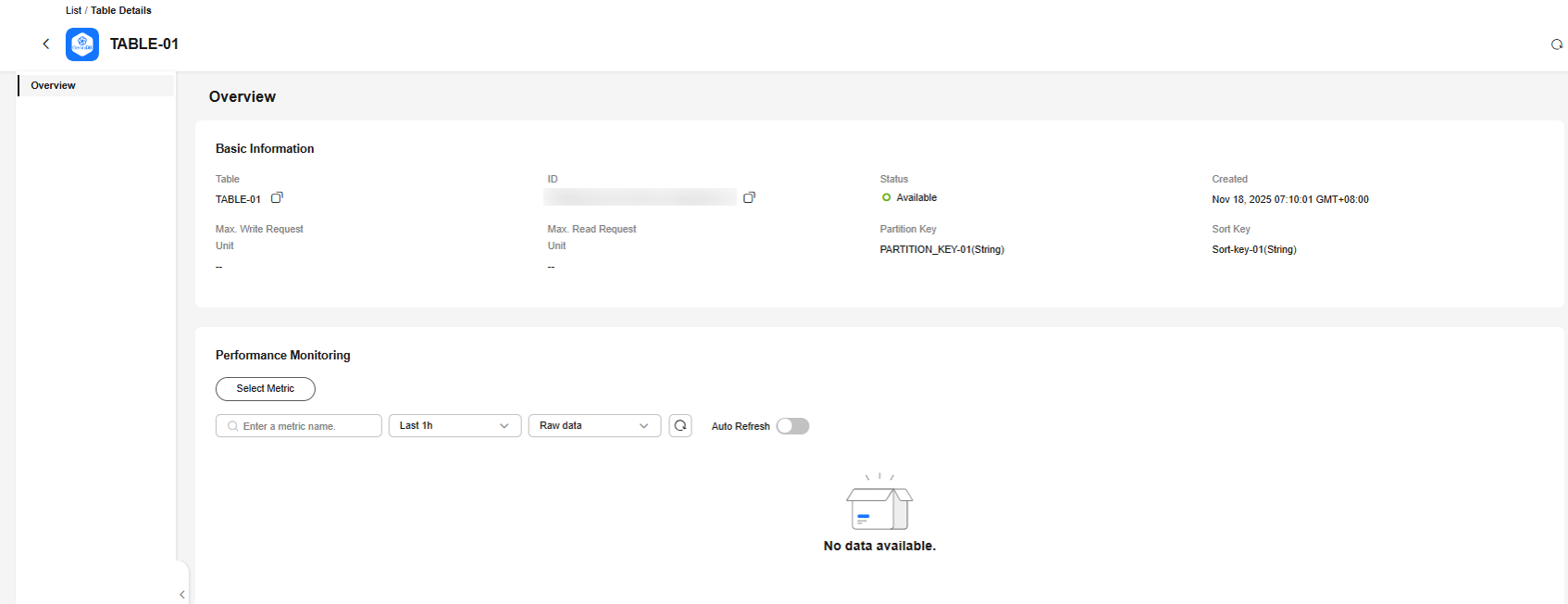
- Click a table name to view details. Figure 3 Table details
- Log in to the GeminiDB console.
- In the navigation pane, choose Serverless > DynamoDB-compatible.
- Select the table to be deleted and click Delete. Figure 4 Deleting a Serverless table

- Confirm the table name and ID and click OK.
Wait for about 30 seconds and refresh the table list to check whether the table is deleted.
What is your overall rating for this page?
Thank you very much for your feedback. We will continue working to improve the documentation.See the reply and handling status in My Cloud VOC.
For any further questions, feel free to contact us through the chatbot.
Chatbot


