

Help Center/ CodeArts/ FAQs/ General/ How Do I View All CodeArts Projects Under My Account as an Administrator?
Updated on 2025-12-22 GMT+08:00
How Do I View All CodeArts Projects Under My Account as an Administrator?
Symptom
After logging in to the CodeArts homepage as an administrator, you cannot see all projects under your account.
Cause Analysis
Only project members can view project details, such as work items, test cases, and build and deployment tasks.
If an IAM user does not add the administrator as a member when creating a project, the project will be invisible to the administrator after they log in to the homepage.
Solution
- Go to the CodeArts homepage.
- Log in to the CodeArts console, click
 , and select a region where you have enabled CodeArts.
 - Click Go to Workspace.
If your account uses the old billing mode (see Old Billing Modes), click Access Service.
- Log in to the CodeArts console, click
- Click the username
 on the navigation bar and choose All Account Settings.
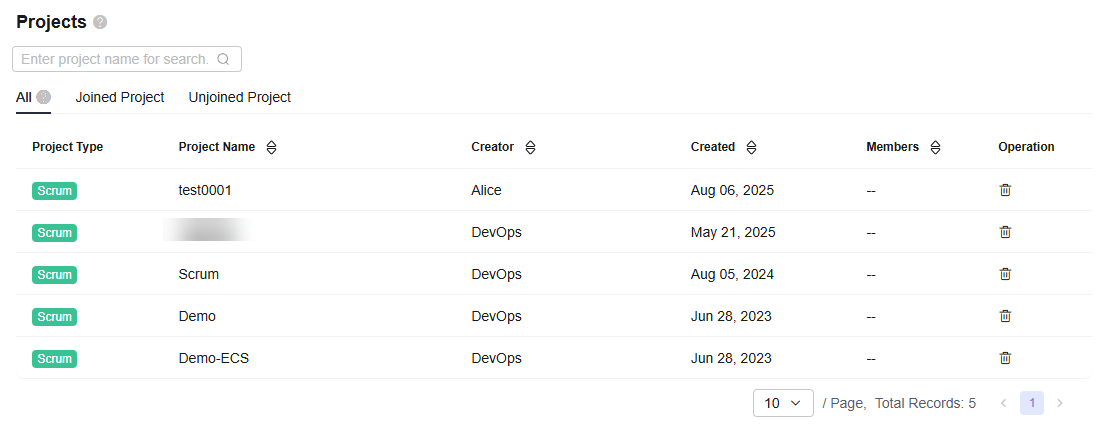
 - Choose General > Projects. On the All tab, view all CodeArts projects under your account. Figure 1 Viewing the project list
Parent topic: General
What is your overall rating for this page?
0
1
2
3
4
5
6
7
8
9
10
Very dissatisfiedVery satisfied
Thank you very much for your feedback. We will continue working to improve the documentation.See the reply and handling status in My Cloud VOC.
The system is busy. Please try again later.
For any further questions, feel free to contact us through the chatbot.
Chatbot


