

Add-on Overview
This section describes the functions, resource usages, and custom annotations of the CCE Cloud Bursting Engine for CCI add-on (also called the bursting add-on).
This add-on functions as a virtual kubelet to connect Kubernetes clusters to APIs of other platforms. It is mainly used to extend Kubernetes APIs to CCI.
With this add-on, you can schedule Deployments, StatefulSets, jobs, and CronJobs in CCE clusters to CCI 2.0 during peak hours. In this way, you can reduce the consumption caused by cluster scaling.
Functions
When using the CCE Cloud Bursting Engine for CCI add-on, pay attention to the workload delivery and scheduling.
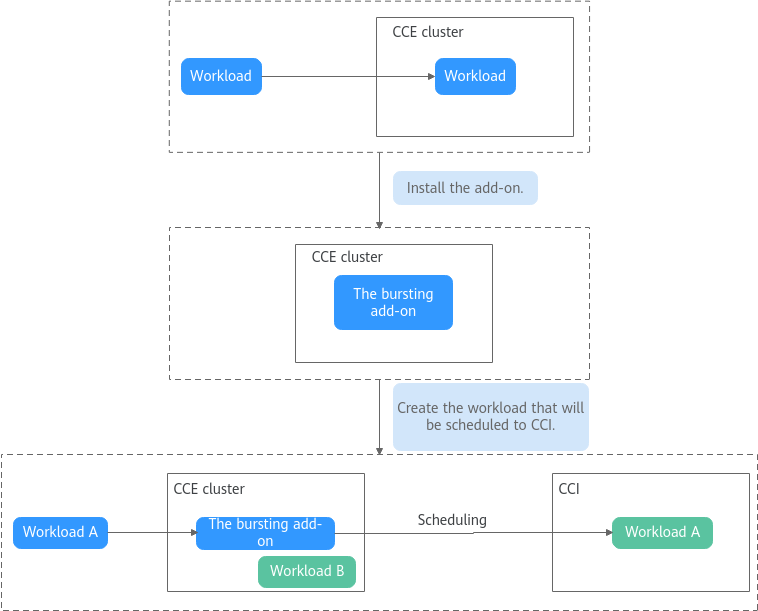

Scheduling workloads to CCI is closely related to your workload settings.
| Configuration Item | Description | Function | Reference |
|---|---|---|---|
| Scheduling | You can manage pods in a CCE cluster in different ways to control their scheduling to CCI. Workloads can be scheduled to CCI 2.0 to improve resource utilization of clusters. |
| |
| Resource quotas | You can configure fields such as cpu and memory to specify resource requests and limits for containers in a pod. The resource quotas for the add-on are rounded up to meet the requirements of CCI 2.0. | Appropriate pod resource quotas are selected. | |
| Images | You can configure service images and run your service containers in Huawei Cloud CCE clusters and CCI. |
| |
| Storage | You can mount storage volumes to workloads for persistent data storage. |
| |
| Networking | You can plan the network topology between CCE clusters and CCI. |
| |
| Monitoring | You can install add-ons to connect to Monitoring Center for better O&M of pods for workloads scheduled to CCI. |
|
Resource Usage Description
The following table describes the Huawei cloud services involved when the CCE Cloud Bursting Engine for CCI add-on is installed in a CCE cluster.
| Involved Cloud Service | Resource Description | Remarks |
|---|---|---|
| CCI 2.0 | A namespace called bursting-{CCE-cluster-ID} will be created for the add-on in CCI 2.0. |
|
| CCE | Workloads, secrets, ConfigMaps, PVs, and PVCs in CCE are synchronized to CCI and occupy CCE node resources. |
|
| ELB | If pods in a CCE cluster can communicate with the pods in CCI through the Service, the CCE Cloud Bursting Engine for CCI add-on automatically creates a shared load balancer. |
|
| VPC | Workloads scheduled to CCI use the same VPC as the CCE cluster. | The CIDR block of the Service in the CCI namespace is 10.247.0.0/16. Do not configure the same CIDR block for the VPC subnet of the CCE cluster. |
| SWR | When you create a workload in CCE, the image can be pulled from Huawei Cloud SWR. | Ensure that your image has been pushed to SWR. |
Pod Annotations
If the CCE Cloud Bursting Engine for CCI add-on is installed in a CCE cluster, custom annotations are required. The following table describes the annotations.
| Annotation Key | Description | Reference |
|---|---|---|
| scheduling.cci.io/managed-by-profile | Profile that manages the pods of the workloads scheduled to CCI | |
| resource.cci.io/size | vCPUs and memory of pods after the workloads are scheduled to CCI | |
| bursting.cci.io/image-replacement | Annotation for replacing image path prefixes |
Release History
| Add-on Version | Supported Cluster Version | New Feature |
|---|---|---|
| 1.5.85 | v1.21 v1.23 v1.25 v1.27 v1.28 v1.29 v1.30 v1.31 v1.32 v1.33 v1.34 v1.35 | Supported clusters v1.35. |
| 1.5.81 | v1.21 v1.23 v1.25 v1.27 v1.28 v1.29 v1.30 v1.31 v1.32 v1.33 v1.34 |
|
| 1.5.72 | v1.21 v1.23 v1.25 v1.27 v1.28 v1.29 v1.30 v1.31 v1.32 v1.33 v1.34 | Supported clusters v1.34. |
| 1.5.71 | v1.21 v1.23 v1.25 v1.27 v1.28 v1.29 v1.30 v1.31 v1.32 v1.33 | Pod distribution remains consistent before and after a rolling upgrade. |
| 1.5.67 | v1.21 v1.23 v1.25 v1.27 v1.28 v1.29 v1.30 v1.31 v1.32 v1.33 | Fixed some issues. |
| 1.5.65 | v1.21 v1.23 v1.25 v1.27 v1.28 v1.29 v1.30 v1.31 v1.32 v1.33 | Fixed some issues. |
| 1.5.63 | v1.21 v1.23 v1.25 v1.27 v1.28 v1.29 v1.30 v1.31 v1.32 v1.33 | ConfigMaps and secrets can be mounted across namespaces. |
| 1.5.58 | v1.21 v1.23 v1.25 v1.27 v1.28 v1.29 v1.30 v1.31 v1.32 v1.33 |
|
| 1.5.44 | v1.21 v1.23 v1.25 v1.27 v1.28 v1.29 v1.30 v1.31 v1.32 |
|
| 1.5.29 | v1.21 v1.23 v1.25 v1.27 v1.28 v1.29 v1.30 v1.31 | Specific subnets can be configured for pods. |
| 1.5.28 | v1.21 v1.23 v1.25 v1.27 v1.28 v1.29 v1.30 v1.31 | Optimized some functions. |
| 1.5.27 | v1.21 v1.23 v1.25 v1.27 v1.28 v1.29 v1.30 v1.31 | Supported CCE clusters v1.31. |
| 1.5.26 | v1.21 v1.23 v1.25 v1.27 v1.28 v1.29 v1.30 | Fixed some issues. |
| 1.5.24 | v1.21 v1.23 v1.25 v1.27 v1.28 v1.29 v1.30 | Optimized some functions. |
| 1.5.16 | v1.21 v1.23 v1.25 v1.27 v1.28 v1.29 v1.30 | Compacted pod CPU and memory resources. |
| 1.5.8 | v1.21 v1.23 v1.25 v1.27 v1.28 v1.29 | Supported CCE clusters v1.29. |
| 1.3.57 | v1.21 v1.23 v1.25 v1.27 v1.28 | Supported CCE clusters v1.28. |
| 1.3.48 | v1.21 v1.23 v1.25 v1.27 |
|
| 1.3.25 | v1.17 v1.19 v1.21 v1.23 |
|
| 1.3.19 | v1.17 v1.19 v1.21 v1.23 | Supported schedule profile. |
| 1.3.7 | v1.17 v1.19 v1.21 v1.23 | Clusters v1.21 and v1.23 are supported. |
| 1.2.12 | v1.13 v1.15 v1.17 v1.19 |
|
| 1.2.5 | v1.13 v1.15 v1.17 v1.19 |
|
| 1.2.0 | v1.13 v1.15 v1.17 v1.19 |
|
| 1.0.5 | v1.13 v1.15 v1.17 | Supported clusters v1.17. |
What is your overall rating for this page?
Thank you very much for your feedback. We will continue working to improve the documentation.See the reply and handling status in My Cloud VOC.
For any further questions, feel free to contact us through the chatbot.
Chatbot


