

Configuring a Cross-Region Backup Policy
Scenarios
RDS can store backups in a different region from the DB instance for disaster recovery. If a DB instance fails, you can use its backups stored in another region to restore data to a new DB instance.
If you enable cross-region backup, backups are automatically stored in the region you specify. You can manage cross-region backups on the Backups page of the RDS console. If cross-region backup is not enabled, backups are stored in the region where your instance is located by default.
You can set cross-region backup policies for up to 150 instances under an account by default.
Precautions
To use cross-region backup, submit a service ticket to request required permissions. This function cannot ensure data timeliness. Therefore, the SLA is not guaranteed. If timeliness is a concern, instead of cross-region backup, you are advised to use Data Replication Service (DRS).
Billing
| Specification Code | Billing Item | Unit Price Subject to the Destination Region |
|---|---|---|
| rds.mysql.crossreg.backup.space | Storage space |
|
| rds.mysql.crossreg.backup.flow | Cross-region backup traffic | This billing item is currently free of charge. You will be notified in advance before fees are introduced. |
Supported Regions
To use cross-region backup, submit a service ticket to apply for required permissions.
Cross-region backup is only supported in the regions listed in the following table.
| Source Region | Destination Region |
|---|---|
| CN North-Beijing4 | CN East-Shanghai1, CN South-Guangzhou, CN-Hong Kong |
| CN East-Shanghai1 | CN North-Beijing4, CN South-Guangzhou, CN-Hong Kong |
| AP-Singapore | CN-Hong Kong, AP-Bangkok, AF-Johannesburg |
| TR-Istanbul | AP-Singapore |
| ME-Riyadh | AP-Singapore |
| CN-Hong Kong | AP-Bangkok and AP-Singapore |
Procedure
- Log in to the RDS console.
- Click
 in the upper left corner and select a region.
- On the Instances page, click the target instance name.
- In the navigation pane on the left, choose Backups & Restorations.
- In the upper right corner of the page, choose Modify Backup Policy > Configure Cross-Region Backup Policy.
- In the displayed dialog box, enable only Cross-Region Full Backup or enable both Cross-Region Full Backup and Cross-Region Log Backup, and specify the region and retention period. Figure 1 Configuring a cross-region backup policy

- Encrypted backups cannot be stored across regions.
- The instance name is synchronized only when cross-region backups are synchronized for the first time. The instance ID is the unique identifier for the cross-region backups.
- If you enable Cross-Region Full Backup, automated full backup files of the DB instance are stored in the region you specify.
- If you enable Cross-Region Log Backup, binlog (incremental) backup files of the DB instance are stored in the region you specify.
- Cross-region backup files can be retained from 1 to 1,825 days.
- The interval ranges from 1 day to 7 days and must be less than the retention periods for both the current instance and the cross-region backups. To use this function, submit a service ticket to request required permissions.
After the interval is set, only one full backup is synchronized to the destination region within the specified interval. It will take longer time to perform a PITR using cross-region backups. The time required for restoration depends on how much data needs to replay from incremental backups. A long interval may even cause PITR failures. Exercise caution when setting this interval.
- Only new backup files generated after you set a cross-region backup policy will be stored in the region you specify.
- After cross-region log backup is enabled, you can restore a DB instance to a specified point in time only after the next automated full backup replication is complete. The specified time point must be later than the time when the automated full backup is complete.
- The cross-region backups of all your instances must be stored in the same destination region.
- After you enable cross-region backup, the completed backup files in the region where your instance is located will be asynchronously replicated to the region you specify.
- Deleting an instance does not delete its cross-region backups. You need to manually disable the cross-region backup policy. When the policy is disabled, the system will delete the cross-region backups.
- Click OK.
- To manage cross-region backups, return to the instance list, choose Backups in the navigation pane, and click the Cross-Region Backups tab.
- By default, all instances with cross-region backups are displayed.
- To modify the cross-region backup policy, click Set Cross-Region Backup in the Operation column.
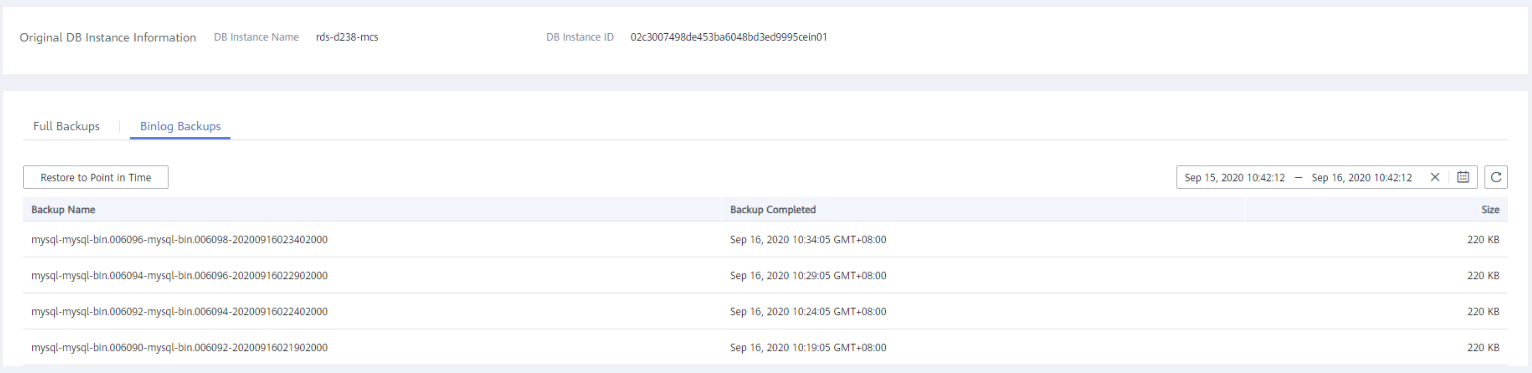
- To view generated cross-region backup files, click View Cross-Region Backup in the Operation column. If a DB instance fails, you can use the cross-region backup files to restore data to a new DB instance. Figure 2 Full backups
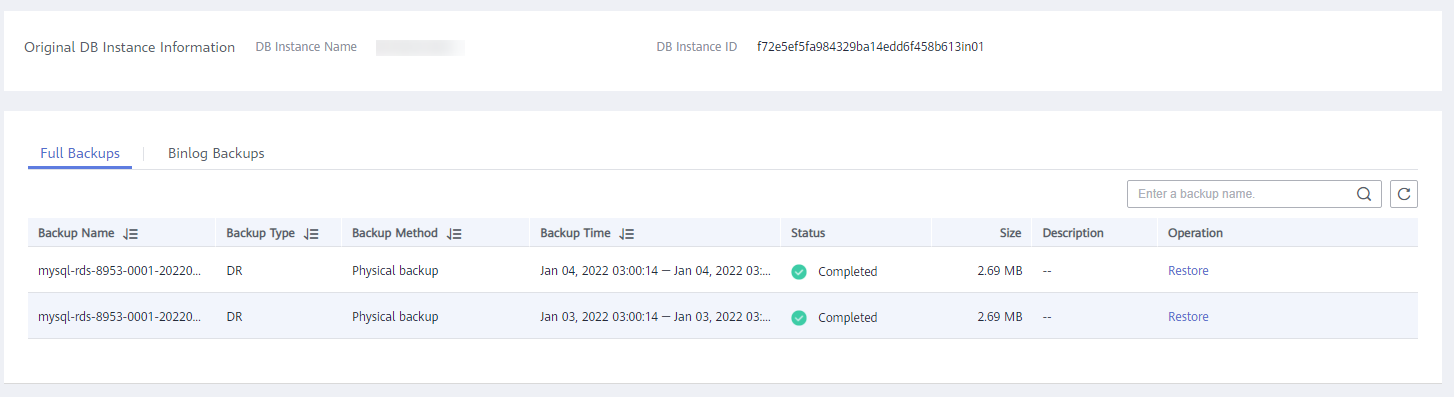 Figure 3 Binlog backups
- By default, all instances with cross-region backups are displayed.
- Log in to the RDS console.
- Click in the upper left corner and select a region.
- On the Backups page, click the Cross-Region Backups tab.
- Locate a DB instance and click Set Cross-Region Backup in the Operation column. On the displayed page, disable the cross-region backup policy.

Disabling the cross-region backup policy deletes the backups stored in the destination region.
Figure 4 Disabling a cross-region backup policy

- Click OK.
What is your overall rating for this page?
Thank you very much for your feedback. We will continue working to improve the documentation.See the reply and handling status in My Cloud VOC.
For any further questions, feel free to contact us through the chatbot.
Chatbot


