

Online Discovery
Before migrating, you need to discover your resources and collect their details. This section describes how to discover resources provisioned on cloud platforms such as Alibaba Cloud, Huawei Cloud, AWS, Google Cloud, Azure, and Tencent Cloud over the Internet. Then you can organize the associations between resources and applications. The resource types supported by MgC depend on the source cloud platform.
- Alibaba Cloud and Huawei Cloud: servers, containers, middleware, databases, big data clusters, networks, and storage
- Tencent Cloud: servers, databases, and storage
- AWS, Google Cloud, and Azure: servers, containers, middleware, databases, storage, and networks
Creating an Online Discovery Task
- Sign in to the MgC console. In the navigation pane, under Project, select your application migration project from the drop-down list.
- In the navigation pane, choose Source Resources.
- Under Online Discovery, click Cloud Discovery.
Figure 1 Cloud platform discovery

- Configure the parameters based on Table 1 to create a discovery task.
Table 1 Parameters for creating a cloud discovery task Area
Parameter
Description
Task Settings
Source Platform
Select the source cloud platform. Currently, Alibaba Cloud, Huawei Cloud, AWS, Google Cloud, Azure, and Tencent Cloud are supported.
Collection Method
If you choose Credential, select the credential for accessing the source cloud platform. If the credential is not in the drop-down list, choose Add Credential to add it. For details, see Managing Credentials.
- If the source cloud platform is Alibaba Cloud, Huawei Cloud, AWS, or Tencent Cloud, select AK/SK for Authentication and enter the AK/SK pair of your source cloud account.
- If the source cloud platform is Google Cloud, select Configuration File for Authentication and upload the configuration file that contains your Google Cloud service account credentials. The file must be in JSON format and cannot exceed 4 KB. For details about how to obtain the configuration file, see Obtaining Google Cloud Credentials Configuration Files.
- If the source cloud platform is Azure, Select ID/Secret for Authentication. To learn how to obtain Azure credentials, see How Do I Obtain Azure Credentials?
If you choose Agency, a cloud service agency is required to assign MgC the permissions required to access resources in your current account. For details about the agency permissions, see Cloud Discovery.
NOTE:This option is available only when Source Platform is set to Huawei Cloud.
If the Agency Status is Agency not created, click Create Agency. On the displayed page, click OK.
Region
Select the region where your source environment is deployed. You can select multiple regions.
Resource Type
Choose the types of source resources (collection items) to be collected from the drop-down list. You can review the supported cloud platforms and resource types.
NOTICE:If Source Platform is set to Huawei Cloud and Collection Method to Agency, the following resources can be collected: servers, EIPs, security groups, and VPCs.
Basic Information
Task Name
The default name format is <task type>-<current-time>. You can also specify a name.
Task Description (Optional)
Describe the task.
Application (Optional)
Select the application that you want to group the discovered resources into. An application, as a group of resources, can serve as the basis for batch resource assessments and migrations. If no applications are available, perform the following steps to create one:
- Click Create Application. Enter an application name and description.
- Configure Business Scenario and Environment, and set Region to the region that you want to migrate to.
- Click OK.
- Click Confirm. After the online discovery task is created, MgC starts discovering source resources.
- If the task succeeds, return to the Source Resources page and view the list of discovered source resources and their details.
- If the task fails, click the task name to view the data source that fails to be collected. Hover over to the collection status to view the failure cause.
Figure 2 Viewing the failure cause

Checking Migration Readiness for Servers
- Ensure that the MgC Agent has been installed in the source intranet environment and has been connected to MgC.
- Go to the Source Resources page, in the server list, select the servers to be migrated and click Group as Application above the list. If you have specified an application in the online discovery task for discovering these source servers, skip this step.
- If an application is available, select the application from the drop-down list and click OK.
- If no applications are available, click Create Application in the displayed dialog box. Then enter an application name and description, select a business scenario, environment, and target region, and click Create. Then click OK.
- Above the server list, choose Migration Scenario > Server migration. If the Migration Readiness column is not in the list, click
 next to the search box and select Migration Readiness.
 - For each source server, click Configure in the Migration Readiness column.
- Configure the parameters based on Table 2.
Table 2 Parameters for configuring migration readiness check Parameter
Configuration
Type
Set this parameter based on the OS type of the source server.
MgC Agent
Select the MgC Agent installed in the source environment.
Access IP Address
Select the IP address for accessing the source server. It can be a public or private IP address. After the pre-migration check is passed, the IP address you select here will be used for migration.
Port
Enter the accessible port of the source server.
- The port defaults to 5985 for Windows. You can change it to any port that is accessible on the source server.
- The port defaults to 22 for Linux. You can change it to any port that is accessible on the source server.
NOTE:To change the connection ports of servers in batches, use the Change Port button above the list.
Credential
Select the server credential. If the credential is not displayed in the list, go to the MgC Agent console, add the server credential, and synchronize it to MgC.
NOTICE:The credentials you provide must have sufficient permissions, so the MgC Agent can collect necessary server details. Deep collection requires that the credentials you provide meet the following requirements:
- Linux: root and its password
- Windows: administrator and its password
- Click Confirm. The system checks whether the source server can be accessed using the information you provide and whether the server can be migrated. If Ready shows up in the Migration Readiness column, the source server can be migrated.
Performing a Deep Collection for Servers
- Ensure that the MgC Agent has been installed in the source intranet environment and has been connected to MgC.
- On the Source Resources page, in the server list, locate the source server whose details you want to collect and click Configure in the MgC Agent column. Configure the parameters based on Table 3.
Table 3 Parameters for configuring a deep collection Parameter
Configuration
Type
Set this parameter based on the OS type of the source server.
MgC Agent
Select the MgC Agent installed in the source environment.
Access IP Address
Select the IP address for accessing the source server. It can be a public or private IP address. After the pre-migration check is passed, the IP address you select here will be used for migration.
Port
Enter the accessible port of the source server.
- The port defaults to 5985 for Windows. You can change it to any port that is accessible on the source server.
- The port defaults to 22 for Linux. You can change it to any port that is accessible on the source server.
NOTE:To change the connection ports of servers in batches, use the Change Port button above the list.
Credential
Select the server credential. If the credential is not displayed in the list, go to the MgC Agent console, add the server credential, and synchronize it to MgC.
NOTICE:The credentials you provide must have sufficient permissions, so the MgC Agent can collect necessary server details. Deep collection requires that the credentials you provide meet the following requirements:
- Linux: root and its password
- Windows: administrator and its password
- Click Confirm. The system automatically starts executing a deep collection. When Collected shows up in the Deep Collection column, the collection is complete.
Performing a Deep Collection for Containers

After the deep collection for containers, the node's IP address will be displayed, instead of the server name. The processor specifications and server ID will not be displayed.
- Ensure that the MgC Agent has been installed in the source intranet environment and has been connected to MgC.
- On the Source Resources page, click the Containers tab.
- For each container resource whose details need to be collected, click Associate in the MgC Agent column.
If you want to associate multiple resources with an MgC Agent at a time, select them and click Manage MgC Agent above the list.
- Select the MgC Agent installed in the source environment and click OK. After the association is done, Associated will appear in the MgC Agent column.
- For each container resource, in the Credential column, click Associate to configure their credentials.
- Select the resource credential. If the credential is not displayed in the list, go to the MgC Agent console, add the credential, and synchronize it to MgC.
- Click OK. Then MgC checks whether the resource can be accessed using the associated credential. When Ready appears in the Deep Collection column, click Collect to perform a deep collection. You can click Collect Again in the Deep Collection column to launch a deep collection again if needed. After the collection is complete, click the resource name to view the collected details.
Performing a Deep Collection for Object Storage Resources
- Ensure that the MgC Agent has been installed in the source intranet environment and has been connected to MgC.
- On the Source Resources page, click the Storage tab.
- Locate an object storage resource and click Configure in the Deep Collection column.
- Select the MgC Agent in the source environment and the credential for accessing the resource, and click Confirm. If the credential is not displayed in the drop-down list, go to the MgC Agent console and add the resource credential to the MgC Agent and synchronize it to MgC.

To perform a deep collection for your Azure object storage resources, you need to provide your storage account and access key. For details about how to obtain the credentials, see How Do I Obtain the Required Credentials Before Using MgC to Perform a Deep Collection for My Azure Object Storage Resources?
- Click Add Prefix in the Operation column.
- Enter a prefix to filter the objects whose details need to be collected. If this parameter is not specified, all objects in the bucket are collected by default. Click OK to save the prefix settings.
- Click Deep Collection in the Operation column. The system starts collecting resource details. You can perform a deep collection on a resource for multiple times. When Collection Status changes to Completed, click the resource name to view the collected information.
Performing a Deep Collection for Databases
Deep collection is available for AWS RDS (for MySQL, MariaDB, Aurora, PostgreSQL, SQL Server, and Oracle) and AWS DocumentDB databases. The data collected includes database versions, engines, server character sets, average transactions per second (TPS), and queries per second (QPS), and other key performance metrics (KPIs). The collected data depends on the database type.
- Ensure that the MgC Agent has been installed in the source intranet environment, can access source databases, and has been connected to MgC.
- On the Source Resources page, click the Databases tab.
- In the database list, filter all discovered AWS databases by applying the Vendor filter. Locate a supported database and in the MgC Agent column, click Associate.
If you want to associate multiple resources with an MgC Agent at a time, select them and click Manage MgC Agent above the list.
- Select your MgC Agent. For Access Setting, if the selected resource is in the same VPC as your MgC Agent, select Private access. Otherwise, select Public access. Then click OK. Wait until Associated appears in the MgC Agent column.
- In the Credential column, click Associate to configure the credential for accessing the resource.
- Select the resource credential. If the credential is not displayed in the drop-down list, go to the MgC Agent console, add the credential, and synchronize it to MgC.
- Click OK. Then MgC checks whether the resource can be accessed using the associated credential. When Ready appears in the Deep Collection column, click Collect to perform a deep collection. You can click Collect Again in the Deep Collection column to launch a deep collection again if needed.
- Wait for the deep collection to complete. Then click the database name to go to the database details page. In the Database Information area, you can view the collected details.
Viewing Discovered Source Resources
- On the Source Resources page, you can view the list and number of discovered resources.
Figure 3 Viewing the resource list
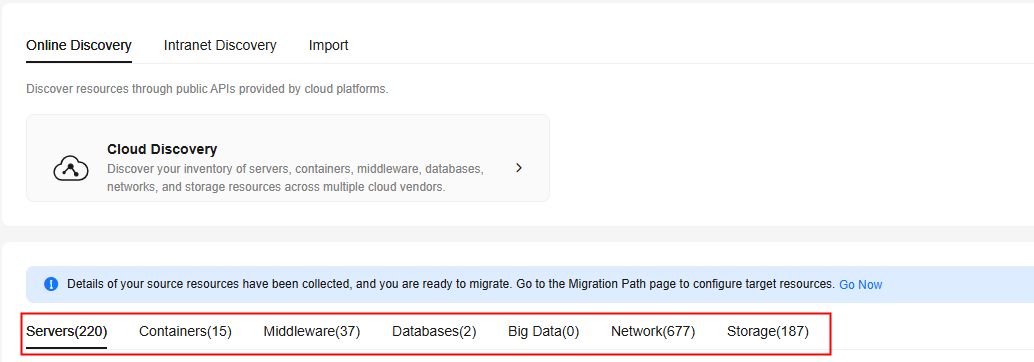
- Click each tab to view the list of resources for that type.
- Click a resource name to view its details.
Supported Resource Types
|
Cloud Platform |
Resource Type |
Subtype |
|---|---|---|
|
Alibaba Cloud |
|
- |
|
Middleware |
|
|
|
Storage |
|
|
|
Networking |
|
|
|
Huawei Cloud |
|
- |
|
Middleware |
|
|
|
Storage |
|
|
|
Networking |
|
|
|
AWS |
|
- |
|
Middleware |
|
|
|
Networking |
|
|
|
Storage |
|
|
|
Tencent Cloud |
|
- |
|
Storage |
|
|
|
Google Cloud |
|
- |
|
Middleware |
Redis |
|
|
Storage |
|
|
|
Networking |
|
|
|
Azure |
|
- |
|
Storage |
|
|
|
Middleware |
|
|
|
Networking |
|
Feedback
Was this page helpful?
Provide feedbackThank you very much for your feedback. We will continue working to improve the documentation.See the reply and handling status in My Cloud VOC.
For any further questions, feel free to contact us through the chatbot.
Chatbot


