

Configuring a Job for Synchronizing Data from MySQL to Elasticsearch (Internal Test)
Supported Source and Destination Database Versions
| Source Database | Destination Database |
|---|---|
| MySQL database (5.6, 5.7, and 8.x) | Elasticsearch database (7.x and 6.x) |
Database Account Permissions
Before you use DataArts Migration for data synchronization, ensure that the source and destination database accounts meet the requirements in the following table. Different types of synchronization tasks require different permissions. For details, see Table 2.
| Type | Required Permissions |
|---|---|
| Source database connection account | The source database account must have the following minimal permissions required for running SQL statements: SELECT, SHOW DATABASES, REPLICATION SLAVE and REPLICATION CLIENT. GRANT SELECT, SHOW DATABASES, REPLICATION SLAVE, REPLICATION CLIENT ON *.* TO 'Username'@'Resource group network segment', 'Username'@'IP address of the CDM cluster as an agent'; |
| Destination database connection account | CSS clusters in security mode are not supported. HTTPS access cannot be enabled for CSS. |

- You are advised to create independent database accounts for DataArts Migration task connections to prevent task failures caused by password modification.
- After changing the account passwords for the source or destination databases, modify the connection information in Management Center as soon as possible to prevent automatic retries after a task failure. Automatic retries will lock the database accounts.
Supported Synchronization Objects
Table 3 lists the objects that can be synchronized in different scenarios.
| Type | Note |
|---|---|
| Synchronization objects |
|
Notes
In addition to the constraints on supported data sources and versions, connection account permissions, and synchronization objects, you also need to pay attention to the notes in Table 4.
| Type | Constraint |
|---|---|
| Database |
|
| Usage | General:
Full synchronization phase: During task startup and full data synchronization, do not perform DDL operations on the source database. Otherwise, the task may fail. Incremental synchronization phase:
Extraction from the standby database: Before extracting data from the standby database, ensure that a value can be returned after the SHOW MASTER STATUS command is executed on the standby database node. Otherwise, data jobs may be abnormal and data may be lost when the jobs are suspended and then resumed. Troubleshooting: If any problem occurs during task creation, startup, full synchronization, incremental synchronization, or completion, rectify the fault by referring to FAQs. |
| Other | Tables in the destination database can contain more columns than those in the source database. The following failures must be avoided: Assume that extra columns in the destination database cannot be null and have no default values. If newly inserted data records are synchronized from the source database to the destination database, the extra columns will become null, which does not meet the requirements of the destination database and will cause the task to fail. |
Procedure
This section uses real-time synchronization from RDS for MySQL to Elasticsearch as an example to describe how to configure a real-time data migration job. Before that, ensure that you have read the instructions described in Check Before Use and completed all the preparations.
- Create a real-time migration job by following the instructions in Creating a Real-Time Migration Job and go to the job configuration page.
- Select the data connection type. Select MySQL for Source and Elasticsearch for Destination. Figure 1 Selecting the data connection type

- Select a job type. The default migration type is Real-time. The migration scenarios include Entire DB and Database/Table partition.
Database and table sharding includes horizontal and vertical sharding.
- Horizontal sharding: A source table is split into multiple database and table shards based on data rows. Tables in different databases can be combined into a single table. Data in this table will then be written to the destination table during synchronization. The matched database and table shards must have the same structure.
- Vertical sharding: A large source table is split into multiple database and table shards based on the table structure column. Tables in different databases can be combined into a single table. Data in this table will then be written to the destination table during synchronization. All the matched table shards must have the same primary key, based on which data is matched. The structure of the destination table is the union set of the structures of all matched tables. Figure 2 Setting the migration job type

- Configure network resources. Select the created MySQL and Elasticsearch data connections and the migration resource group for which the network connection has been configured. Figure 3 Selecting data connections and a migration resource group
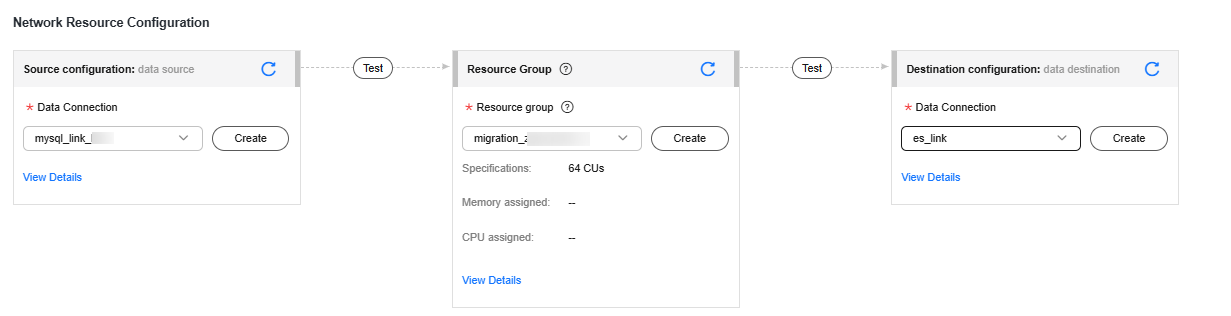
If no data connection is available, click Create to go to the Manage Data Connections page of the Management Center console and click Create Data Connection to create a connection. For details, see Configuring DataArts Studio Data Connection Parameters.
If no migration resource group is available, click Create to create one. For details, see Buying a DataArts Migration Resource Group Incremental Package.
- Check the network connectivity. After the data connections and migration resource group are configured, perform the following operations to check the connectivity between the data sources and the migration resource group.
- Click Source Configuration. The system will test the connectivity of the entire migration job.
- Click Test in the source and destination and migration resource group.
If the network connectivity is abnormal, see How Do I Troubleshoot a Network Disconnection Between the Data Source and Resource Group?
- Configure source parameters.
Select the databases and tables to be synchronized based on Table 5.
Table 5 Selecting the databases and tables to be synchronized Synchronization Scenario
Configuration Method
Entire DB
Select the MySQL databases and tables to be migrated.Figure 4 Selecting databases and tables
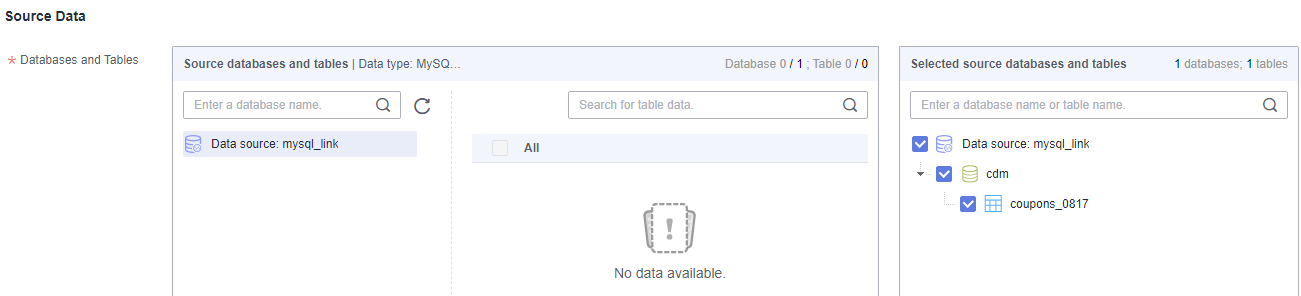
Both databases and tables can be customized. You can select one database and one table, or multiple databases and tables.
Database/Table shard
Add a logical table.
- Logical table name: name of the table that is finally written to Elasticsearch.
- Source database filtering condition: You can enter a regular expression to filter all shards to be written to the destination aggregation table in all MySQL instances.
- Source table filter condition: You can enter a regular expression to filter all shards to be written to the destination Elasticsearch aggregation table from the filtered source shards.
- When synchronizing database and table shards, ensure that at least one database table connected by each connection meets the configured filter criteria. Otherwise, the synchronization may fail. Figure 5 Adding a logical table

You can click Preview in the Operation column to preview an added logical table. When you preview a logical table, the more the source tables, the longer the waiting time.
Figure 6 Previewing a logical table

- Configure destination parameters.
- Set Database and Table Matching Policy.
For details about the matching policy between source and destination databases and tables in each synchronization scenario, see Table 6.
Table 6 Database and table matching policy Synchronization Scenario
Configuration Method
Entire DB
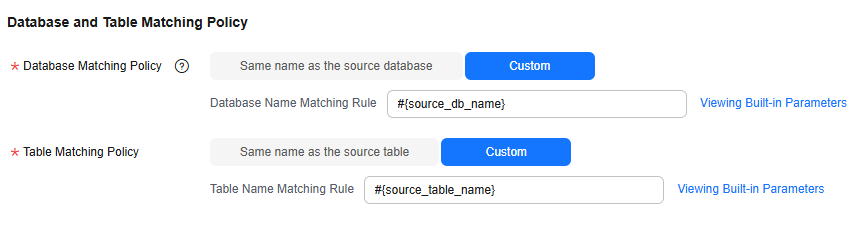
- Index matching policy
- Same name as the source table: Data will be synchronized to the Elasticsearch table with the same name as the source MySQL table.
- Custom: Data will be synchronized to the Elasticsearch table you specify. Figure 7 Index matching policy in the entire DB migration scenario
 NOTE:
NOTE:When customizing an index matching policy, you can use built-in variable #{source_table_name} to identify the source table name. The table name must contain #{source_table_name}.
- Data source configuration at the destination
- Elasticsearch Version: 7.x and 6.x
- Configure Global Index Attributes: Global index attributes apply to all indexes. The attributes you configure here have a lower priority than those defined in Edit Index Attribute.
For details about the supported configuration items, see Table 7.
Database/Table shard
- Index matching policy: By default, the value is the same as the name of the logical table entered in the source configuration.
- When synchronizing database and table shards, ensure that at least one database table connected by each connection meets the configured filter criteria. Otherwise, the synchronization may fail. Figure 8 Database and table matching policy in the sharding scenario

- Data source configuration at the destination
- Elasticsearch Version: 7.x and 6.x
- Configure Global Index Attributes: Global index attributes apply to all indexes. The attributes you configure here have a lower priority than those defined in Edit Index Attribute.
For details about the supported configuration items, see Table 7.
Table 7 Configuration items supported by the Elasticsearch destination Parameter
Type
Default Value
Unit
Description
sink.server.timezone
string
System time zone
-
Write the time zone. Time zone when the expected time data (timestamp) is written to Elasticsearch. The default value is the current system time zone, for example, UTC+8.
Perform global configurations.
es.num.shards
int
1
-
Number of shards Specifies the number of shards when an index is created.
Global configuration or single-index configuration.
es.num.replicas
int
1
-
Number of replicas. Specifies the number of replicas when an index is created.
Global configuration or single-index configuration.
es.primary.key
string
-
-
This parameter is the primary key. Primary key field of an index. Primary keys can be combined. Primary keys are separated by primary key separators.
Single-index configuration.
document-id.key-delimiter
string
English SBC Comma
-
Primary key separator. Separator between different fields in the composite primary key.
Global configuration or single-index configuration.
sink.keyby.mode
string
TABLE
-
Write concurrency mode. When configuring multi-concurrency for a job, you can define the conditions for concurrently writing data to Elasticsearch to improve the write efficiency. Concurrency by primary key (configured PK) and concurrency by table name (TABLE) are supported.
sink.http.connect.timeout.millis
long
1000
Millisecond (ms)
Timeout interval for creating a connection. Timeout interval for connecting to Elasticsearch for the first time.
Perform global configurations.
sink.http.socket.timeout.millis
long
30000
Millisecond (ms)
Write response timeout interval. Defines the timeout interval for waiting for the completion of writing data to the Elasticsearch server.
Perform global configurations.
sink.bulk-flush.max-actions
long
1000
Piece (rec)
Maximum number of cached data records to be written. When the number of cached data records exceeds the upper limit, data is flushed and a write request is immediately sent to the Elasticsearch service.
Perform global configurations.
sink.bulk-flush.max-size
string
2mb
-
Maximum size of the cache data to be written. When the amount of cached data exceeds the upper limit, data is flushed and a write request is immediately sent to the Elasticsearch service.
Perform global configurations.
sink.bulk-flush.interval
int
10
Second (sec)
Interval for flushing data. Interval for flushing data. By default, data is written every 10 seconds to clear the data in the cache.
Perform global configurations.
es.dynamic-index.ddl.strategy
enum
LATEST_INDEX
-
Index range for DDL to take effect. When the dynamic index suffix is enabled, indexes of some columns are dynamically generated regularly. This parameter is used to specify the index range for DDL synchronization. LATEST_INDEX: DDL applies to the latest index. ALL_INDEXES: DDL applies to all indexes.
Perform global configurations.
index.time.format
string
yyyy-MM-dd HH:mm:ss.SSSSSS||yyyy-MM-dd HH:mm:ss.SSSSS||yyyy-MM-dd HH:mm:ss.SSSS||yyyy-MM-dd HH:mm:ss.SSS||yyyy-MM-dd HH:mm:ss.SS||yyyy-MM-dd HH:mm:ss.S||yyyy-MM-dd HH:mm:ss||yyyy-MM-dd HH:mm:ss.SSSSSS||yyyy-MM-dd HH:mm:ss.SSSSS||yyyy-MM-dd HH:mm:ss.SSSS||yyyy-MM-dd HH:mm:ss.SSS||yyyy-MM-dd HH:mm:ss.SS||yyyy-MM-dd HH:mm:ss.S||yyyy-MM-dd HH:mm:ss||yyyy-MM-dd||HH:mm:ss.SSSSSS||HH:mm:ss.SSSSS||HH:mm:ss.SSSS||HH:mm:ss.SSS||HH:mm:ss.SS||HH:mm:ss.S||HH:mm:ss||yyyy
-
Default format of the date field mapped from the source time field to the destination index when an index is created during job running.
Global configuration or single-index configuration.
index.time.format.for.datetime
string
yyyy-MM-dd HH:mm:ss.SSSSSS||yyyy-MM-dd HH:mm:ss.SSSSS||yyyy-MM-dd HH:mm:ss.SSSS||yyyy-MM-dd HH:mm:ss.SSS||yyyy-MM-dd HH:mm:ss.SS||yyyy-MM-dd HH:mm:ss.S||yyyy-MM-dd HH:mm:ss
-
Default format of the datetime field mapped from the source to the destination index when an index is created during job running.
Global configuration or single-index configuration.
index.time.format.for.timestamp
string
yyyy-MM-dd HH:mm:ss.SSSSSS||yyyy-MM-dd HH:mm:ss.SSSSS||yyyy-MM-dd HH:mm:ss.SSSS||yyyy-MM-dd HH:mm:ss.SSS||yyyy-MM-dd HH:mm:ss.SS||yyyy-MM-dd HH:mm:ss.S||yyyy-MM-dd HH:mm:ss
-
Default format of the date field mapped from the source timestamp field to the destination index when an index is created during job running.
Global configuration or single-index configuration.
index.time.format.for.date
string
yyyy-MM-dd
-
Default format of the date field mapped from the source end to the destination end when an index is created during job running.
Global configuration or single-index configuration.
index.time.format.for.time
string
HH:mm:ss.SSSSSS||HH:mm:ss.SSSSS||HH:mm:ss.SSSS||HH:mm:ss.SSS||HH:mm:ss.SS||HH:mm:ss.S||HH:mm:ss
-
Default format of the date field mapped from the time field at the source to the index at the destination when an index is created during job running.
Global configuration or single-index configuration.
index.time.format.for.year
string
yyyy
-
Default format of the year field mapped from the source to the date field in the destination index when an index is created during job running.
Global configuration or single-index configuration.
sink.field.name.case-sensitive
boolean
true
-
Whether field names are case-sensitive. The default value is true. This parameter also affects automatic index creation. If this parameter is disabled, field names will be converted to lowercase letters during automatic index creation.
- Index matching policy
- Set Database and Table Matching Policy.
- Refresh and check the mapping between the source and destination tables. In addition, you can modify table attributes, add additional fields, and use the automatic table creation capability to create tables in the destination Elasticsearch database. When the vertical sharding mode is used, you need to specify a table as the primary table after refreshing the mapping between the source and destination tables. Data will be deleted from the destination table only when a deletion operation on the primary table is synchronized to the destination. When a deletion operation on a non-primary table is synchronized to the destination, only the values of non-primary key fields in the destination table are cleared.Figure 9 Mapping between source and destination tables

- Edit additional fields: Click Additional Field in the Operation column to add custom fields to the destination Elasticsearch index. The additional fields are also added to the table created for the Elasticsearch index. For a new table, you can add additional fields to the existing fields in the source table. You can customize the field name, select the field type, and enter the field value.
- Field Name: name of the new field in the destination Elasticsearch index
- Field Type: type of the new field in the destination Elasticsearch index
- Field Value: value source of the new field in the destination Elasticsearch index
Table 8 Additional field value obtaining mode Type
Example
Constant
Digits, letters, and special characters are supported. Color emoticons may cause a job submission failure.
Built-in variable
- Source host IP address: source.host
- Source schema name: source.schema
- Source table name: source.table
- Destination schema name: target.schema
- Destination table name: target.table
Source table field
Any field in the source table
Do not change the name of the source table field when the job is running. Otherwise, the job may be abnormal.
UDF
- substring(#col, pos[, len]): obtains a substring of a specified length from the source column name. The substring range is [pos, pos+len).
- date_format(#col, time_format[, src_tz, dst_tz]): formats the source column name based on a specified time format. The time zone can be converted using src_tz and dst_tz.
- now([tz]): obtains the current time in a specified time zone.
- if(cond_exp, str1, str2): returns str1 if the condition expression cond_exp is met and returns str2 otherwise.
- concat(#col[, #str, ...]): concatenates multiple parameters, including source columns and strings.
- from_unixtime(#col[, time_format]): formats a Unix timestamp based on a specified time format.
- unix_timestamp(#col[, precision, time_format]): converts a time into a Unix timestamp of a specified time format and precision. time_format must be the same as that in the source data.
- Edit index attributes.
Click Edit Index Attribute in the Operation column to configure Elasticsearch index attributes, including the index name, dynamic index name suffix, and index attributes.
Figure 10 Configuring Elasticsearch index attributes
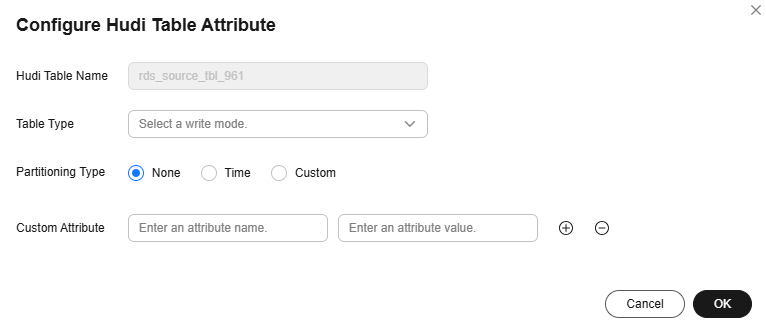
- Index name: index name (prefix) generated based on the index matching rule.
- Customizing the suffix of a dynamic index name: You can configure a UDF to dynamically define the suffix of an index name. The UDF calculation result is combined with the index name to generate the final index name. With the dynamic index suffix function, you can write data to different indexes (with the same alias) to improve query efficiency. Currently, the following UDF methods are supported:
- Time format: date_format (#col_name, format, time zone). col_name is the name of the time field. Example: date_format (#ts, yyyyMMdd, +8)
- Hash: hash(#col_name, algorithm_name, hash function input parameters...), for example, hash(#id, simple_hash, 5)
- Week number in a year: week_in_year(#col_name), where col_name is the name of the time field. Example: week_in_year (#ts)
- Character string truncation: substring (#col_name) Example: substring (#item_name, 0, 5). The first five characters of item_name are truncated.
- When configuring the dynamic index name suffix, ensure that the generated index name complies with the Elasticsearch index name naming rules. Otherwise, the dynamic index fails to be created and the job is abnormal. Specifically, the suffix cannot contain special characters, including but not limited to [, ", *, \,,, >, </,? ] and Chinese characters. In addition, the suffix cannot contain uppercase letters.
- Custom Attribute: You can configure advanced attributes for an index. For details about the supported configuration items, see Table 7.
- Edit additional fields: Click Additional Field in the Operation column to add custom fields to the destination Elasticsearch index. The additional fields are also added to the table created for the Elasticsearch index. For a new table, you can add additional fields to the existing fields in the source table. You can customize the field name, select the field type, and enter the field value.
- Configure DDL message processing rules.
Real-time migration jobs can synchronize data manipulation language (DML) operations, such as adding, deleting, and modifying data, as well as some table structure changes using the data definition language (DDL). You can set the processing policy for a DDL operation to Normal processing, Ignore, or Error.
- Normal processing: When a DDL operation on the source database or table is detected, the operation is automatically synchronized to the destination.
- Ignore: When a DDL operation on the source database or table is detected, the operation is ignored and not synchronized to the destination.
- Error: When a DDL operation on the source database or table is detected, the migration job throws an exception. Figure 11 DDL configuration

- Configure task parameters.
Table 9 Task parameters Parameter
Description
Default Value
Execution Memory
Memory allocated for job execution, which automatically changes with the number of CPU cores.
8 GB
CPU Cores
Value range: 2 to 32
For each CPU core added, 4 GB execution memory and one concurrency are automatically added.
2
Maximum Concurrent Requests
Maximum number of jobs that can be concurrently executed. This parameter does not need to be configured and automatically changes with the number of CPU cores.
1
Auto Retry
Whether to enable automatic retry upon a job failure
No
Maximum Retries
This parameter is displayed when Auto Retry is set to Yes.
1
Retry Interval (Seconds)
This parameter is displayed when Auto Retry is set to Yes.
120
Add Custom Attribute
You can add custom attributes to modify some job parameters and enable some advanced functions. For details, see Job Performance Optimization.
-
- Submit and run the job.
After configuring the job, click Submit in the upper left corner to submit the job.
Figure 12 Submitting the job

After submitting the job, click Start on the job development page. In the displayed dialog box, set required parameters and click OK.
Figure 13 Starting the job
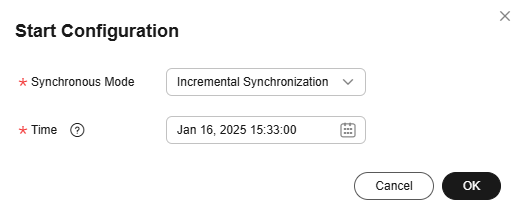
Table 10 Parameters for starting the job Parameter
Description
Synchronous Mode
- Incremental Synchronization: Incremental data synchronization starts from a specified time point.
- Full and incremental synchronization: All data is synchronized first, and then incremental data is synchronized in real time.
Time
This parameter must be set for incremental synchronization, and it specifies the start time of incremental synchronization.
NOTE:If you set a time that is earlier than the earliest binlog time, the earliest log time is used.
- Monitor the job.
On the job development page, click Monitor to go to the Job Monitoring page. You can view the status and log of the job, and configure alarm rules for the job. For details, see Real-Time Migration Job O&M.
Figure 14 Going to Monitor Job page

Performance Tuning
If the synchronization speed is too slow, rectify the fault by referring to Job Performance Optimization.
Others
In vertical partitioning mode, a primary table and multiple secondary tables at the source can be merged into a destination table. The data records in the primary table are mapped to those in the secondary tables one by one through the primary key.

- The names, types, and quantity of the primary keys of the tables into which a table is split must be the same. Elasticsearch merges tables based on the data with the same primary key.
- Vertical sharding does not support additional fields or dynamic indexing.
- Data in the primary and secondary tables is distinguished based on the MySQL sharding mode. Data consistency and transactionality are ensured by the source sharding plugin or service data operations.
- It is recommended that a maximum of 10 secondary tables be associated with a primary table. If too many secondary tables are associated with the primary table, data migration may be slow. Currently, a maximum of 20 tables can be merged.
What is your overall rating for this page?
Thank you very much for your feedback. We will continue working to improve the documentation.See the reply and handling status in My Cloud VOC.
For any further questions, feel free to contact us through the chatbot.
Chatbot


