

Pay-per-Use to Yearly/Monthly
If you have a pay-per-use DB instance that you expect to use for a long time, you can change it to yearly/monthly billing to reduce costs. Doing so will create an order. After you pay for the order, yearly/monthly billing will be applied immediately.
Constraints
Pay-per-use instances in any of the following statuses cannot be changed to yearly/monthly: frozen, creation failed, changing instance class, and scaling up.
When you change the billing mode of an RDS instance, the billing modes of its instance specifications, storage, and dedicated resources are also changed.
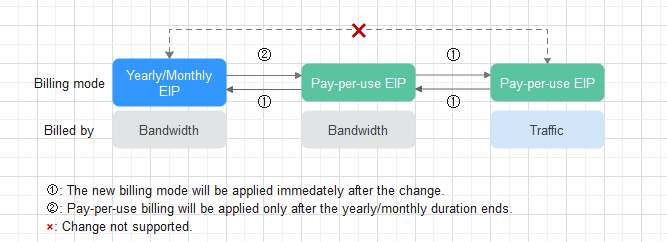
- To change the EIP billing mode, see Changing the Billing Mode of an EIP from Pay-per-Use to Yearly/Monthly.
- The backup space and cross-region backup storage space can only be billed on a pay-per-use basis.
Changing the Billing Mode of an RDS Instance from Pay-per-Use to Yearly/Monthly
- Log in to the RDS console.
- Click
 in the upper left corner and select a region.
- On the Instances page, locate the target DB instance and choose More > Change to Yearly/Monthly in the Operation column.
- Select the renewal duration, in months. The minimum duration is one month.
- If you do not need to modify your settings, click Pay to go to the payment page.
- If you do not make the payment immediately, the system will retain your order. You can pay for or cancel the order later by choosing Billing & Costs > Unpaid Orders. The instance status is Changing to Yearly/Monthly. Payment incomplete. Pay Now.
- Select a payment method and click Confirm.
- View the result on the Instances page.
In the upper right corner of the instance list, click
 to refresh the list. The instance status will become Available and the billing mode will become yearly/monthly after the change is complete.
Changing the Billing Mode of an EIP from Pay-per-Use to Yearly/Monthly
Resources such as the EIP that is used by a DB instance may not support the change with this instance. For details about their billing mode change rules and handling methods, see Table 1.
| Resource | Billing Mode | Billed By | Bandwidth Type | Change to Yearly/Monthly Billing with the DB instance | Handling Measure |
|---|---|---|---|---|---|
| EIP | Pay-per-use | Bandwidth | Dedicated | Not supported | Change the EIP to yearly/monthly billing on the EIP console. For details, see Changing EIP Billing Mode. |
| EIP | Pay-per-use | Traffic | Dedicated | Not supported | An EIP that is billed by traffic on a pay-per-use basis cannot be directly changed to be billed on a yearly/monthly basis. To change this:
For details, see Changing EIP Billing Mode. |
FAQ
Q: What Bills Are Generated After the Billing Mode of an RDS DB Instance Is Changed from Pay-per-Use to Yearly/Monthly?
A: Suppose you bought a pay-per-use DB instance at 15:29:16 on April 18, 2023 and changed it to yearly/monthly billing at 16:30:30 on the same day. After you paid for the order, yearly/monthly billing was applied immediately. On the Billing Center > Billing page, three line items were generated, one for each of the hours the DB instance was used on a pay-per-use basis, and one for the yearly/monthly subscription:
- Pay-per-use: from 15:00:00 on April 18, 2023, to 16:00:00 on April 18, 2023. Expenditures are generated for the period from 15:29:16 to 16:00:00.
- Pay-per-use: 16:00:00 on April 18, 2023, to 17:00:00 on April 18, 2023. Expenditures are generated for the period from 16:00:00 to 16:30:30.
- Yearly/Monthly: 16:30:30 on April 18, 2023
What is your overall rating for this page?
Thank you very much for your feedback. We will continue working to improve the documentation.See the reply and handling status in My Cloud VOC.
For any further questions, feel free to contact us through the chatbot.
Chatbot


