

Help Center/ IoT Device Access/ FAQs/ Solution Consulting/ Does the IoTDA Support Device Registration in Batches?
Updated on 2025-12-18 GMT+08:00
Does the IoTDA Support Device Registration in Batches?
IoTDA allows an application to call the API Creating a Batch Task to register a batch of devices. Alternatively, you can perform batch registration on the IoTDA console. This topic describes how to use the IoTDA console to register a batch of devices.
- Visit the IoTDA product page and click Access Console.
- Click the target instance. In the navigation pane, choose Devices > All Devices.
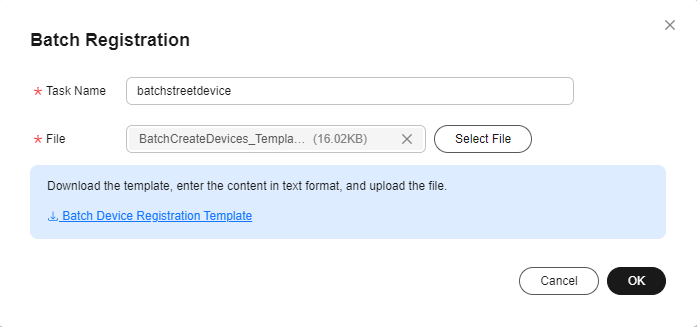
- Click the Batch Registration tab, click Batch Register, specify Task Name, add a file, and click OK. Figure 1 Device - Registering devices in batches
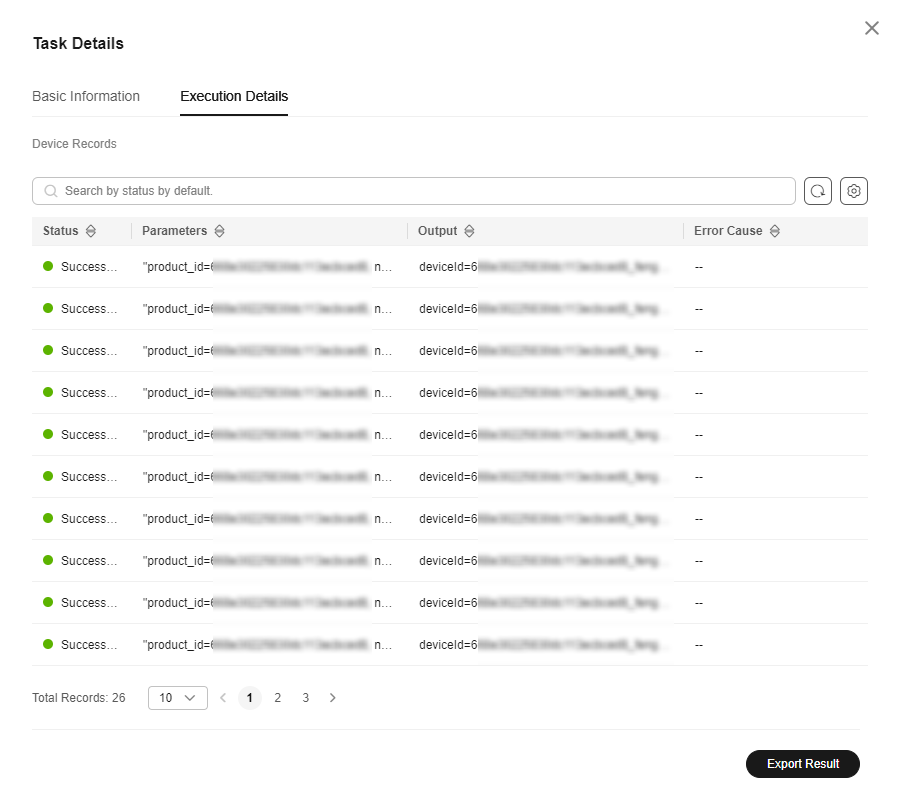
- If the devices use the native MQTT protocol, click the batch task registration record to open the task execution details, and save the device IDs and secrets generated, which will be used for device access. Figure 2 Batch device registration - Execution details
Parent topic: Solution Consulting
What is your overall rating for this page?
0
1
2
3
4
5
6
7
8
9
10
Very dissatisfiedVery satisfied
Thank you very much for your feedback. We will continue working to improve the documentation.See the reply and handling status in My Cloud VOC.
The system is busy. Please try again later.
For any further questions, feel free to contact us through the chatbot.
Chatbot


