

Migrating Data Between Elasticsearch Clusters Using Huawei Cloud Logstash
You can use a Logstash cluster created using Huawei Cloud's Cloud Search Service (CSS) to migrate data between Elasticsearch clusters.
Scenario
Huawei Cloud Logstash is a fully managed data ingestion and processing service. It is compatible with open-source Logstash and can be used for data migration between Elasticsearch clusters.
You can use Huawei Cloud Logstash to migrate data from Huawei Cloud Elasticsearch, self-built Elasticsearch, or third-party Elasticsearch to Huawei Cloud Elasticsearch. This solution applies to the following scenarios:
- Cross-version migration: Migrate data between different versions to maintain data availability and consistency in the new version, leveraging the compatibility and flexibility of Logstash. This mode applies to migration scenarios where the Elasticsearch cluster version span is large, for example, from 6.X to 7.X.
- Cluster merging: Utilize Logstash to transfer and consolidate data from multiple Elasticsearch clusters into a single Elasticsearch cluster, enabling unified management and analysis of data from different Elasticsearch clusters.
- Cloud migration: Migrate an on-premises Elasticsearch service to the cloud to enjoy the benefits of cloud services, such as scalability, ease-of-maintenance, and cost-effectiveness.
- Changing the service provider: An enterprise currently using a third-party Elasticsearch service wishes to switch to Huawei Cloud for reasons such as cost, performance, or other strategic considerations.
Solution Architecture

Figure 1 shows how to migrate data between Elasticsearch clusters using Huawei Cloud Logstash.
- Input: Huawei Cloud Logstash receives data from Huawei Cloud Elasticsearch, self-built Elasticsearch, or third-party Elasticsearch.

The procedure for migrating data from Huawei Cloud Elasticsearch, self-built Elasticsearch, or third-party Elasticsearch to Huawei Cloud Elasticsearch remains the same. The only difference is the access address of the source cluster. For details, see Obtaining Elasticsearch Cluster Information.
- Filter: Huawei Cloud Logstash cleanses and converts data.
- Output: Huawei Cloud Logstash outputs the data to the target cluster, such as Huawei Cloud Elasticsearch.
- Full data migration: Utilize Logstash to perform a complete data migration. This method is suitable for the initial phase of migration or scenarios where data integrity must be ensured.
- Incremental data migration: Configure Logstash to perform incremental queries and migrate only index data with incremental fields. This method is suitable for scenarios requiring continuous data synchronization or real-time data updates.
Advantages
- Compatibility with later versions: This solution supports the migration of Elasticsearch clusters across different versions.
- Efficient data processing: Logstash supports batch read and write operations, significantly enhancing data migration efficiency.
- Concurrent synchronization technology: The slice concurrent synchronization technology can be utilized to boost data migration speed and performance, especially when handling large volumes of data.
- Simple configuration: Huawei Cloud Logstash offers a straightforward and intuitive configuration process, allowing you to input, process, and output data through configuration files.
- Powerful data processing: Logstash includes various built-in filters to clean, convert, and enrich data during migration.
- Flexible migration policies: You can choose between full migration or incremental migration based on service requirements to optimize storage usage and migration time.
Performance Impact
- If the source cluster has a high resource usage, it is advisable to tune the size parameter to slow down the data retrieval speed or perform the migration during off-peak hours, reducing impact on the performance of the source cluster.
- If the source cluster has a low resource usage, keep the default settings of the Scroll API. In the meantime, monitor the load of the source cluster. Tune the size and slice parameters based on the load conditions of the source cluster, optimizing migration efficiency and resource utilization.
Constraints
During the full migration process, the index data of the source cluster must not be added, deleted, or modified. Otherwise, the data in the target cluster after migration will be inconsistent with the data in the source cluster. Incremental migration is not subject to this restriction.
Prerequisites
- The source and destination Elasticsearch clusters are available.
- You have created a CSS Logstash cluster (for example, Logstash-ES) and confirmed that Logstash and the Elasticsearch clusters involved are connected.
- If the source and destination clusters and Logstash are in the same VPC, the network is already connected.
- If the source and destination clusters and Logstash are in different VPCs, connect these VPCs first. For details, see Configuring Routes for a Logstash Cluster.
- To migrate an on-premises Elasticsearch cluster to Huawei Cloud, you can configure public network access for the on-premises Elasticsearch cluster.
- To migrate a third-party Elasticsearch cluster to Huawei Cloud, you need to establish a VPN or Direct Connect connection between the third party's internal data center and Huawei Cloud.
- Ensure that _source has been enabled for indexes in the cluster.
By default, _source is enabled. Run the GET {index}/_search command. If the search results contain _source information, the field is enabled.
Procedure
- Obtaining Elasticsearch Cluster Information.
- (Optional) Migrating the Index Structure: Migrate an Elasticsearch cluster's index template and index structure using scripts.
- Verifying Connectivity Between Clusters: Verify the connectivity between the Logstash cluster and the source Elasticsearch cluster.
- Migrate the source Elasticsearch cluster using Logstash.
- Using Logstash to Perform Full Data Migration is recommended at the initial stage of cluster migration or in scenarios where data integrity needs to be ensured.
- Using Logstash to Incrementally Migrate Cluster Data is recommended for scenarios that require continuous data synchronization or real-time data updates.
- Deleting a Logstash Cluster: After the cluster migration is complete, release the Logstash cluster in a timely manner.
Obtaining Elasticsearch Cluster Information
Before migrating a cluster, you need to obtain necessary cluster information for configuring a migration task.
| Cluster Source | Required Information | How to Obtain | |
|---|---|---|---|
| Source cluster | Huawei Cloud Elasticsearch cluster |
|
|
| Self-built Elasticsearch cluster |
| Contact the service administrator to obtain the information. | |
| Third-party Elasticsearch cluster |
| Contact the service administrator to obtain the information. | |
| Destination cluster | Huawei Cloud Elasticsearch cluster |
|
|
The method of obtaining the cluster information varies depending on the source cluster. This section describes how to obtain information about the Huawei Cloud Elasticsearch cluster.
- Log in to the CSS management console.
- In the navigation pane on the left, choose .
- In the cluster list, find the destination cluster and obtain the cluster name and address. Figure 2 Obtaining cluster information

(Optional) Migrating the Index Structure
If you plan to manually create an index structure in the destination Elasticsearch cluster, skip this section. This section describes how to migrate an Elasticsearch cluster's index template and index structure using scripts.
- Create an ECS to migrate the metadata of the source cluster.
- Create an ECS. Select CentOS as the OS of the ECS and 2U4G as its flavor. The ECS must be in the same VPC and security group as the CSS cluster.
- Test the connectivity between the ECS and the source and destination clusters.
Run the curl http://{ip}:{port} command on the ECS to test the connectivity. If 200 is returned, the connection is successful.
IP indicates the access address of the source or destination cluster. port indicates the port number. The default port number is 9200. Use the actual port number of the cluster.
- Install Python for executing the migration script.
Select a proper Python installation method based on the ECS (executor) environment.
Table 2 Python installation methods Python Version
Internet Connection
Operation Guide
Python3
Yes
No
Python2
Yes
No
- Install Python 3 online.
- Install Python 3 offline.
If the ECS is not connected to the Internet, download the installation package to the ECS and run the installation commands.
- Download the python3 installation package from https://www.python.org/downloads/release/python-380/. Download and install the source code. Figure 3 Downloading the python3 package

- Use WinSCP to upload the Python installation package to the opt directory and install Python.
# Extract the Python package.
[root@ecs-52bc opt]# tar -xvf Python-3.8.0.tar.xz
Python-3.8.0/Modules/zlib/crc32.c
Python-3.8.0/Modules/zlib/gzlib.c
Python-3.8.0/Modules/zlib/inffast.c
Python-3.8.0/Modules/zlib/example.c
Python-3.8.0/Modules/python.c
Python-3.8.0/Modules/nismodule.c
Python-3.8.0/Modules/Setup.config.in
...
# Enter the installation directory.
[root@ecs-52bc opt]# cd Python-3.8.0
# Check the file configuration installation path.
[root@ecs-52bc Python-3.8.0]# ./configure --prefix=/usr/local/python3 --with-zlib
...
checking for build directories... checking for --with-computed-gotos... no value specified
checking whether gcc -pthread supports computed gotos... yes
done
checking for ensurepip... no
configure: creating ./config.status
config.status: creating Makefile.pre
config.status: creating Modules/Setup.config
config.status: creating Misc/python.pc
config.status: creating Modules/ld_so_aix
config.status: creating pyconfig.h
creating Modules/Setup
creating Modules/Setup.local
creating Makefile
# Compile Python.
[root@ecs-52bc Python-3.8.0]# make
# Install Python.
[root@ecs-52bc Python-3.8.0]# make install
- Confirm a successful installation.
# Check the Python version.
[root@ecs-52bc Python-3.8.0]# python3 --version
Python 3.8.0
# Check the pip version.
[root@ecs-52bc Python-3.8.0]# pip3 --version
pip 9.0.3 from /usr/lib/python3.8/site-packages (python 3.8)
- Download the python3 installation package from https://www.python.org/downloads/release/python-380/. Download and install the source code.
- Install Python 2 online.
- Install Python 2 offline.
If the ECS is not connected to the Internet, download the installation package to the ECS and run the installation commands.
- Download the python2 installation package from https://www.python.org/downloads/release/python-2718/. Download and install the source code. Figure 4 Downloading the python2 package
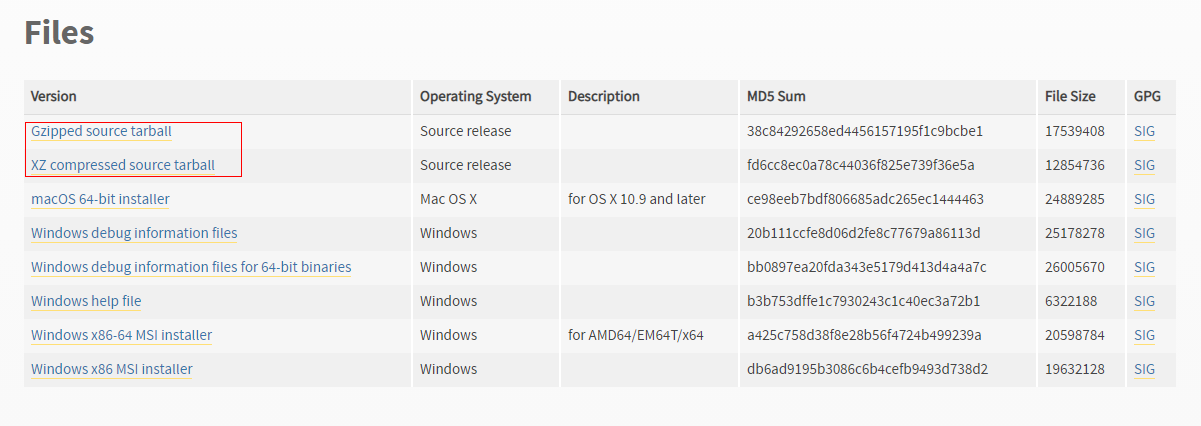
- Use WinSCP to upload the Python installation package to the opt directory and install Python.
# Extract the Python package.
[root@ecs-52bc opt]# tar -xvf Python-2.7.18.tgz
Python-2.7.18/Modules/zlib/crc32.c
Python-2.7.18/Modules/zlib/gzlib.c
Python-2.7.18/Modules/zlib/inffast.c
Python-2.7.18/Modules/zlib/example.c
Python-2.7.18/Modules/python.c
Python-2.7.18/Modules/nismodule.c
Python-2.7.18/Modules/Setup.config.in
...
# Enter the installation directory.
[root@ecs-52bc opt]# cd Python-2.7.18
# Check the file configuration installation path.
[root@ecs-52bc Python-2.7.18]# ./configure --prefix=/usr/local/python2
...
checking for build directories... checking for --with-computed-gotos... no value specified
checking whether gcc -pthread supports computed gotos... yes
done
checking for ensurepip... no
configure: creating ./config.status
config.status: creating Makefile.pre
config.status: creating Modules/Setup.config
config.status: creating Misc/python.pc
config.status: creating Modules/ld_so_aix
config.status: creating pyconfig.h
creating Modules/Setup
creating Modules/Setup.local
creating Makefile
# Compile Python.
[root@ecs-52bc Python-2.7.18]# make
# Install Python.
[root@ecs-52bc Python-2.7.18]# make install
- Confirm a successful installation.
# Check the Python version.
[root@ecs-52bc Python-2.7.18]# python --version
Python 2.7.5
# Check the pip version.
[root@ecs-52bc Python-2.7.18]# pip --version
pip 7.1.2 from /usr/lib/python2.7/site-packages/pip-7.1.2-py2.7.egg (python 2.7)
- Download the python2 installation package from https://www.python.org/downloads/release/python-2718/. Download and install the source code.
- Prepare the index migration script of the source Elasticsearch cluster.
- Run the following commands to migrate the index template and index structure of the Elasticsearch cluster:
# For Python 3:
python3 migrateTemplate.py
python3 migrateMapping.py

# For Python 2:
python migrateTemplate.py
python migrateMapping.py
Verifying Connectivity Between Clusters
Before starting a migration task, verify the network connectivity between Logstash and the source Elasticsearch cluster.
- Go to the Configuration Center page of Logstash.
- Log in to the CSS management console.
- In the navigation pane on the left, choose Clusters > Logstash.
- In the cluster list, click the name of the target cluster. The cluster information page is displayed.
- Click the Configuration Center tab.
- On the Configuration Center page, click Test Connectivity.
- In the dialog box that is displayed, enter the IP address and port number of the source cluster and click Test. Figure 5 Testing connectivity

If Available is displayed, the network is connected. If Unavailable is returned, troubleshoot by following What Should I Do If the Result of a Logstash Connectivity Test Is Unavailable?.
Using Logstash to Perform Full Data Migration
At the initial stage of cluster migration, or in scenarios where guaranteeing data integrity takes top priority, it is recommended to use Logstash for full data migration. This approach migrates the entire Elasticsearch cluster's data in one go.
- Go to the Configuration Center page of Logstash.
- Log in to the CSS management console.
- In the navigation pane on the left, choose Clusters > Logstash.
- In the cluster list, click the name of the target cluster. The cluster information page is displayed.
- Click the Configuration Center tab.
- On the Configuration Center page, click Create in the upper right corner. On the Create Configuration File page, edit the configuration file for the full Elasticsearch cluster migration.
- Selecting a cluster template: Expand the system template list, select elasticsearch, and click Apply in the Operation column.
- Setting the name of the configuration file: Set Name, for example, es-es-all.
- Editing the configuration file: Enter the migration configuration plan of the Elasticsearch cluster in Configuration File Content. The following is an example of the configuration file:
input{
     elasticsearch{
        # Source cluster node addresses. No need to include the protocol.
        hosts => ["xxx.xxx.xxx.xxx:9200", "xxx.xxx.xxx.xxx:9200"]
        # Set the name of the source index.
        index => "index*"
        docinfo => true
        slices => 3
        size => 3000
        # Mandatory fields for a security-mode cluster. (Delete them for a cluster with the security mode disabled.)
        # user => "xxx"           # Username for accessing the cluster.
        # password => "xxx"       # Password corresponding to the username.
        # If SSL is enabled for the source cluster, additionally configure the following information:
        # ssl => true
        # ca_file => "/opt/logstash/extend/certs"     # Path of the CA certificate used to verify the source cluster.
     }
 }

 filter {
   # Removes some metadata fields automatically added by Logstash
   mutate {
     remove_field => ["@version"]
   }
 }

 output{
     elasticsearch{
        # Destination cluster node addresses. No need to include the protocol.
        hosts => ["xxx.xxx.xxx.xxx:9200", "xxx.xxx.xxx.xxx:9200"]
        # Target index for writing events. The following configuration retains the source index name, document type, and document IDs.
        index => "%{[@metadata][_index]}"
        document_type => "%{[@metadata][_type]}"
        document_id => "%{[@metadata][_id]}"
        # Mandatory fields for a security-mode cluster. (Delete them for a cluster with the security mode disabled.)
        # user => "xxx"           # Username for accessing the cluster.
        # password => "xxx"       # Password corresponding to the username.
        # If SSL is enabled for the destination cluster, additionally configure the following information:
        # ssl => true
        # cacert => "/opt/logstash/extend/certs"      # Path of the CA certificate used to verify the destination cluster.
        # ssl_certificate_verification => false        # Whether to enable SSL certificate verification for the destination cluster.
     }
 }
Table 3 Configuration items for full migration Item
Description
input
hosts
Source cluster node addresses. You can configure multiple IP addresses.
Value format: ["<Node IP address 1>:<Port number>", "<Node IP address 2>:<Port number>"]
user
Username for accessing the source cluster.
Mandatory for a security-mode cluster.
password
Password for accessing the source cluster.
Mandatory for a security-mode cluster.
index
Name of the source index to be migrated.
- Single index: Enter the index name, for example, my_index.
- Multiple indexes: Enter multiple index names and use a comma (,) to separate them, for example, my_index1,my_index2.
- Wildcard: Use the wildcard (*) to match multiple indexes. For example, myindex* indicates all indexes whose name starts with myindex.
docinfo
Whether to retain the metadata of the source documents.
The value can be:
- true: Extracts metadata into the @metadata field of the events.
- false (default): Only extracts the _source part of documents.
slices
Number of parallel shards. The read task will be split into multiple parallel shards to improve throughput.
Default value: 1
Set this parameter based on the cluster load. Too many parallel shards will increase the cluster load. Given sufficient cluster resources, to improve performance, increase this value accordingly. The recommended value is 2 to 8.
size
Maximum number of hits returned for each query.
ssl
Whether SSL is enabled for the source cluster.
The value can be:
- true: Uses HTTPS to transmit data.
- false: Uses HTTP to transmit data.
ca_file
Path of the CA certificate used to verify the source cluster.
Value format: <certificate path><certificate name>, for example, /opt/logstash/extend/certs.
- If the source is a CSS Elasticsearch or OpenSearch cluster, the certificate name and certificate path of the default CA certificate will be obtained. For details, see Viewing Default Certificates.
- If the source is a self-managed or third-party Elasticsearch or OpenSearch cluster, upload the source cluster's security certificate to Logstash and obtain the certificate name and certificate path. For details, see Uploading a Custom Certificate.
output
hosts
Destination cluster node addresses. You can configure multiple IP addresses.
Value format: ["<Node IP address 1>:<Port number>", "<Node IP address 2>:<Port number>"]
index
Name of the index to which events are written.
- Single index: Enter the index name, for example, my_index.
- Multiple indexes: Use dynamic naming (based on event fields) or configure multiple conditional output blocks to route events to different indexes.
document_type
Type of document to which events are written.
Similar events should be written into documents of the same type.
document_id
ID of document to which events are written. To have it automatically generated, use # to comment out this parameter.
Specifying an existing ID may cause historical data to be overwritten.
For data migration tasks, you are advised to set this parameter to prevent duplicate data.
user
Username for accessing the destination cluster.
Mandatory for a security-mode cluster.
password
Password for accessing the destination cluster.
Mandatory for a security-mode cluster.
ssl
Whether SSL is enabled for the destination cluster.
The value can be:
- true: Uses HTTPS to transmit data.
- false: Uses HTTP to transmit data.
cacert
Path of the CA certificate used to verify the destination cluster.
Value format: <certificate path><certificate name>, for example, /opt/logstash/extend/certs.
- If the destination is a CSS Elasticsearch or OpenSearch cluster, the certificate name and certificate path of the default CA certificate will be obtained. For details, see Viewing Default Certificates.
- If the destination is a self-managed or third-party Elasticsearch or OpenSearch cluster, upload the destination cluster's security certificate to Logstash and obtain the certificate name and certificate path. For details, see Uploading a Custom Certificate.
ssl_certificate_verification
Whether SSL certificate verification is enabled for the destination cluster.
The value can be:
- true (default): Uses an SSL certificate to verify the destination cluster.
- false: Ignores SSL certificate verification.
- Click Next to configure Logstash pipeline parameters.
In this example, retain the default values. For details about how to set the parameters, see .
- Click OK.
On the Configuration Center page, you can check the created configuration file. If its status changes to Available, it has been successfully created.
- Execute the full migration task.
- In the configuration file list, select configuration file es-es-all and click Start in the upper left corner.
- In the Start Logstash dialog box, select Keepalive if necessary. In this example, Keepalive is not enabled.
When Keepalive is enabled, a daemon process is configured on each node. If the Logstash service becomes faulty, the daemon process will try to rectify the fault and restart the service, ensuring that the Logstash pipelines run efficiently and reliably. You are advised to enable Keepalive for services running long-term. Do not enable it for services running only short-term, or your migration tasks may fail due to a lack of source data.
- Click OK to execute the configuration file and thereby start the Logstash full migration task.
You can view the started configuration file in the pipeline list.
- After data migration is complete, check data consistency.
- Method 1: Use PuTTY to log in to the VM used for the migration and run the python checkIndices.py command to compare the data.
- Method 2: Run the GET _cat/indices command on the Kibana console of the source and destination clusters, separately, to check whether their indexes are consistent.
Using Logstash to Incrementally Migrate Cluster Data
In scenarios where continuous data synchronization or real-time data is required, it is recommended to use Logstash incremental cluster data migration. This method involves configuring incremental queries in Logstash, allowing only index data with incremental fields to be migrated.
- Go to the Configuration Center page of Logstash.
- Log in to the CSS management console.
- In the navigation pane on the left, choose Clusters > Logstash.
- In the cluster list, click the name of the target cluster. The cluster information page is displayed.
- Click the Configuration Center tab.
- On the Configuration Center page, click Create in the upper right corner. On the Create Configuration File page, edit the configuration file for the incremental migration.
- Selecting a cluster template: Expand the system template list, select elasticsearch, and click Apply in the Operation column.
- Setting the name of the configuration file: Set Name, for example, es-es-inc.
- Editing the configuration file: Enter the migration configuration plan of the Elasticsearch cluster in Configuration File Content. The following is an example of the configuration file:
The incremental migration configuration varies according to the index and must be provided based on the index analysis. For details about how to obtain the cluster information, see Obtaining Elasticsearch Cluster Information.
input{
     elasticsearch{
        # Source cluster node addresses. No need to include the protocol.
        hosts => ["xxx.xxx.xxx.xxx:9200", "xxx.xxx.xxx.xxx:9200"]
        # Set the name of the source index.
        index => "index*"
        # Configure incremental migration query statements.
        query => '{"query":{"bool":{"should":[{"range":{"postsDate":{"from":"2021-05-25 00:00:00"}}}]}}}'
        docinfo => true
        scroll => 1m
        size => 1000
        # Mandatory fields for a security-mode cluster. (Delete them for a cluster with the security mode disabled.)
        # user => "xxx"           # Username for accessing the cluster.
        # password => "xxx"       # Password corresponding to the username.
        # If SSL is enabled for the source cluster, additionally configure the following information:
        # ssl => true
        # ca_file => "/opt/logstash/extend/certs"     # Path of the CA certificate used to verify the source cluster.
     }
 }

 filter {
   # Removes some metadata fields automatically added by Logstash
   mutate {
     remove_field => ["@timestamp", "@version"]
   }
 }

 output{
     elasticsearch{
        # Destination cluster node addresses. No need to include the protocol.
        hosts => ["xxx.xxx.xxx.xxx:9200", "xxx.xxx.xxx.xxx:9200"]
        # Target index for writing events. The following configuration retains the source index name, document type, and document IDs.
        index => "%{[@metadata][_index]}"
        document_type => "%{[@metadata][_type]}"
        document_id => "%{[@metadata][_id]}"
        # Mandatory fields for a security-mode cluster. (Delete them for a cluster with the security mode disabled.)
        # user => "xxx"           # Username for accessing the cluster.
        # password => "xxx"       # Password corresponding to the username.
        # If SSL is enabled for the destination cluster, additionally configure the following information:
        # ssl => true
        # cacert => "/opt/logstash/extend/certs"      # Path of the CA certificate used to verify the destination cluster.
        # ssl_certificate_verification => false        # Whether to enable SSL certificate verification for the destination cluster.
     }
 }
Table 4 Incremental migration configuration items Item
Description
input
hosts
Source cluster node addresses. You can configure multiple IP addresses.
Value format: ["<Node IP address 1>:<Port number>", "<Node IP address 2>:<Port number>"]
user
Username for accessing the source cluster.
Mandatory for a security-mode cluster.
password
Password for accessing the source cluster.
Mandatory for a security-mode cluster.
index
Name of the source index to be incrementally migrated.
- Single index: Enter the index name, for example, my_index.
- Multiple indexes: Enter multiple index names and use a comma (,) to separate them, for example, my_index1,my_index2.
- Wildcard: Use the wildcard (*) to match multiple indexes. For example, myindex* indicates all indexes whose name starts with myindex.
query
Identifier for incremental data, typically an Elasticsearch DSL statement.
For example, to migrate data added after 2021-05-25:
{"query":{"bool":{"should":[{"range":{"postsDate":{"from":"2021-05-25 00:00:00"}}}]}}}postsDate indicates the time field in the service. The time value in this field must be modified during multiple incremental migration processes. If the date is in timestamp format, convert it to a timestamp. The validity of this command must be verified in advance.
docinfo
Whether to retain the metadata of the source documents.
The value can be:
- true: Extracts metadata into the @metadata field of the events.
- false (default): Only extracts the _source part of documents.
scroll
If there is massive data on the source end, you can use the scroll function to obtain data in batches to prevent Logstash memory overflow.
Default value: 1m
The interval cannot be too long. Otherwise, data may be lost.
size
Maximum number of hits returned for each query.
ssl
Whether SSL is enabled for the source cluster.
The value can be:
- true: Uses HTTPS to transmit data.
- false: Uses HTTP to transmit data.
ca_file
Path of the CA certificate used to verify the source cluster.
Value format: <certificate path><certificate name>, for example, /opt/logstash/extend/certs.
- If the source is a CSS Elasticsearch or OpenSearch cluster, the certificate name and certificate path of the default CA certificate will be obtained. For details, see Viewing Default Certificates.
- If the source is a self-managed or third-party Elasticsearch or OpenSearch cluster, upload the source cluster's security certificate to Logstash and obtain the certificate name and certificate path. For details, see Uploading a Custom Certificate.
output
hosts
Destination cluster node addresses. You can configure multiple IP addresses.
Value format: ["<Node IP address 1>:<Port number>", "<Node IP address 2>:<Port number>"]
index
Name of the index to which events are written.
- Single index: Enter the index name, for example, my_index.
- Multiple indexes: Use dynamic naming (based on event fields) or configure multiple conditional output blocks to route events to different indexes.
document_type
Type of document to which events are written.
Similar events should be written into documents of the same type.
document_id
ID of document to which events are written.
Specifying an existing ID may cause historical data to be overwritten.
For data migration tasks, you are advised to set this parameter to prevent duplicate data.
user
Username for accessing the destination cluster.
Mandatory for a security-mode cluster.
password
Password for accessing the destination cluster.
Mandatory for a security-mode cluster.
ssl
Whether SSL is enabled for the destination cluster.
The value can be:
- true: Uses HTTPS to transmit data.
- false: Uses HTTP to transmit data.
cacert
Path of the CA certificate used to verify the destination cluster.
Value format: <certificate path><certificate name>, for example, /opt/logstash/extend/certs.
- If the destination is a CSS Elasticsearch or OpenSearch cluster, the certificate name and certificate path of the default CA certificate will be obtained. For details, see Viewing Default Certificates.
- If the destination is a self-managed or third-party Elasticsearch or OpenSearch cluster, upload the destination cluster's security certificate to Logstash and obtain the certificate name and certificate path. For details, see Uploading a Custom Certificate.
ssl_certificate_verification
Whether SSL certificate verification is enabled for the destination cluster.
The value can be:
- true (default): Uses an SSL certificate to verify the destination cluster.
- false: Ignores SSL certificate verification.
- Execute the incremental migration task.
- In the configuration file list, select configuration file es-es-inc and click Start in the upper left corner.
- In the Start Logstash dialog box, select Keepalive if necessary. In this example, Keepalive is not enabled.
When Keepalive is enabled, a daemon process is configured on each node. If the Logstash service becomes faulty, the daemon process will try to rectify the fault and restart the service, ensuring that the Logstash pipelines run efficiently and reliably. You are advised to enable Keepalive for services running long-term. Do not enable it for services running only short-term, or your migration tasks may fail due to a lack of source data.
- Click OK to execute the configuration file and thereby start the Logstash incremental migration task.
You can view the started configuration file in the pipeline list.
- After data migration is complete, check data consistency.
- Method 1: Use PuTTY to log in to the VM used for the migration and run the python checkIndices.py command to compare the data.
- Method 2: Run the GET _cat/indices command on the Kibana console of the source and destination clusters, separately, to check whether their indexes are consistent.
Deleting a Logstash Cluster
After the migration is complete, release the Logstash cluster in a timely manner to save resources and avoid unnecessary fees.
- Log in to the CSS management console.
- In the navigation pane on the left, choose Clusters > Logstash.
- In the Logstash cluster list, select the Logstash cluster Logstash-ES and click More > Delete in the Operation column. In the confirmation dialog box, manually type in DELETE, and click OK.
What is your overall rating for this page?
Thank you very much for your feedback. We will continue working to improve the documentation.See the reply and handling status in My Cloud VOC.
For any further questions, feel free to contact us through the chatbot.
Chatbot


