

Creating Custom Policies for IAM Identity Center
You can create custom policies to supplement the system-defined policies of IAM Identity Center.
To create a custom policy, choose either visual editor or JSON.
- Visual editor: Select cloud services, actions, resources, and request conditions. This does not require knowledge of policy grammar.
- JSON: Create a JSON policy or edit an existing one.
For details, see Creating a Custom Policy. The following lists examples of common IAM Identity Center custom policies.
Example Custom Policies
- Example 1: Grant permission to create a permission set.
{ "Version": "1.1", "Statement": [ { "Effect": "Allow", "Action": [ "IdentityCenter:permissionSet:create" ] }, { "Effect": "Allow", "Action": [ "organizations:delegatedAdministrators:list" ] } ] } - Example 2: Grant permission to deny permission set deletion.
A policy with only "Deny" permissions must be used together with other policies. If the permissions granted to an IAM user contain both "Allow" and "Deny", the "Deny" permissions take precedence over the "Allow" permissions.
Assume that you want to grant the permissions of the IdentityCenter FullAccess policy to a user but want to prevent them from deleting permission sets. You can create a custom policy for denying permission set deletion, and attach this policy together with the IdentityCenter FullAccess policy to the user. As an explicit deny in any policy overrides any allows, the user can perform all operations in IAM Identity Center excepting deleting permission sets.
Example policy denying permission set deletion:
{ "Version": "1.1", "Statement": [ { "Effect": "Deny", "Action": [ "IdentityCenter:permissionSet:delete" ] } ] } - Example 3: Create a custom policy containing multiple actions.
A custom policy can contain the actions of one or multiple services that are of the same type (global or project-level).
The following is a policy with multiple actions:
{
    "Version": "1.1",
    "Statement": [
        {
            "Effect": "Allow",
            "Action": [
                "IdentityCenter:permissionSet:delete",
                "IdentityCenter:user:create",
                "IdentityCenter:permissionSet:create"
            ]
        },
        {
            "Effect": "Allow",
            "Action": [
                "organizations:delegatedAdministrators:list"
            ]
        }
    ]
}
Example Custom Identity Policies
You can create custom identity policies to supplement the system-defined identity policies of IAM Identity Center. For the actions supported for custom identity policies, see "Actions Supported by Identity Policy-based Authorization" in the IAM Identity Center API Reference.
To create a custom identity policy, choose either visual editor or JSON.
- Visual editor: Select cloud services, actions, resources, and request conditions. This does not require knowledge of policy syntax.
- JSON: Create a JSON policy or edit an existing one.
For details, see Creating a Custom Identity Policy and Attaching It to a Principal.
When creating a custom identity policy, use the Resource element to specify the resources the policy applies to and use the Condition element (service-specific condition keys) to control when the policy is in effect. For details about the supported resource types and condition keys, see "Actions Supported by Identity Policy-based Authorization" in IAM Identity Center API Reference.
- Structure of a custom identity policy:
Select all resources, or select specific resources by specifying their paths.
An identity policy consists of a version and one or more statements (indicating different actions).
Figure 1 Policy structure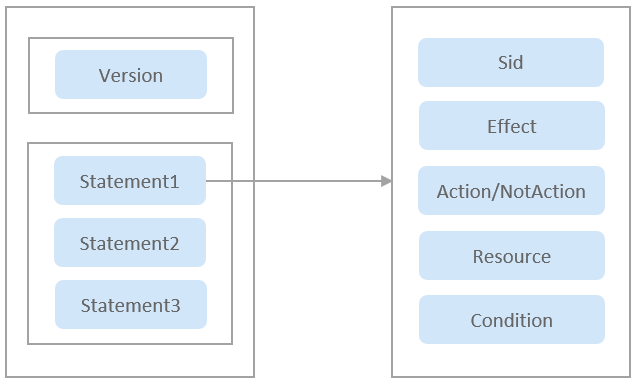
The following table describes the elements of an identity policy: Version and Statement. You can create custom identity policies by specifying the elements. For details, see Table 1. An identity policy is composed of JSON elements, such as Version, Statement, Sid, Effect, Action, Condition, and Resource. For more information, see JSON Element Reference.
Table 1 Elements of an identity policy Parameter
Definition
Value
Version
Version of an identity policy.
The version 5.0, and cannot be changed. It indicates the version of the identity policy JSON grammar.
Statement:
permissions defined by an identity policy
Sid
Statement ID (Sid) indicates an optional identifier of a statement.
A string.
Effect
Determines whether to allow or deny the actions.
- Allow
- Deny
NOTE:If policies both Allow and Deny actions on a resource, the denial policy takes precedence.
Action/NotAction
Actions on the cloud service.
Format: "Service name:Resource type:Operation". Actions support wildcards (*) and (?). (*) indicates any number of characters, and (?) indicates a single character. Action and NotAction are case-insensitive. Action matches all actions in the list, and NotAction matches all actions outside the list.
Example:
"obs:bucket:listAllMyBuckets": Permissions for listing all OBS buckets.
You can open Identity Policy–based Authorization, and navigate to the "Actions" section to view all actions.
Resource
Resources to be controlled by the identity policy.
Resource type represented by URN in the format of <service-name>:<region>:<account-id>:<type-name>:<resource-path>. The resource URN supports wildcards (*) and (?). (*) indicates any number of characters, and (?) indicates a single character. Resource is case-insensitive. For details about resource URNs, see Using URNs to Identify Huawei Cloud Resources.
Example:
- "obs:*:*:bucket:*": All OBS buckets.
- "obs:*:*:object:my-bucket/my-object/*": All objects in the my-object directory of the my-bucket bucket.
Condition
Determines when an identity policy is in effect. A condition consists of a condition key and an operator.
Format: "Operator:{Condition key:[Value 1,Value 2]}" (condition keys are case-insensitive)
If you set multiple conditions, the policy applies only when all the conditions are met.
Example:
"StringEndWithIfExists":{"g:UserName":["specialCharacter"]}: The statement is valid only for users whose names end with specialCharacter.
The following lists examples of common IAM Identity Center custom identity policies.
- Example 1: Grant permission to create a permission set.
{
    "Version": "5.0",
    "Statement": [
        {
            "Effect": "Allow",
            "Action": [
                "IdentityCenter:permissionSet:create"
            ]
        },
        {
            "Effect": "Allow",
            "Action": [
                "organizations:delegatedAdministrators:list"
            ]
        }
    ]
}
- Example 2: Create a custom identity policy containing multiple actions.
A custom identity policy can contain the actions of one or more services. The following is a policy with multiple actions:
{
    "Version": "5.0",
    "Statement": [
        {
            "Effect": "Allow",
            "Action": [
                "IdentityCenter:permissionSet:create",
                "IdentityCenter:permissionSet:delete",
                "IdentityCenter:user:create",
                "IdentityCenter:user:delete"
            ]
        },
        {
            "Effect": "Allow",
            "Action": [
                "organizations:delegatedAdministrators:list"
            ]
        }
    ]
}
IAM Identity Center Resources
A resource is an object that exists within a service. IAM Identity Center resources include accounts, instances, and permission sets. To select these resources, specify their paths.
|
Resource |
Resource Name |
Path |
|---|---|---|
|
account |
Account URN |
[Format] IdentityCenter::<manage-account-id>:account:<account-id> [Description] <manage-account-id>: ID of the administrator account of the Organizations service <account-id>: account ID in the organization Resource example: IdentityCenter::06e32776ef59452bbc9cfef8a1eec4e9:account:06e32776ef59452bbc9cfef8a1eec412 |
|
instance |
Instance URN |
[Format] IdentityCenter::<manage-account-id>:instance:<instance-id> [Description] <manage-account-id>: ID of the administrator account of the Organizations service <instance-id>: ID of an enabled IAM Identity Center instance Resource example: IdentityCenter::06e32776ef59452bbc9cfef8a1eec4e9:instance:ins-ddef0bf9de2fc696 |
|
permissionSet |
Permission set URN |
[Format] IdentityCenter::<manage-account-id>:permissionSet:<instance-id>/<permission-set-id> [Description] <manage-account-id>: ID of the administrator account of the Organizations service <instance-id>: ID of an enabled IAM Identity Center instance <permission-set-id>: ID of a permission set in IAM Identity Center Resource example: IdentityCenter::06e32776ef59452bbc9cfef8a1eec4e9:permissionSet:ins-ddef0bf9de2fc696/ps-44c2fe52a90b7230 |
Feedback
Was this page helpful?
Provide feedbackThank you very much for your feedback. We will continue working to improve the documentation.See the reply and handling status in My Cloud VOC.
For any further questions, feel free to contact us through the chatbot.
Chatbot


