

Change the Security Group for an Instance
Scenarios
A security group is a logical group. It provides access control policies for the ECSs and CBH instances that are trustful to each other and have the same security protection requirements in a VPC.
To ensure CBH instance security and reliability, configure security group rules to allow specific IP addresses and ports to access the resources. However, if you select an inapplicable security group when purchasing a bastion host, you cannot allow access from these IP addresses and ports by configuring security group rules. In this case, change the security group to meet your O&M requirements.
Notes and Constraints
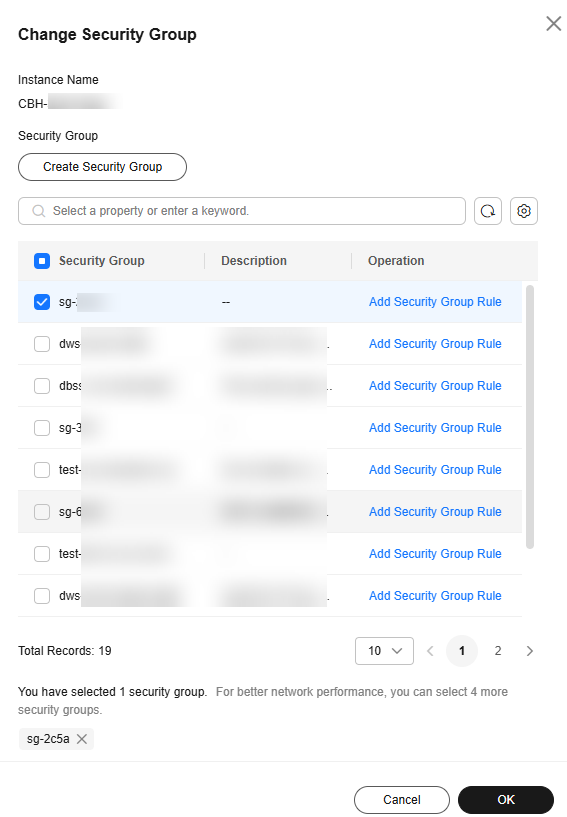
- A CBH instance can be bound to a maximum of five security groups.
- You can change the security group for an instance only when it is in the Running state.
- If a CBH instance is added to multiple security groups, rules of all security groups are applied to the instance.
Change the Security Group for an Instance
- Log in to the CBH console.
- Click
 in the upper left corner on the displayed page and select a region.
 - Locate the row that contains the target instance. In the Operation column, choose More > Configure Network > Change Security Group.
- In the displayed dialog box, select the security group you want to configure for the instance. Figure 1 Change Security Group
- Click OK. The security group is modified.
What is your overall rating for this page?
Thank you very much for your feedback. We will continue working to improve the documentation.See the reply and handling status in My Cloud VOC.
For any further questions, feel free to contact us through the chatbot.
Chatbot


