

Updated on 2026-09-16 GMT+08:00
Process
Figure 1 shows how to use CloudPond if you are new to it.
Familiarize yourself with basic concepts before you perform any operations on the CloudPond console.
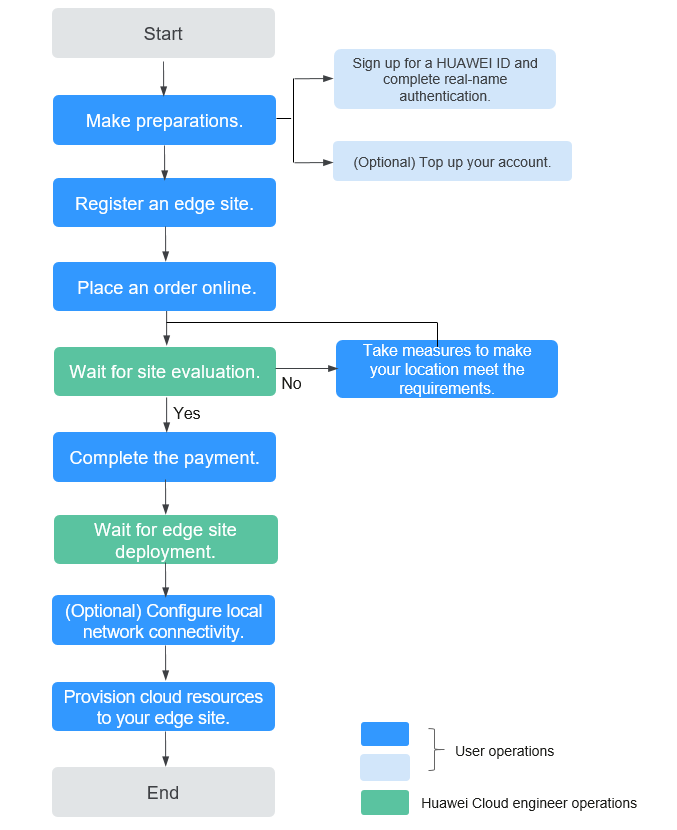
- Make preparations.
- Sign up for a Huawei Cloud account.
- Complete real-name authentication.
- (Optional) Top up your account. You can also top up the account after you place an order on the CloudPond console.
- Register an edge site on the CloudPond console by referring to Registering an Edge Site. This enables you to view details about the edge site, provision cloud resources to the edge site, and manage the cloud resources.
- Select proper compute and storage resources for your edge site based on your service requirements, confirm the price, and submit the order. The order status is Pending Approval. For details, see Placing an Order.
- The Huawei Cloud technical support team arranges engineers to evaluate whether your site meets the deployment requirements. If your site fails to meet the edge site deployment requirements, you need to take measures until it meets the requirements. For details, see Wait for Site Evaluation.
- Pay for the order on the management console when its status changes to Pending Payment. For details, see Completing the Payment.
- After you complete the payment, the Huawei Cloud technical support team will contact you as soon as possible to arrange the CloudPond installation. For details, see Wait for Edge Site Deployment.
- Configure the network connection between the edge site and your on-premises system. For details, see Configuring Local Network Connectivity.
- On the CloudPond console, provision compute and storage resources to the edge site. For details, see Provisioning Cloud Resources to an Edge AZ.
What is your overall rating for this page?
0
1
2
3
4
5
6
7
8
9
10
Very dissatisfiedVery satisfied
Thank you very much for your feedback. We will continue working to improve the documentation.See the reply and handling status in My Cloud VOC.
The system is busy. Please try again later.
For any further questions, feel free to contact us through the chatbot.
Chatbot


