

Overview of Multi-Tenant Management
Function Description
Multi-tenant management in TaurusDB allows a database to serve multiple tenants, maximizing resource utilization. Data is isolated among tenants. Different tenants can only access their own data. There are tenant-level resource isolation and user-level resource isolation to avoid resource waste and improve performance. Resources can be dynamically adjusted to process workload peaks and troughs of different tenants or users in a timely manner.
The following figure shows the principle of multi-tenant management.
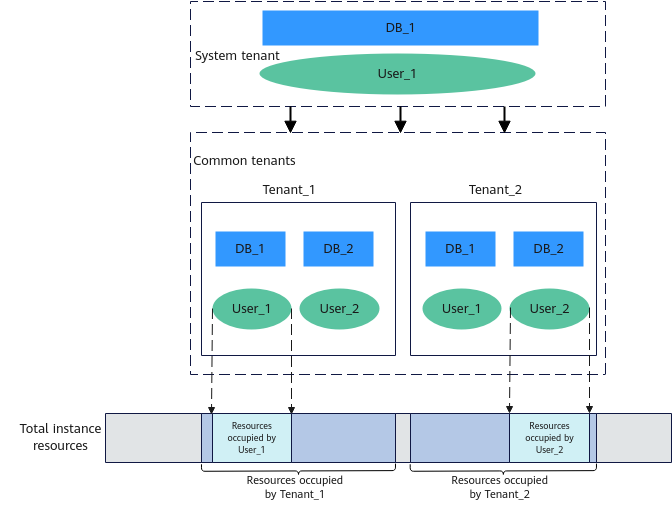
The figure shows the overall process of multi-tenant management. There are system tenants and regular tenants.
There is a database (DB_1) and a user (User_1) under the system tenant, two databases (DB_1 and DB_2) and two users (User_1 and User_2) under regular tenant Tenant_1, and two databases (DB_1 and DB_2) and two users (User_1 and User_2) under regular tenant Tenant_2.
The system tenant has access to the entire DB instance. That is, the system tenant can access and manage its own database and user, and can also access and manage the databases and users under Tenant_1 or Tenant_2. Data is isolated between different regular tenants. Tenant_1 can only access and manage its own databases (DB_1 and DB_2) and users (user_1 and user_2). It cannot access the databases and users under Tenant_2 or the database and user under the system tenant.
In addition to data isolation, multi-tenancy also ensures vCPU isolation. The figure shows the total vCPUs of the current instance. You can adjust resource settings for the system tenant and regular tenants, and then allocate these resources to specific users under a tenant.
Basic Concepts
Tenant-level
- Tenant: Tenants are under a DB instance and above databases and users. Tenants are used for data isolation and resource isolation. However, actual database access must still be authenticated as a specific user.
- There are system tenants and regular tenants based on data isolation.
- System tenant (sys_tenant): System tenants are designed to accommodate users who exist before the implementation of multi-tenancy. By default, these existing users belong to system tenants and are also referred to as system users. If a user under a system tenant can connect to and access a DB instance, the user can access the databases of all tenants.
- Regular tenant (user_tenant): You can create regular tenants as a system tenant. The users and databases of each regular tenant are completely isolated from those of other regular tenants. In addition, regular tenants cannot access databases of the system tenants.
- There are dedicated tenants and shared tenants based on resource isolation. The resources available to tenants, currently limited to vCPUs, are determined by tenant-level resource configurations.
- Dedicated tenant: The value of min_cpu in the resource configuration associated with the tenant is greater than 0. Ensure that vCPUs allocated to dedicated tenants at any time are not less than the value of min_cpu.
- Shared tenant: tenants associated with the specific resource configuration shared_tenants_config. The value of min_cpu in the resource configuration is 0. The system preferentially ensures the resource requests of dedicated tenants and then allocates the remaining resources to shared tenants. In addition, the system reserves some vCPUs (specified by the mt_shared_cpu_reserved parameter) for shared tenants to ensure that shared tenants can obtain resources during vCPU contention. You can modify associated resource configurations to change the roles between dedicated and shared tenants.
- There are system tenants and regular tenants based on data isolation.
- Tenant-level resource configuration (resource_config): A resource configuration indicates the resources available to a tenant, enabling tenant-level resource isolation. Currently, vCPU resources can only be limited by setting min_cpu and max_cpu. The following resource configurations are built in:
- RDS_SYS_CONFIG: resource configuration of the system tenant. The default value of min_cpu is 0.1 (unit: vCPUs), and the default value of max_cpu is the vCPUs in the instance specifications.
- shared_tenants_config: resource configuration of the shared tenant. The value of min_cpu is fixed to 0, and the default value of max_cpu is the vCPUs in the instance specifications.
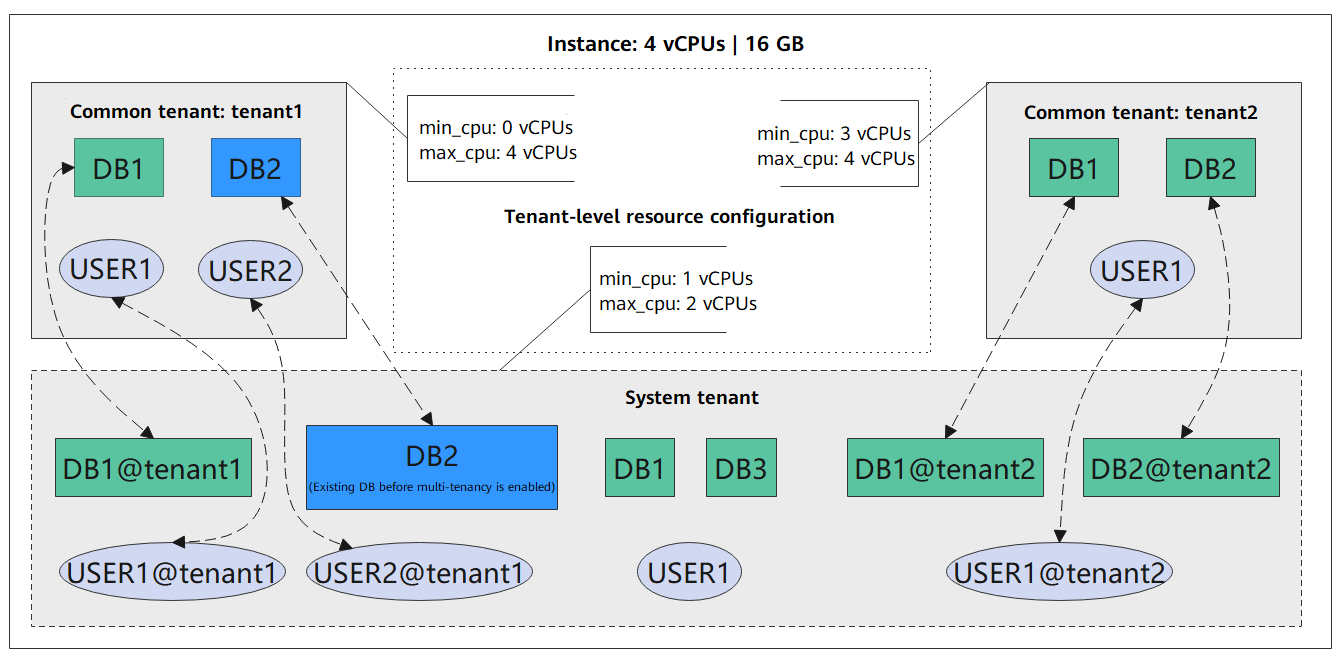
As shown in the figure, when a user logs in to the instance as the system tenant and creates DB1, DB3, and USER1, the names of these databases and the username remain unchanged. The system tenant can view all databases and users under regular tenants, but the names of the databases and users displayed to the system tenant change. For example, DB1, USER1, and USER2 of tenant1 will be displayed as DB1@tenant1, USER1@tenant1, and USER2@tenant1. DB1, DB2, and USER1 of tenant2 will be displayed as DB1@tenant2, DB2@tenant2, and USER1@tenant2.
TaurusDB uses different tenant name suffixes to distinguish databases and users of different tenants. When a user logs in to the instance as tenant1, the databases and users are displayed as DB1, DB2, USER1, and USER2. The same rule applies to tenant2. If DB2 exists before multi-tenancy is enabled, DB2 will belong to the system tenant by default after multi-tenancy is enabled. You can also assign DB2 to other tenants using the syntax provided by TaurusDB. For details, see the following sections.
When it comes to resource isolation, a system tenant can use default resource configurations or customize ones. In the preceding figure, the system tenant can use a minimum of 1 vCPU and a maximum of 2 vCPUs. tenant1 can use a minimum of 0 vCPUs (which indicates that it is a shared tenant) and a maximum of 4 vCPUs. tenant2 can use a minimum of 3 vCPUs (which indicates that it is a dedicated tenant) and a maximum of 4 vCPUs.
User-level
Users are under DB instances and tenants. A tenant can have multiple users. Multi-tenancy does not change how user data is isolated, but it does provide a way to manage resources at the user level.
- Resource consumer group (consumer_group)
Multiple users can belong to a given resource consumer group to share the resources associated with the group.
- Resource plan directive (plan_directive)
A resource plan directive corresponds to only one resource consumer group and describes the specific resource configuration of the resource consumer group. A resource consumer group can be associated with multiple resource plan directives, but only one can be enabled at a time.
- Resource plan (plan)
A resource plan controls whether to enable or disable a resource plan directive. Each resource plan is associated with one or more resource plan directives. Enabling or disabling a resource plan will activate or deactivate the resource plan directives. Only one resource plan can be enabled per tenant.
Figure 3 User-level resource configuration relationship
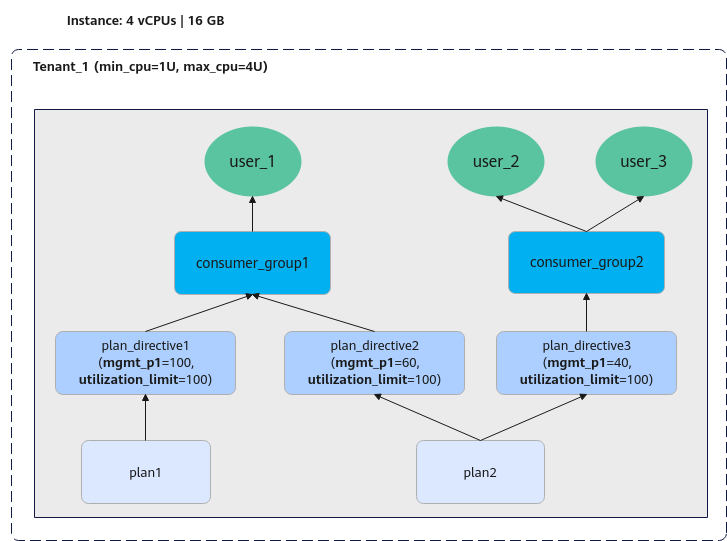
The figure above shows an instance with 4 vCPUs and a dedicated tenant (Tenant_1). The tenant can use a minimum of 1 vCPU and a maximum of 4 vCPUs. All users under the tenant share the tenant resources. There are two resource plans (plan1 and plan2). plan1 has one plan directive (plan_directive1), and plan2 has two plan directives (plan_directive2 and plan_directive3).
- plan_directive2: states that consumer_group1 can use a minimum of 60% and a maximum of 100% of Tenant_1's vCPUs.
- plan_directive3: states that consumer_group2 can use a minimum of 40% and a maximum of 100% of Tenant_1's vCPUs.
When plan2 is enabled, the user-level vCPU limits specified by plan_directive2 and plan_directive3 take effect. user_1 belongs to consumer_group1, so its vCPU limits are determined by plan_directive2. The same rule applies to user_2 and user_3.
Constraints
| Category | Constraints |
|---|---|
| Database visibility | If the kernel version of your TaurusDB instance is 2.0.78.260602 or later, the database visibility for regular tenants will change as follows:
|
| Multi-tenant view | If the kernel version of your TaurusDB instance is 2.0.60.241200 or later, the new multi-tenant views (including MT_RESOURCE_CONFIG, MT_TENANT, MT_TENANT_DB, MT_RESOURCE_PLAN, MT_CONSUMER_GROUP, MT_GROUP_MAPPING_RULE, and MT_PLAN_DIRECTIVE) will replace the old DBA_RSRC_* views. |
| Binlog | Binlogs do not support tenant isolation. If regular tenants pull binlogs, this compromises data isolation between tenants. Therefore, users of regular tenants are not allowed to pull binlogs. |
| Database proxy | HTAP (Standard Edition) does not support databases whose names contain at signs (@). When a database of a regular tenant is migrated to such an HTAP instance, the destination database name will be changed. After Auto Assign Requests to Column Store or Row Store Nodes is enabled, the proxy instance requires that the source and destination database names be the same, so this function must be disabled for migrating databases of regular tenants. |
| Backup and restoration | If the source instance has multi-tenancy enabled and its kernel version is earlier than 2.0.60.241200, and if the destination instance's kernel version is 2.0.60.241200 or later, data of the source instance cannot be restored to the destination instance using backups. In such a case, the __taurus_sys__ database may be cleared, and multi-tenancy cannot function properly. If multi-tenancy is disabled for the destination instance, you cannot create users, databases, or tablespaces with at signs (@) in their names for that instance. |
| Upgrade and downgrade |
|
| Compatibility |
|
What is your overall rating for this page?
Thank you very much for your feedback. We will continue working to improve the documentation.See the reply and handling status in My Cloud VOC.
For any further questions, feel free to contact us through the chatbot.
Chatbot


