

How Do I Resolve the Issue of Remote Extension Host Response Timeout?
Symptom
When using CodeArts Agent IDE, you may encounter disconnection issues, with an error message displayed, indicating that the remote extension host response times out and the connection is being re-established. After the window is reloaded, another error message may be displayed, indicating that the remote extension host response times out twice within 1 minute and reloading the window is recommended.
Cause Analysis
The disconnection may be caused by an installed extension. Rectify the fault by referring to Solution.
Solution
You can select a solution based on the scenario:
- If the error message provides the name of the abnormal extension that causes the disconnection, disable or uninstall the abnormal extension, and then restart CodeArts Agent IDE.
- If the error message does not provide the name of the abnormal extension that causes the disconnection, perform the following steps:
- Log in to CodeArts Agent by referring to Quick Start.
- In the sidebar of CodeArts Agent IDE, click
 .
. - Click
 and choose Disable All Installed Extensions from the drop-down list. Figure 1 Disable All Installed Extensions
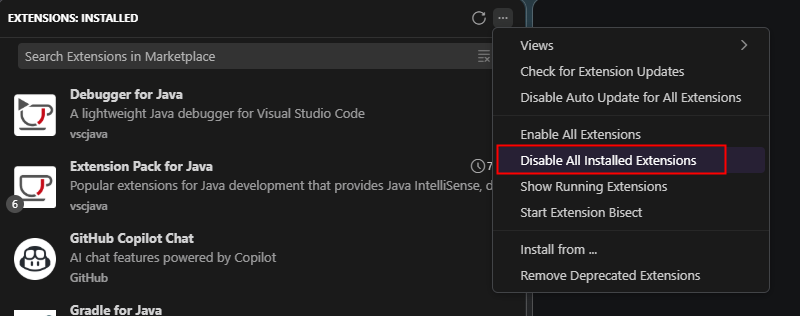
- After the extension is disabled, perform a fault reproduction test. If the fault disappears, the disconnection is caused by the extension. In this case, go to 5. If the fault persists, the fault is irrelevant to the extension. In this case, submit a service ticket to get help from Huawei Cloud customer service.
- During the reproduction, if the error message returns the name of the abnormal extension, directly disable or uninstall the extension. If the name cannot be identified even after the fault is reproduced, click
 and select Start Extension Bisect from the drop-down list to locate the target extension. After the extension is located, disable or uninstall it. Figure 2 Extension bisect

- If the issue persists, submit a service ticket to get help from Huawei Cloud customer service.
What is your overall rating for this page?
Thank you very much for your feedback. We will continue working to improve the documentation.See the reply and handling status in My Cloud VOC.
For any further questions, feel free to contact us through the chatbot.
Chatbot


