

Configuring CC Attack Protection for Common Scenarios
This topic introduces how CC attack protection rules are used in certain scenarios.
Overview
You can have a quick glance to learn how to set WAF protection in similar scenarios to protect your services.
Heavy-traffic CC attacks
In large-scale CC attacks, a single zombie server can send far more packets than a common user does. In this scenario, a rate limiting rule is the most effective method to defend against this type of CC attack. We recommend IP address-based rate limiting CC attack protection rules. For details, see Limiting Accesses Through IP Address-based Rate Limiting.
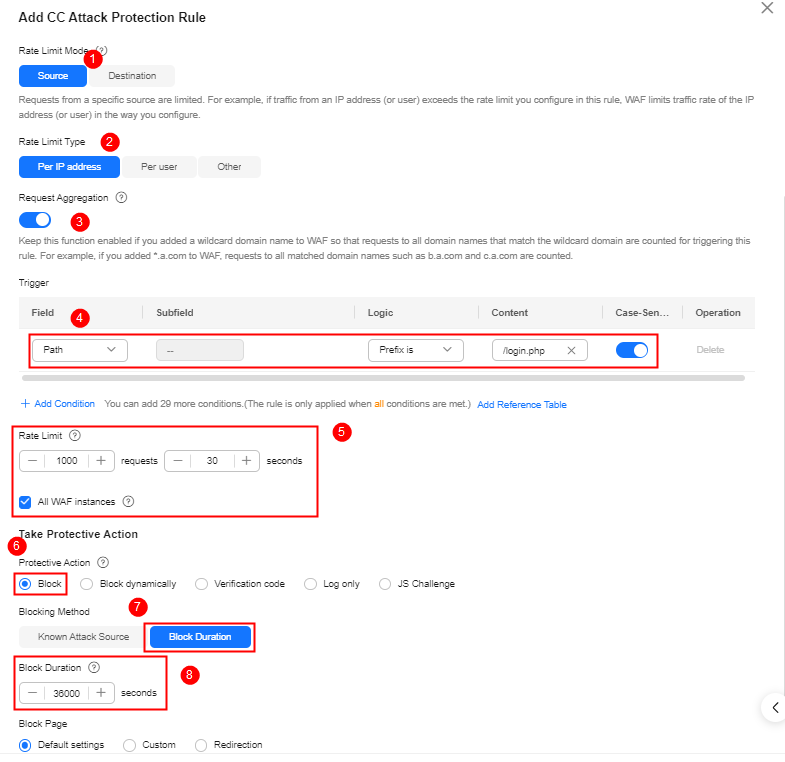
You can configure such a CC rule to mitigate CC attacks. If an IP address accesses any path under the current domain name more than 1000 times within 30 seconds, this rule will block requests from the IP address for 10 hours. This rule can be used as a preventive configuration for common small and medium-sized websites
To get improved and refined protection, you need to adjust rate limit settings and specify an appropriate protective action based on your service requirements. For example, if you need to prevent the login interface from being affected by crazy credential stuffing attacks, use the prefix is logical operator and set the matching content to the specific login path, such as /login.php.
- Request Aggregation: Keep this function enabled so that requests to all domain names that match a protected wildcard domain are counted for triggering this rule. For example, if you add *.a.com to WAF, requests to all matched domain names such as b.a.com and c.a.com are counted.
- All WAF instances: This parameter is supported only in cloud mode. By default, requests to each WAF instance are counted. If you enable this, WAF will count requests to all your WAF instances for triggering this rule.
Protection Verification
If you have configured a CC attack protection rule for your domain name www.example.com by referring to Figure 1, take the following steps to verify the protection:
- Clear the browser cache and access the domain name www.example.com/login.php 1000 times within 30 seconds. Normally, the custom block page is displayed when you access the page for the 1001st time. Refresh the target page 10 hours later. The page can be accessed properly.
- Return to the WAF console. In the navigation pane on the left, click Events. On the displayed page, check event details.
The request features are malformed or incorrect.
Many CC attack requests are constructed by attackers. After analyzing logs, it is found that these requests have many malformed packet features that do not match normal requests. The following protection rules are recommended to defend against requests having common malformed packets:
The following protection configurations are implemented through precise protection rules. For details, see Configuring a Precise Protection Rule.
Abnormal or Malformed User-Agent
Invalid User-Agent (for example, Mozilla///), improper User-Agent (for example, www.example.com), and User Agent containing automation tool features. If the request feature exists, you can refer to Figure 2 to block the content request containing Mozilla/// in User-Agent.

Protection Verification
Assume that the domain name www.example.com has been added and a precise protection rule has been added by referring to Figure 2.
- Clear the browser cache, open the browser developer tool, change the user-agent to "Mozilla///", and access http://www.example.com. If the rule works, WAF detects "Mozilla///" in the User-Agent header field of the request from the browser, blocks the request, and returns the block page.
- Return to the WAF console. In the navigation pane on the left, click Events. On the displayed page, check event details.
Improper User-Agent
For example, for HTML5 pages promoted by WeChat, normal users should initiate access through WeChat. It obviously does not make sense if the request User-Agent comes from a Windows desktop browser (for example, MSIE 6.0). If the request feature exists, you can refer to Figure 3 to block the content request containing MSIE 6.0 in User-Agent.

Protection Verification
Assume that the domain name www.example.com has been added and a precise protection rule has been added by referring to Figure 3.
- Clear the browser cache, open the browser developer tool, change the user-agent to "MSIE 6.0", and access http://www.example.com. If the rule works, WAF detects "MSIE 6.0" in the User-Agent header field of the request from the browser, blocks the access, and returns the block page.
- Return to the WAF console. In the navigation pane on the left, click Events. On the displayed page, check event details.
Abnormal Referer
For example, if a request does not contain a Referer or the Referer is fixed and comes from an unauthorized website, the request can be blocked (except when the website home page is accessed or the page is accessed for the first time). You can analyze abnormal behavior based on Referer for URLs that can be accessed only through an intranet address. Refer to Figure 4 to block requests without Referer.

Protection Verification
Assume that the domain name www.example.com has been added and a precise protection rule has been added by referring to Figure 4.
- Clear the browser cache, open the browser developer tool, disable the Referer field, and access http://www.example.com. If the rule works, WAF detects the empty Referer field in the request, blocks the request, and returns the block page.
- Return to the WAF console. In the navigation pane on the left, click Events. On the displayed page, check event details.
Abnormal Cookie
A normal request usually carries cookies that belong to the service set of the website (except when the user accesses the page for the first time). In most cases, CC attack packets do not carry any cookie. You can block requests without the cookie field by referring to Figure 5.

Protection Verification
Assume that the domain name www.example.com has been added and a precise protection rule has been added by referring to Figure 5.
- Clear the browser cache and access http://www.example.com in the browser. If the rule works, WAF detects and blocks the request that does not contain the cookie field and returns the block page.
- Return to the WAF console. In the navigation pane on the left, click Events. On the displayed page, check event details.
Lack of Some HTTP Headers
For example, a common user will have the authentication header required by some services carried in the request, but attack packets do not. You can block requests that do not contain the authorization header by referring to Figure 6.

Protection Verification
Assume that the domain name www.example.com has been added and a precise protection rule has been added by referring to Figure 6.
- Use the private mode of the browser to access http://www.example.com. In this scenario, the browser does not automatically add the authorization header. If the rule works, WAF detects that the request does not contain authorization, blocks the request, and returns the block page.
- Return to the WAF console. In the navigation pane on the left, click Events. On the displayed page, check event details.
Invalid Request Methods
For example, if an interface designed for only POST requests is attacked by a large number of GET requests, you can directly block GET requests. You can block GET requests by referring to Figure 6.

Protection Verification
Assume that the domain name www.example.com has been added and a precise protection rule has been added by referring to Figure 7.
- Use JavaScript to initiate GET requests. Normally, WAF blocks the requests and returns the block page.
- Return to the WAF console. In the navigation pane on the left, click Events. On the displayed page, check event details.
CC Attacks Against APIs
Challenge Collapsar (CC) attacks are often launched against key APIs of a system.
APIs of service systems typically require authentication. To mitigate CC attacks against APIs, you can limit the API call rate based on service characteristics (such as token and header). The user-based rate limiting mode in CC attack protection rules is recommended.
You can configure a CC attack protection rule to mitigate CC attacks. If a user (token/cookie) calls an API for your domain name more than 1,000 times within 30 seconds, this rule will block requests from the IP address for 10 hours. This rule can be used as a preventive configuration for common small and medium-sized websites.

Verifying Protection
If you have configured a CC attack protection rule by referring to the preceding figure for your domain name www.example.com, take the following steps to verify the protection:
- Clear the browser cache, configure a token field in your request, and access the domain name www.example.com/api/user 1,000 times within 30 seconds. Normally, the custom block page is displayed on the 1001st access. Then, refresh the target page 10 hours later.
- Return to the WAF console. In the navigation pane on the left, click Events. On the displayed page, check event details.
What is your overall rating for this page?
Thank you very much for your feedback. We will continue working to improve the documentation.See the reply and handling status in My Cloud VOC.
For any further questions, feel free to contact us through the chatbot.
Chatbot


