

Uso del almacenamiento híbrido de filas y columnas
Escenarios
En los escenarios de servicio del mundo real, una tabla debe gestionar de forma eficiente tanto las consultas puntuales de alta concurrencia como las actualizaciones (por ejemplo, para pedidos, facturas y registros) y admitir consultas y agregaciones rápidas por lotes para cargas de trabajo analíticas (por ejemplo, informes estadísticos y análisis de tendencias). El almacenamiento tradicional de filas y columnas tiene sus propias ventajas:
- El almacenamiento de filas es adecuado para escenarios en tiempo real con consultas y escrituras puntuales frecuentes, por ejemplo, consultar detalles de pedidos por número de pedido.
- El almacenamiento de columnas es adecuado para consultas de análisis por lotes, como calcular el monto total de transacciones dentro de un período de tiempo.
El almacenamiento híbrido de filas y columnas proporcionado por DWS almacena datos en formato de fila y columna en una sola tabla. Los datos de los dos formatos se mantienen de forma independiente y se actualizan de forma sincrónica. El optimizador de consultas selecciona el modo de acceso óptimo en función de la ruta de la consulta real.
Sus ventajas principales son las siguientes:
- No es necesario dividir tablas ni copiar datos: Una tabla admite tanto consultas detalladas como análisis por lotes.
- Selección automática de la ruta óptima: El almacenamiento de filas se utiliza para consultas puntuales, y el almacenamiento de columnas se utiliza para consultar campos de agregación. No se requiere desarrollo adicional.
- Rendimiento óptimo: Se garantiza la eficiencia de las consultas OLAP sin sacrificar el rendimiento OLTP.
- Compatible con el diseño de tablas de almacenamiento por filas: Puede disfrutar rápidamente de los beneficios de rendimiento de las optimizaciones de almacenamiento de columnas y de filas sin ajustar la estructura de la aplicación.
- Gestión unificada y reducción de los costos de O&M: Una tabla física cubre dos escenarios, lo que simplifica la sincronización de datos, la copia de respaldo y el control de permisos.
Esta sección describe cómo diseñar y utilizar estructuras de almacenamiento híbridas de filas y columnas en función de escenarios típicos y comparaciones de rendimiento, lo que le ayuda a procesar datos de manera eficiente.
Comparación entre almacenamiento de filas, almacenamiento de columnas y almacenamiento híbrido de filas y columnas
| Dimensión | Almacenamiento de filas (orientation='row') | Almacenamiento de columnas (tablas HStore Opt) | Almacenamiento híbrido de filas y columnas (storage_mode='mix') |
|---|---|---|---|
| Arquitectura de almacenamiento | Almacenamiento de filas nativo (no basado en almacenamiento de columnas) | Almacenamiento de columnas HStore Opt | Coexistencia del almacenamiento por filas y el almacenamiento por columnas HStore Opt |
| Consulta puntual (clave principal) |
|
|
|
| Rendimiento de importación por lotes |
|
|
|
| Rendimiento de importación en tiempo real |
|
|
|
| Rendimiento de agregación/análisis |
|
|
|
| Espacio ocupado |
|
|
|
| Inflación de espacio |
|
|
|
| Optimización especial de almacenamiento por columnas de DWS |
|
|
|


Restricciones
- Solo los clústeres de la versión 9.1.1.100 o posterior admiten esta función.
- Se utilizan tablas HStore, es decir, enable_hstore_opt se establece en on.
- No se admiten vistas materializadas.
- Cuando se copia una pequeña cantidad de datos en una base de datos en tiempo real, el rendimiento del almacenamiento híbrido de filas y columnas se deteriora en un 10 % en comparación con el de la tabla HStore.
- Una tabla de almacenamiento híbrido de filas y columnas solo se puede intercambiar con otra tabla de almacenamiento híbrido de filas y columnas. No se permite el intercambio después de la expansión de capacidad y la redistribución.
- Después de ejecutar DROP COLUMN en una tabla de almacenamiento híbrido de filas y columnas, las columnas eliminadas siguen ocupando recursos de número de columnas del sistema. La cantidad máxima de columnas disponibles en la tabla sigue siendo 1,600.
Sugerencias de uso
- En escenarios de OLTP (como consultas y escrituras de puntos de alta frecuencia), si el uso del espacio es sensible, se recomiendan las tablas de almacenamiento híbrido de filas y columnas para equilibrar el uso del espacio y el rendimiento de las consultas puntuales. Si el uso del espacio no es sensible y se requiere un rendimiento robusto, se recomiendan las tablas de almacenamiento de filas.
- En escenarios de OLAP (como análisis y reportes de estadísticas), se recomiendan las tablas HStore.
- En consultas detalladas y estadísticas en las que es difícil distinguir las columnas calientes y frías, se recomiendan las tablas de almacenamiento híbrido de filas y columnas para lograr un excelente rendimiento en cada escenario.
- Para la importación de datos en tiempo real, se recomienda PBE addBatch.
- Se recomienda no modificar las definiciones de columnas a menos que sea necesario. Si se activa la reescritura de datos, se reescribirá la parte de almacenamiento de filas de una tabla de almacenamiento híbrido de filas y columnas, lo que lleva mucho tiempo.
Referencia de sintaxis
Cree una tabla de almacenamiento híbrido de filas y columnas. Para obtener más información, consulte CREATE TABLE. (Solo 9.1.1.100 y las versiones posteriores admiten esta función.)
1 2 3 4 5 6 7 8 | CREATE TABLE < table name> ( <Column definition> ) WITH ( orientation = column, -- Use the column storage architecture. enable_hstore_opt = on, -- Enable hstore_opt. storage_mode = 'mix' --Create a hybrid row-column store table. ); |
Ejemplo:
-- Hybrid row-column storage stores data in both row and column formats. It is suitable for mixed services.
CREATE TABLE tbl_mix (
    a INT,
    b TEXT
)
WITH (
    orientation = column,
    enable_hstore_opt = on,
    storage_mode = 'mix'
);
Ejemplo de uso del almacenamiento híbrido de filas y columnas
- Cree una tabla de datos simple.
1
2
3
DROP TABLE IF EXISTS data;
CREATE TABLE data(a INT, b BIGINT, c VARCHAR(10), d VARCHAR(10));
INSERT INTO data values(generate_series(1,100),1,'asdfasdf','gergqer');
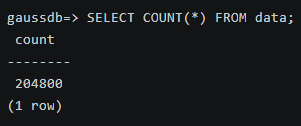
- Amplíe los datos de la tabla a 200,000 registros.
 1
 2
 3
 4
 5
 6
 7
 8
 9
10
11
12
INSERT INTO data SELECT * FROM data;
INSERT INTO data SELECT * FROM data;
INSERT INTO data SELECT * FROM data;
INSERT INTO data SELECT * FROM data;
INSERT INTO data SELECT * FROM data;
INSERT INTO data SELECT * FROM data;
INSERT INTO data SELECT * FROM data;
INSERT INTO data SELECT * FROM data;
INSERT INTO data SELECT * FROM data;
INSERT INTO data SELECT * FROM data;
INSERT INTO data SELECT * FROM data;
SELECT COUNT(*) FROM data;
- Cree una tabla de almacenamiento híbrido de filas y columnas simple.
 1
 2
 3
 4
 5
 6
 7
 8
 9
10
11
12
DROP TABLE IF EXISTS rowmode_test1;
CREATE TABLE rowmode_test1 (
    a INT,
    b BIGINT,
    c VARCHAR(10),
    d VARCHAR(10)
)
WITH (
    orientation = column,
    enable_hstore_opt = on,
    storage_mode = 'mix'
);
- Importe datos a la tabla de almacenamiento híbrido de filas y columnas.
1INSERT INTO rowmode_test1 SELECT * FROM data;
- Cree una vista para consultar la tabla auxiliar de cudesc a través de funciones personalizadas.
 1
 2
 3
 4
 5
 6
 7
 8
 9
10
11
12
13
14
15
16
17
18
19
20
21
22
23
24
25
26
27
28
29
30
31
32
33
34
35
36
DROP FUNCTION IF EXISTS get_cudesc_data_info;
CREATE FUNCTION get_cudesc_data_info(target_table_name text)
RETURNS TABLE (
    col_id int,
    cu_id oid,
    min text,
    max text,
    row_count int,
    cu_mode int,
    size bigint,
    cu_pointer text,
    magic int,
    extra text,
    src_info text,
    xid xid,
    dr_bucket_id int,
    dict_key bytea,
    cu_data bytea,
    cu_data_size_kb numeric
) AS
$$
DECLARE
    cudesc_relid oid;
    cudesc_relname text;
    query text;
BEGIN
    SELECT relcudescrelid INTO cudesc_relid FROM pg_class WHERE relname = target_table_name;
    SELECT relname INTO cudesc_relname FROM pg_class WHERE oid = cudesc_relid;
    IF cudesc_relname IS NULL THEN
        RAISE NOTICE 'CU descriptor table not found for %.', target_table_name;
        RETURN;
    END IF;
    query := FORMAT('SELECT *, octet_length(cu_data)::numeric/1024 AS cu_data_size_kb FROM cstore.%I', cudesc_relname);
    RETURN QUERY EXECUTE query USING target_table_name;
END;
$$ LANGUAGE plpgsql;
- Consulte el nombre del DN.
1SELECT * FROM pgxc_node;

Vea el resultado del comando y registre el valor de node_name correspondiente a DN1, por ejemplo, dn_6001_6002.
- Conéctese directamente a DN1 para consultar los registros. Reemplace datanode1 con el resultado obtenido en 6, por ejemplo, dn_6001_6002.
1
2
3
4
5
6
7
EXECUTE DIRECT ON(datanode1) $$
SELECT col_id, cu_id, row_count, size, cu_pointer
FROM (
    SELECT col_id, cu_id, row_count, size, cu_pointer
    FROM get_cudesc_data_info('rowmode_test1') where col_id = -16 and cu_id = 1002
)
$$;
A continuación se muestra un ejemplo de la salida del comando:

El ejemplo anterior es para el almacenamiento de filas. El sistema inserta un registro de identificador especial para cada grupo de filas en la tabla auxiliar de almacenamiento de columnas. Los campos son los siguientes:
- col_id: El valor se fija en –16, lo que indica que el registro corresponde a metadatos de grupo de filas en lugar de datos de columnas comunes.
- cu_id: ID de la CU a la que pertenece el grupo de filas. La regla de ID es la misma que la de las CU de almacenamiento de columnas.
- row_count: número total de filas en el grupo de CU actual, por ejemplo, 60,000
- size: espacio en disco ocupado por las filas comprimidas, en bytes
- cu_pointer: almacena la información de la estructura del grupo de filas. Consta de cuatro campos separados por barras verticales (|):
- Número de versión: El valor actual es 1, que indica la versión de metadatos utilizada por el grupo de filas.
- Número de filas en un solo grupo: número máximo de filas (por ejemplo, 2,000) contenidas en cada grupo de filas
- Número de grupos: número de grupos de filas (por ejemplo, 30) contenidos en la CU
- Desplazamiento inicial: desplazamiento inicial (por ejemplo, 0) del grupo de filas en el archivo de almacenamiento físico
El almacenamiento de filas aprovecha la arquitectura de CU para heredar las ventajas de optimización de ejecución y gestión de compresión del motor de almacenamiento de columnas. Mantiene consultas puntuales de alto rendimiento mientras reduce drásticamente los costos de almacenamiento, lo que lo convierte en una opción rentable para cargas de trabajo híbridas.
Parámetros GUC relacionados con tablas de almacenamiento híbrido de filas y columnas
| Parámetro | Descripción | Valor predeterminado |
|---|---|---|
| Especifica el número de filas comprimidas en un grupo de filas de una tabla de almacenamiento híbrido de filas y columnas en modo de filas o mixto.
| 0 |


