

Help Center/ TaurusDB/ User Guide/ Read Replica Management/ Changing the Private IP Address for Read of a Read Replica
Updated on 2026-11-03 GMT+08:00
Changing the Private IP Address for Read of a Read Replica
Scenarios
If the IP address of a read replica conflicts with other IP addresses, you can change it on the DB instance's Basic Information page to reduce application changes.
Constraints
If a DB instance has a read-only proxy instance, and the proxy instance contains only the read replica whose private IP address for read is to be changed and read weight is greater than 0, the private IP address for read of the read replica cannot be changed.
Changing a Private IP Address for Read
- Log in to the TaurusDB console.
- On the Instances page, click the instance name to go to the Basic Information page.
- In the Node List area, locate a read replica and click Change in the Private IP Address for Read column.
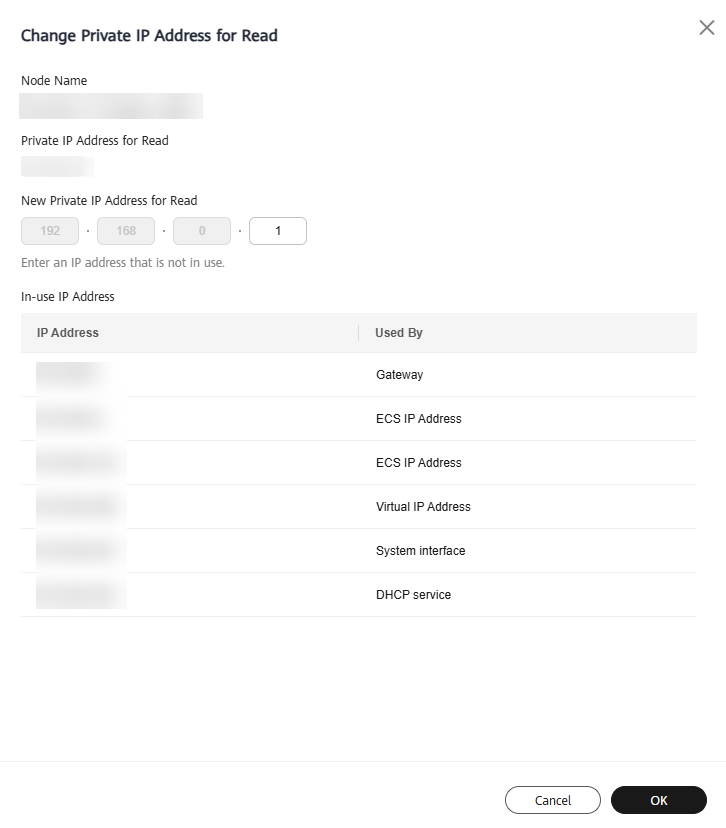
- In the displayed Change Private IP Address for Read dialog box, enter a new private IP address for read and click OK.
An in-use IP address cannot be used as the new private IP address for read.
Figure 1 Changing a private IP address for read
What is your overall rating for this page?
0
1
2
3
4
5
6
7
8
9
10
Very dissatisfiedVery satisfied
Thank you very much for your feedback. We will continue working to improve the documentation.See the reply and handling status in My Cloud VOC.
The system is busy. Please try again later.
For any further questions, feel free to contact us through the chatbot.
Chatbot


