

Help Center/
Relational Database Service_RDS for MySQL/
User Guide/
Metrics and Alarms/
Configuring Monitoring by Seconds
Updated on 2025-12-18 GMT+08:00
Configuring Monitoring by Seconds
RDS for MySQL supports monitoring by seconds. You can set the monitoring interval to 1 second or 5 seconds to view the metric values.
Constraints
DB instances with fewer than four vCPUs do not support monitoring by seconds.
Billing
The following table lists the price of monitoring by seconds.
|
Specification Code |
Price (USD/Hour) |
|---|---|
|
rds.mysql.second.monitor |
0.012 |
Procedure
- Click
 in the upper left corner and select a region.
 - Click
 in the upper left corner of the page and choose Databases > Relational Database Service.
 - On the Instances page, click the target instance name to go to the Summary page.
- In the navigation pane, choose Performance under DBA Assistant.
- Click Enable Monitoring by Seconds.
- In the displayed dialog box, enable Monitoring by Seconds and click OK.
- This function is unavailable for any DB instances with fewer than four vCPUs.
- Once you turn on this function, the system will report monitoring data again and show it in about 5 minutes.
- You can turn off this function if needed. Once it is turned off, the system will report monitoring data again and show it in about 5 minutes.
Figure 1 Enabling Monitoring by Seconds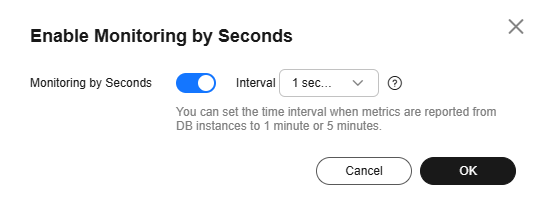
- Click in the upper left corner and select a region.
- Click in the upper left corner of the page and choose Databases > Relational Database Service.
- On the Instances page, click the target instance name to go to the Summary page.
- In the navigation pane, choose Performance under DBA Assistant.
- Click Enable Monitoring by Seconds.
- In the displayed dialog box, disable Monitoring by Seconds and click OK.
Once this function is disabled, the system will report monitoring data again and show it in about 5 minutes.
Feedback
Was this page helpful?
Provide feedbackThank you very much for your feedback. We will continue working to improve the documentation.See the reply and handling status in My Cloud VOC.
The system is busy. Please try again later.
For any further questions, feel free to contact us through the chatbot.
Chatbot


