

Configuring Auto Scaling of vCPUs and Memory
Scenarios
RDS for MySQL allows you to set vCPU usage limits for triggering auto scaling. When your instance's average vCPU usage exceeds the upper limit, its specifications increase automatically. When it drops below the lower limit, the specifications decrease. Auto scaling of vCPUs and memory can handle changes in database load, helping you optimize resource costs and utilization.
Permissions
- To configure auto scaling of vCPUs and memory, you must have related permissions. For details, see Permissions.
- Enabling auto scaling of vCPUs and memory will automatically create an agency named RDSAccessProjectResource, which is visible to users. Deleting the agency will cause auto scaling to fail.
Constraints
- Only primary/standby instances that use cloud SSD disks or extreme SSD disks support auto scaling of vCPUs and memory.
- After auto scaling of vCPUs and memory is enabled, the storage type can only be changed to cloud SSD or extreme SSD.
- Auto scaling of vCPUs and memory will briefly interrupt workloads. Determine whether to enable it as required.
- Auto scaling cannot be triggered if the instance is abnormal, stopped, or frozen.
- Auto scaling of vCPUs and memory cannot be enabled if the instance has other ongoing tasks or scheduled specification changes. If it has been enabled, it still cannot be triggered.
- Auto scaling of vCPUs and memory cannot be triggered for any yearly/monthly instance that has unfinished orders or is in arrears.
- If your instance has read replicas, avoid using undersized specifications for the read replicas. Otherwise, high replication latency and heavy workloads may easily occur.
- Auto scaling of vCPUs and memory will temporarily occupy IP addresses, which are not released immediately after the scaling is complete (they are released after 12 hours by default). If there are not enough available floating IP addresses, the scaling will fail.
- During auto scaling, vCPU and memory cannot be adjusted independently and vCPU capacity must change when scaling occurs. Examples:
- If the current instance specifications are 4 vCPUs | 8 GB and the upper limit for scale-up is 4 vCPUs | 16 GB, the instance cannot be scaled up to this limit because vCPU capacity must be upgraded during a scale-up.
- If the current instance specifications are 2 vCPUs | 8 GB and the lower limit for scale-down is 2 vCPUs | 4 GB, the instance cannot be scaled down to this limit because vCPU capacity must be downgraded during a scale-down.
- During a scale-up, the system searches for a specification with more vCPUs and at least the same memory as the current amount. If the next larger matching specification is sold out or unavailable, the system continues to search for a higher one that matches the requirements. During a scale-down, to avoid out of memory (OOM) problems, if the next smaller specification is sold out or unavailable, the system will stop matching downwards.
Billing
| Billing Mode | Operation | Impact on Fees |
|---|---|---|
| Yearly/Monthly | Instance class upgrade | After an instance class is upgraded, the new instance class takes effect in the original usage period. You need to pay for the difference in price based on the remaining period. Example (The prices below are for reference only. The actual prices are displayed on the console.) Suppose you purchased a one-month RDS for MySQL 5.7 single-node DB instance (instance class: general-purpose, 2 vCPUs | 8 GB; storage: cloud SSD, 40 GB) in CN-Hong Kong on June 1, 2023. The instance price was $59.56 USD per month. On June 15, 2023, you changed the instance class to 4 vCPUs | 8 GB. The instance price became $121.56 USD per month. Price difference = Price for the new instance specifications x Remaining period – Price for the original instance specifications x Remaining period The remaining period is the remaining days of each calendar month divided by the maximum number of days in each calendar month. In this example, the remaining period and price difference are calculated as follows: Remaining period = 15 (Remaining days in June)/30 (Maximum number of days in June) = 0.5 Price difference of the upgrade = $121.56 USD × 0.5 - $59.56 USD × 0.5 = $31 USD |
| Instance class downgrade | After an instance class is downgraded, the new instance class takes effect in the original usage period. RDS refunds the difference in price based on the remaining period. Example (The prices below are for reference only. The actual prices are displayed on the console.) Suppose you purchased a one-month RDS for MySQL 5.7 single-node DB instance (instance class: general-purpose, 2 vCPUs | 8 GB; storage: cloud SSD, 40 GB) in CN-Hong Kong on June 1, 2023. The instance price was $59.56 USD per month. On June 15, 2023, you changed the instance class to 2 vCPUs | 4 GB. The instance price became $50.56 USD per month. Price difference = Price for the original instance specifications x Remaining period – Price for the new instance specifications x Remaining period The remaining period is the remaining days of each calendar month divided by the maximum number of days in each calendar month. In this example, the remaining period and refunded fees are calculated as follows: Remaining period = 15 (Remaining days in June)/30 (Maximum number of days in June) = 0.5 Refunded fees = $59.56 USD x 0.5 - $50.56 USD x 0.5 = $4.5 USD | |
| Pay-per-use | Instance class upgrade | After an instance class is changed, the new instance class is billed by hour. For details, see Product Pricing Details. |
| Instance class downgrade |
Procedure
- Log in to the RDS console.
- Click
 in the upper left corner and select a region.
- On the Instances page, click the target primary/standby instance name to go to the Summary page.
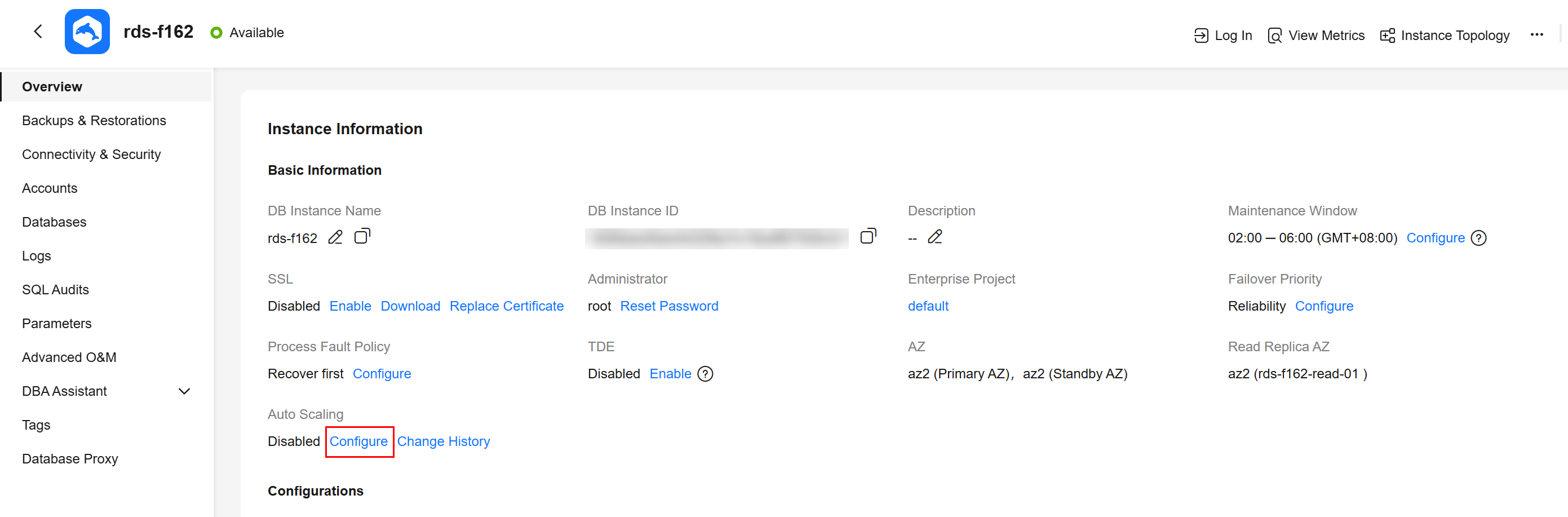
- Click Configure under Auto Scaling. Figure 1 Configuring Auto Scaling
- In the displayed dialog box, configure the required parameters. Figure 2 Setting auto scaling parameters

Table 2 Parameter description Parameter
Description
Auto Scale-up
You can enable or disable it as needed.
Observation Period
- When auto scale-up is enabled, the system periodically checks the vCPU usage. If the average vCPU usage exceeds the preset limit within the observation period, the system adjusts the instance specifications based on the read and write traffic. The system then enters a silent period.
- The minimum observation period is 2 minutes.
Max. Specifications
The maximum specifications after the final auto scale-up. The system scales up specifications level by level. Each time the specifications are upgraded to a higher level, the system then enters a silent period.
Trigger If Avg. vCPU Usage Reaches
The vCPU usage limit for triggering an auto scale-up. If the average vCPU usage exceeds this limit during the observation period, an auto scale-up is triggered.
Auto Scale-down
You can enable or disable it as needed.
Min. Specifications
The minimum specifications after the final auto scale-down. The system scales down specifications level by level. Each time the specifications are downgraded to a lower level, the system then enters a silent period.
Trigger If Avg. vCPU Usage Drops To
The vCPU usage limit for triggering an auto scale-down. When the average vCPU usage in the observation period is less than this limit, an auto scale-down is triggered.
Silent Period
The silent period is the minimum interval between two specification changes (triggered automatically or manually). During the silent period, RDS for MySQL will not trigger auto scaling.
The following options are available: 5 minutes, 10 minutes, 30 minutes, 60 minutes, 2 hours, 3 hours, 1 day, and 7 days.
- Click OK.
- Log in to the RDS console.
- Click in the upper left corner and select a region.
- On the Instances page, click the target primary/standby instance name to go to the Summary page.
- Click Change History under Auto Scaling.
- In the displayed dialog box, check the change time, change type, status, original specifications, and new specifications of the historical tasks.
What is your overall rating for this page?
Thank you very much for your feedback. We will continue working to improve the documentation.See the reply and handling status in My Cloud VOC.
For any further questions, feel free to contact us through the chatbot.
Chatbot


