

Events
Scenarios
The system regularly checks your instance for risky versions or underlying software/hardware failures to help maintain its availability. If the risk cannot be automatically mitigated, the system generates an event for the instance and reports it on the console.
You can view the instance ID, event type, event cause, event status, and service impact of each event and also modify the event execution time.
Event Types
| Event Type | Risk Level | Event Cause |
|---|---|---|
| Minor version upgrade | Major | The risky version needs to be upgraded. |
| Instance redeployment | Critical | The instance is redeployed due to an underlying software or hardware failure. The fault must be rectified as soon as possible. |
| Flavor migration/incorporation | Major | The instance is currently using an old-generation underlying flavor. You can use the flavor migration feature to upgrade it to a new-generation compute flavor, which provides better instance stability. |
| OS incorporation | Major | If the instance is running an outdated OS version, an OS upgrade is required to ensure system security and stability. |
Impact on Workloads
- Executing certain events may cause a brief workload interruption. To help workloads recover quickly, ensure that your application can automatically reconnect to the DB instance.
- Flavor migration/incorporation events: Changes can be made immediately or during a maintenance window. You are advised to schedule the changes during off-peak hours. The entire process takes approximately 10 to 15 minutes. A VIP switchover is performed during the process, which is expected to cause a brief interruption of about 10 seconds.
Procedure
- Log in to the RDS console.
- Click
 in the upper left corner and select a region.
- In the navigation pane on the left, choose Events. Figure 1 Events
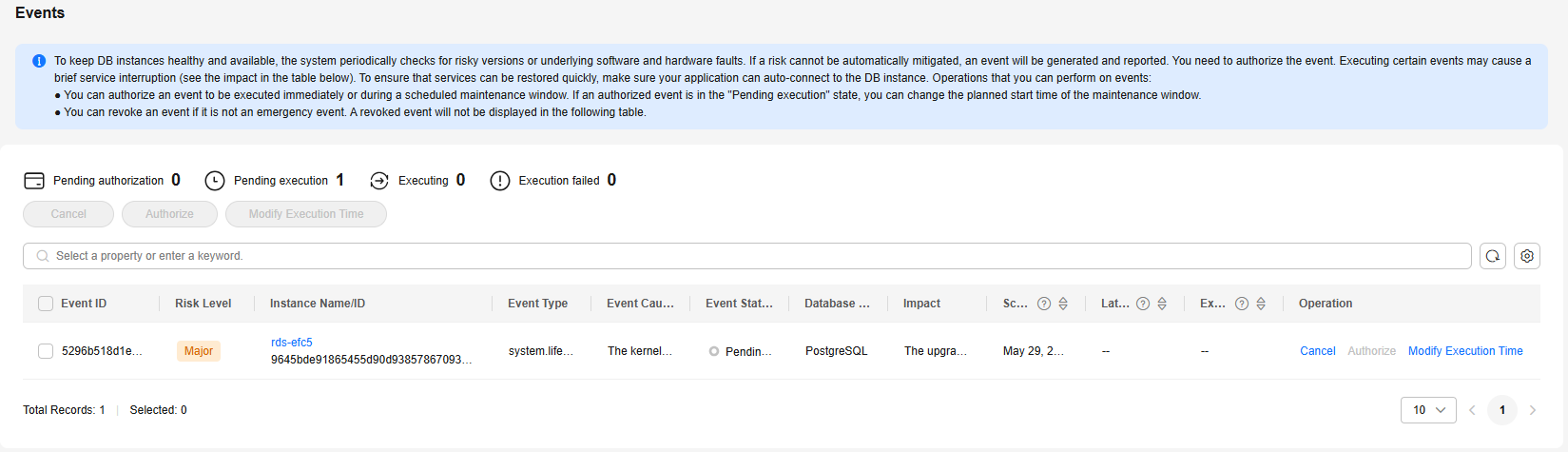
- Authorize: You can authorize an event to be executed immediately or during a scheduled maintenance window. If an authorized event is in the "Pending execution" state, you can change the planned start time of the maintenance window.
- Cancel: You can revoke an event if it is not an emergency event. A revoked event will not be displayed in the following table.
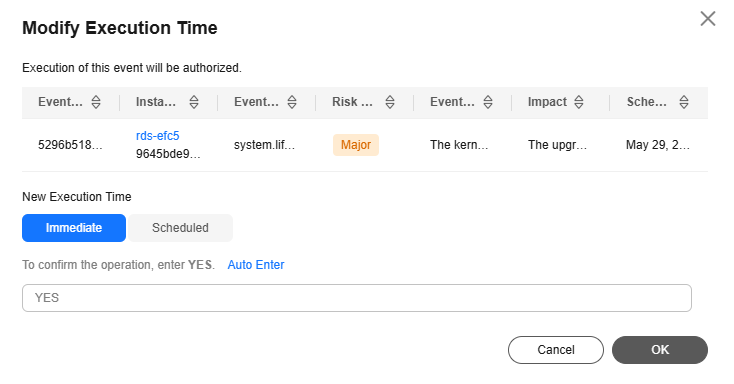
- Modify Execution Time: You can change the planned execution time of an event. Figure 2 Modifying the event execution time
What is your overall rating for this page?
Thank you very much for your feedback. We will continue working to improve the documentation.See the reply and handling status in My Cloud VOC.
For any further questions, feel free to contact us through the chatbot.
Chatbot


